单细胞亚群绝对数量和相对比例的探索


前面我在:单细胞转录组降维聚类分群过滤基因和过滤细胞的区别 介绍了文献,题目为“Revealing the transcriptional heterogeneity of organ-specific metastasis in human gastric cancer using single-cell RNA Sequencing”。通讯作者是浙江大学的范骁辉教授,于2022年发表在Clin Transl Med杂志(IF=10.6),这个胃癌单细胞数据集GSE163558的单细胞转录组在降维聚类分群后,就可以看细胞比例的变化情况。
首先就需要查看文献里面的实验设计,一般来说会在文献的附件:
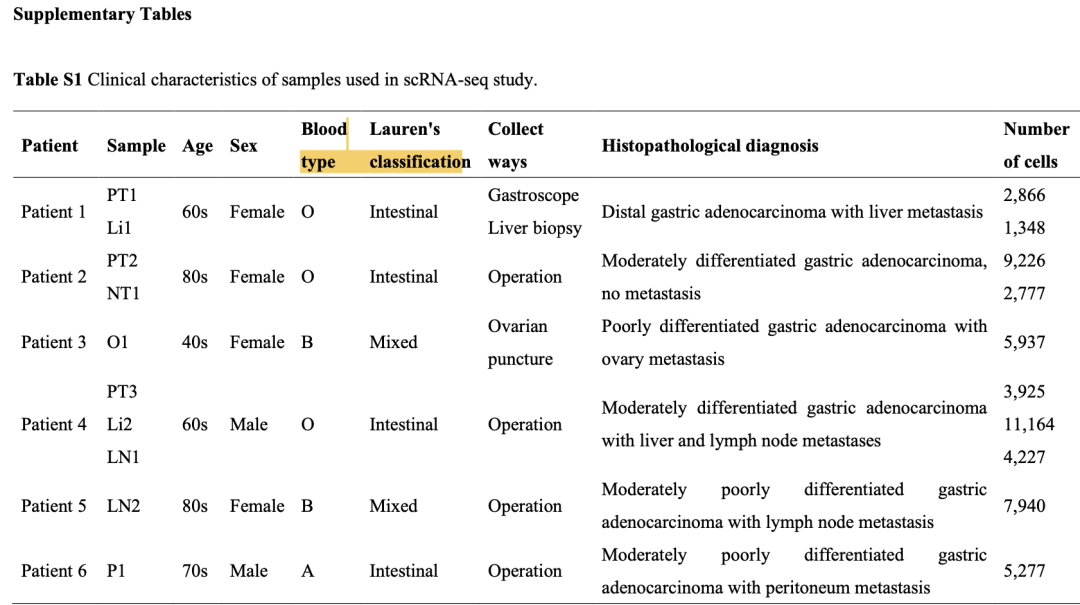
实验共收集了来自六名患者的样本,包括原发肿瘤、非肿瘤邻近组织和转移性肿瘤样本,合起来是10个样品的10x技术的单细胞转录组,可以分成6组,如下所示:
- 原发肿瘤样本(Primary Tumour, PT):
- 收集了三份原发肿瘤样本,分别命名为PT1、PT2和PT3。这些样本代表了肿瘤最初发生的位置。
- 非肿瘤邻近组织样本(Adjacent Non-tumoural, NT):
- 收集了一份非肿瘤邻近组织样本,命名为NT1。此样本来自肿瘤附近的组织,但本身不是肿瘤,用于对照分析。
- 转移性肿瘤样本(Metastatic, M):
- 卵巢转移样本一份,命名为O1。此样本来自卵巢中的转移肿瘤。
- 腹膜转移样本一份,命名为P1。此样本来自腹膜中的转移肿瘤。
- 淋巴结转移样本两份,命名为LN1和LN2。这些样本来自淋巴结中的转移肿瘤。
- 肝脏转移样本两份,命名为Li1和Li2。这些样本来自肝脏中的转移肿瘤。
- 肝脏转移样本(Liver Metastasis, Li):
- 淋巴结转移样本(Lymph Nodes Metastasis, LN):
- 腹膜转移样本(Peritoneal Metastasis, P):
- 卵巢转移样本(Ovary Metastasis, O):
这样的话,仅仅是(Primary Tumour, PT)组,以及 (Lymph Nodes Metastasis, LN)里面是有多个样品的,其它的每个组都是单个样品。
整理临床信息
这个时候其实都不需要前面的降维聚类分群后的单细胞转录组表达量矩阵文件了,仅仅是每个细胞的身份信息即可:
load('phe.Rdata')
phe$group = ifelse(grepl('Control',phe$orig.ident),
                   'control','treat')
phe$group = gsub('[0-9]','',phe$orig.ident)
head(phe)
gplots::balloonplot(
  table(phe$group,phe$orig.ident)
)

>  head(phe[,c(1,16,17)])
                                  orig.ident    celltype group
GSM5004180_PT1_AAACCCACAACAACAA-1        PT1 neutrophils    PT
GSM5004180_PT1_AAACCCAGTCAAAGTA-1        PT1      Tcells    PT
GSM5004180_PT1_AAACCCAGTGGATACG-1        PT1 neutrophils    PT
GSM5004180_PT1_AAACCCATCGTTCCCA-1        PT1 neutrophils    PT
GSM5004180_PT1_AAACGAAAGCTGTTCA-1        PT1 neutrophils    PT
GSM5004180_PT1_AAACGAACAGGCACAA-1        PT1 neutrophils    PT
可以看到:
      Li1   Li2   LN1   LN2   NT1    O1    P1   PT1   PT2   PT3
  Li  1293 10321     0     0     0     0     0     0     0     0
  LN     0     0  3898  7501     0     0     0     0     0     0
  NT     0     0     0     0  2254     0     0     0     0     0
  O      0     0     0     0     0  1439     0     0     0     0
  P      0     0     0     0     0     0  4038     0     0     0
  PT     0     0     0     0     0     0     0  2339  6528  2976
批量组合不同变量(分组,样品)看细胞类型比例
我写了一个函数来针对我们的phe数据框里面的任意列的组合去做单细胞亚群细胞数量的统计:
cal_table = function(x,y,prefix ){
  # x = phe$orig.ident
  # y = phe$celltype
  library(sur)
  library(reshape2)
  tbl =  table(x,y)
  pdf(paste0(prefix,'-table.pdf'),width = 10,height = 10)
  gplots::balloonplot( tbl )
  dev.off()
  df = dcast(as.data.frame(tbl),x~y)
  head(df)
  write.csv(  df ,paste0(prefix,'-table.csv'))

  # ptb = round(sur::percent.table(x,y),2)
  ptb = round(100*tbl/rowSums(df[,-1]),2)

  pdf(paste0(prefix,'-percent-table.pdf'),width = 10,height = 10)
  gplots::balloonplot( ptb )
  dev.off()
  write.csv(  dcast(as.data.frame(ptb),x~y) ,paste0(prefix,'-percent-table.csv'))

}

cal_table(phe$orig.ident,phe$celltype,prefix = 'celltype-vs-orig.ident')
cal_table(phe$group,phe$celltype,prefix = 'celltype-vs-group')
cal_table(phe$group,phe$seurat_clusters,prefix = 'seurat_clusters-vs-group')
cal_table(phe$group,phe$RNA_snn_res.0.8,prefix = 'RNA_snn_res.0.8-vs-group')
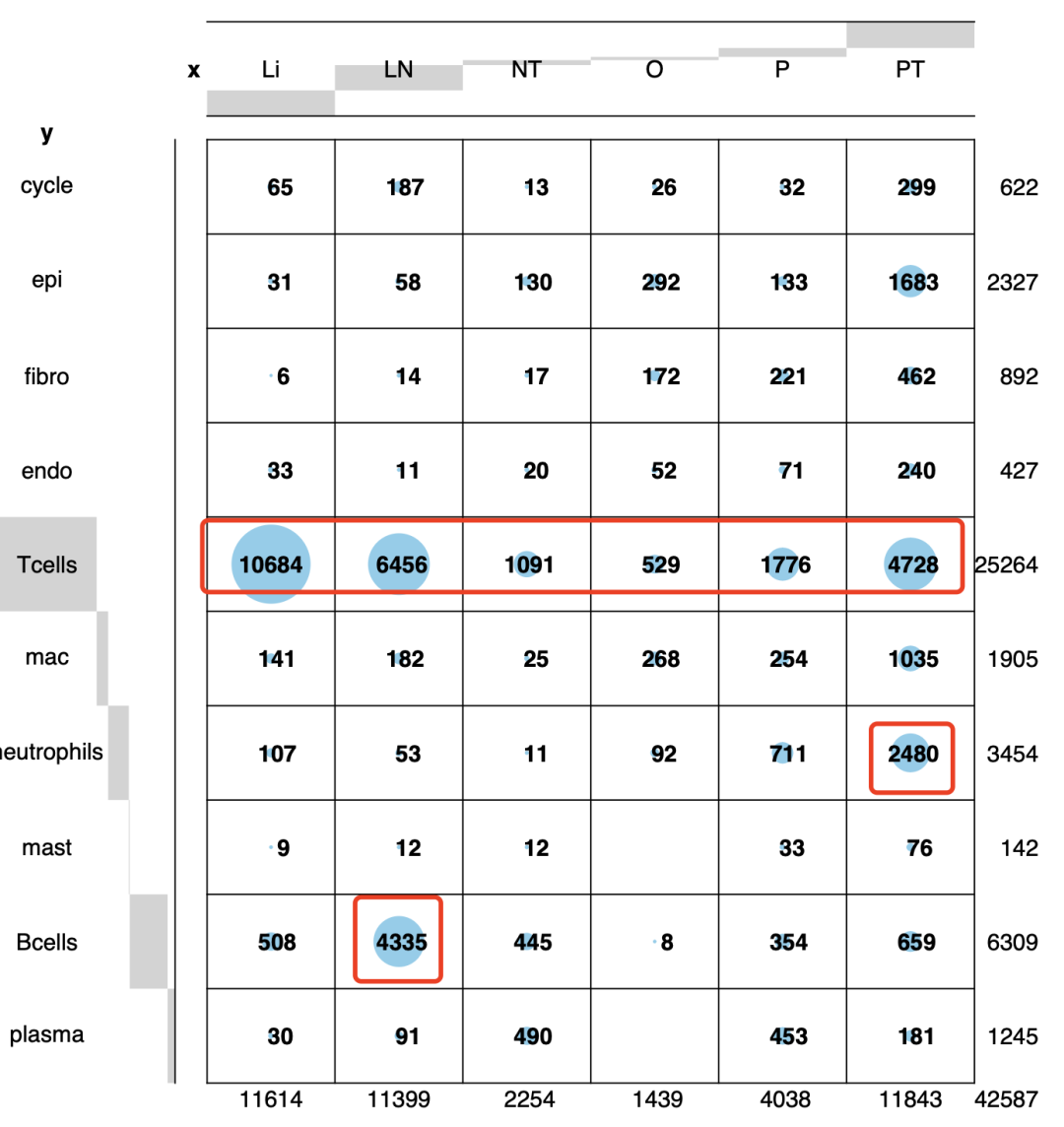
首先是可以看绝对数量,可以看到的是t细胞占比非常夸张,都过半了,而中性粒细胞和b细胞呢,有两个组的特异性:
然后可以看到相对比例:
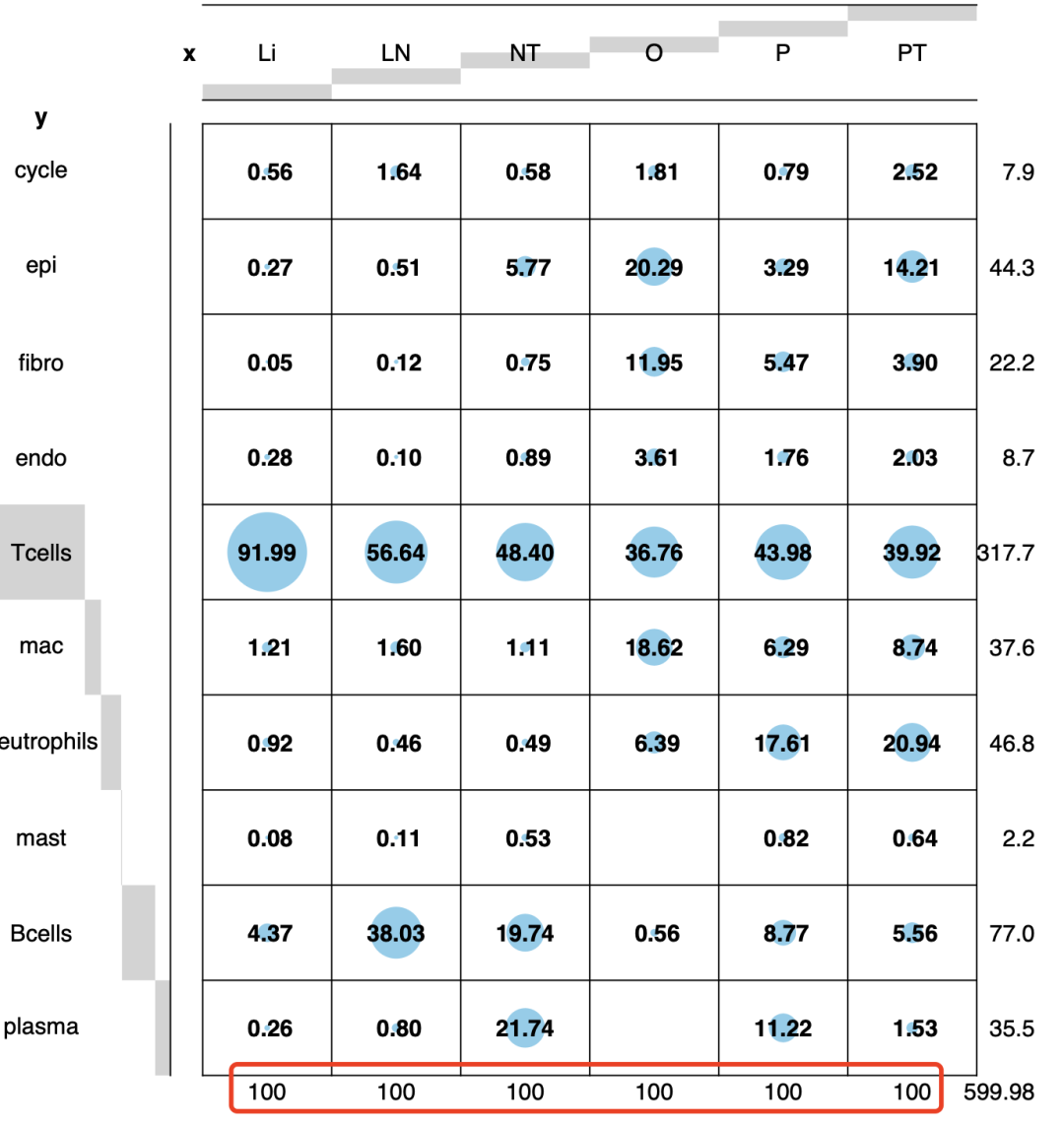
值得注意的是,上面的相对比例应该是在具体的某个分组内部,或者在某个样品内部计算不同单细胞亚群的比例。而不是在某个单细胞亚群内部去计算它来源于不同组或者不同样品的比例,如果计算错误会得到“南辕北辙”的结论。
上面的单细胞亚群表达量比例的表格也可以进行多种多样的可视化:
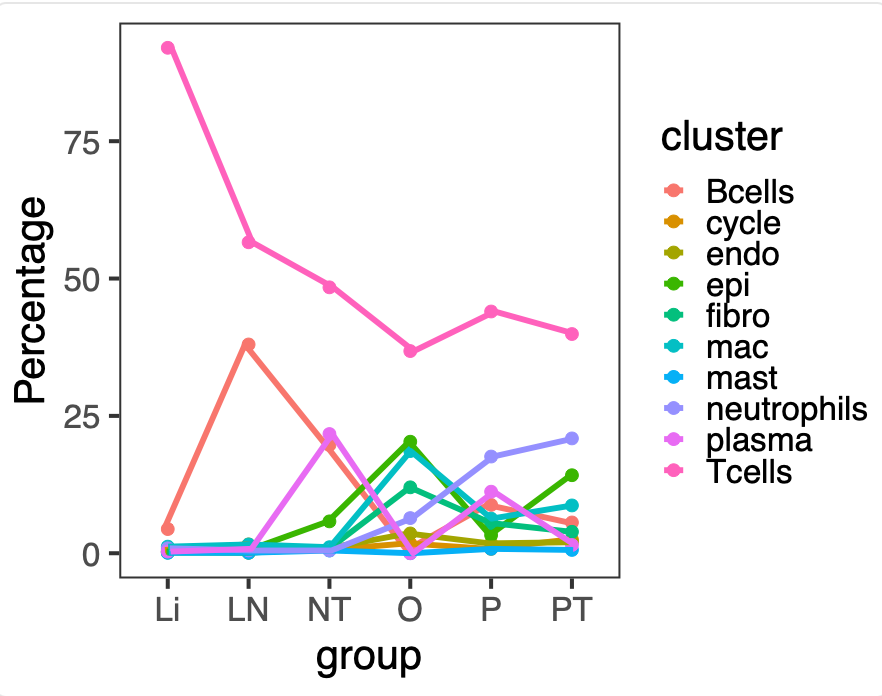
比如折线图:
x='celltype';y='group'
plot_data <- data.frame(table(phe[, y ],
                              phe[, x ]))
head(plot_data)
plot_data$Total <- apply(plot_data,1,function(x)sum(plot_data[plot_data$Var1 == x[1],3]))
plot_data <- plot_data %>% mutate(Percentage = round(Freq/Total,3) * 100)
colnames(plot_data) <- c("group","cluster","Freq","Total","Percentage")
head(plot_data)
ggplot(plot_data,aes(group,Percentage,group= cluster,color =cluster))+geom_point(size=4)+
  geom_line(position = position_dodge(0.1),cex=2)+theme_bw()+theme_test(base_size = 30)

ggsave("celltype-vs-group-percent-plot.pdf",width = 9,height = 7)
如下所示:
也可以是箱线图:
x = phe$orig.ident
y = phe$celltype
tbl =  table(x,y)
df = dcast(as.data.frame(tbl),x~y)
ptb = round(100*tbl/rowSums(df[,-1]),2)
df = as.data.frame(ptb)
colnames(df)=c('orig.ident','celltype','Percentage')
head(df)
gpinfo=unique(phe[,c('orig.ident','group')]);gpinfo
df=merge(df,gpinfo,by='orig.ident')
head(df)

p <- ggplot(df,aes(x=group,y=Percentage))+
  geom_boxplot(outlier.alpha=0, aes(fill=celltype))+facet_grid(~celltype,scales = "free")+
  geom_jitter(aes(x = group, y = Percentage,color=celltype))+
  scale_color_npg() +
  scale_fill_npg() +
  theme_bw()+
  theme(axis.text.x = element_text(face = "bold",angle = 45, hjust=1, vjust=0.5,size = 14),
        legend.position= "none",
        strip.background = element_rect(color="black",fill = "steelblue3", linetype = "solid"),
        strip.text = element_text(face = "bold", color = "black",hjust = 0.5, size = 12,),
        plot.title=element_text(face="bold.italic",size="20", color="brown",hjust = 0.5),
        axis.text.y = element_text(face = "bold",size = 14) ,
        axis.title = element_text(size = 14),
        panel.grid.major = element_blank(),
        panel.grid.minor = element_blank())
p
pro='Percentage-of-each--celltype-in-orig.ident-by-group'
ggsave(paste0(pro,"_boxplot.pdf"),width = 12,height = 6)
当然了,不同的数据集有不同的比例情况,是需要自己慢慢的折腾的。
如何计算各单细胞亚群比例并且显示在图例
交流群有小伙伴问自己参考我们的降维聚类分群后,虽然很容易拿到可视化的umap图,但是看很多文献里面的图例就很丰富,问是不是有什么参数可以调整,得到如下所示的图例样式:
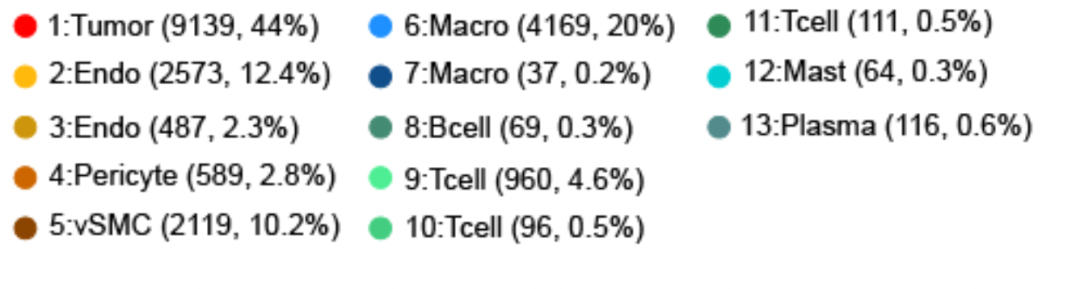
亚群比例并且显示在图例
这个目前我没有看到什么样的参数可以做到,不过实现起来并不可能,只需要自己计算好各个单细胞亚群的比例即可,以我们熟知的pbmc3k数据集为例,大家先安装这个数据集对应的包 SeuratData,就可以使用它啦:
# install.packages('devtools')
# devtools::install_github('satijalab/seurat-data')
library(SeuratData) #加载seurat数据集
library(Seurat)
getOption('timeout')
options(timeout=10000)
#InstallData("pbmc3k")
data("pbmc3k")
sce <- pbmc3k.final
colnames(sce@meta.data)
DimPlot(sce,reduction = 'umap',
        group.by = 'seurat_clusters',
        label.box = T,  label = T,repel = T)+
  DimPlot(sce,reduction = 'umap',
          group.by = 'seurat_annotations',
          label.box = T,  label = T,repel = T)
gplots::balloonplot(table(sce$seurat_annotations,sce$seurat_clusters))
很明显的可以看到这个pbmc3k数据集里面自带顺序编号的亚群以及作者给出来了的担心亚群生物学名字:
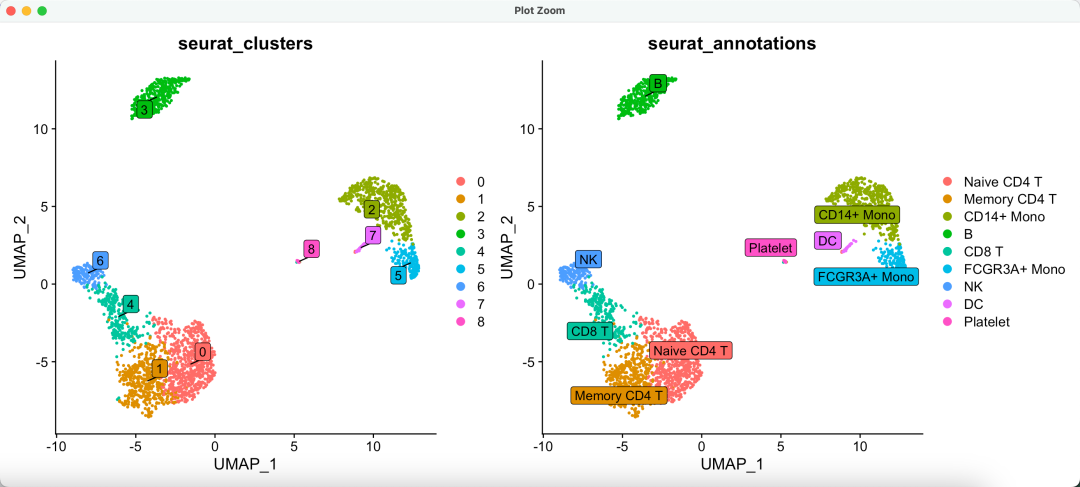
两个注释
我们只需要简单的计算单细胞亚群比例并且显示在图例:
df = data.frame(clu=names(table(sce$seurat_clusters)),
                per=sprintf("%1.2f%%", 100*table(sce$seurat_clusters)/length(sce$seurat_clusters)))
sce$per = df[match(sce$seurat_clusters,df$clu),2]
sce$new = paste0(sce$seurat_clusters,":",sce$seurat_annotations,"(",sce$per,")")
table(sce$new )
DimPlot(sce,reduction = 'umap',
        group.by = 'new',
        label.box = T,  label = F,repel = T)
如下所示:
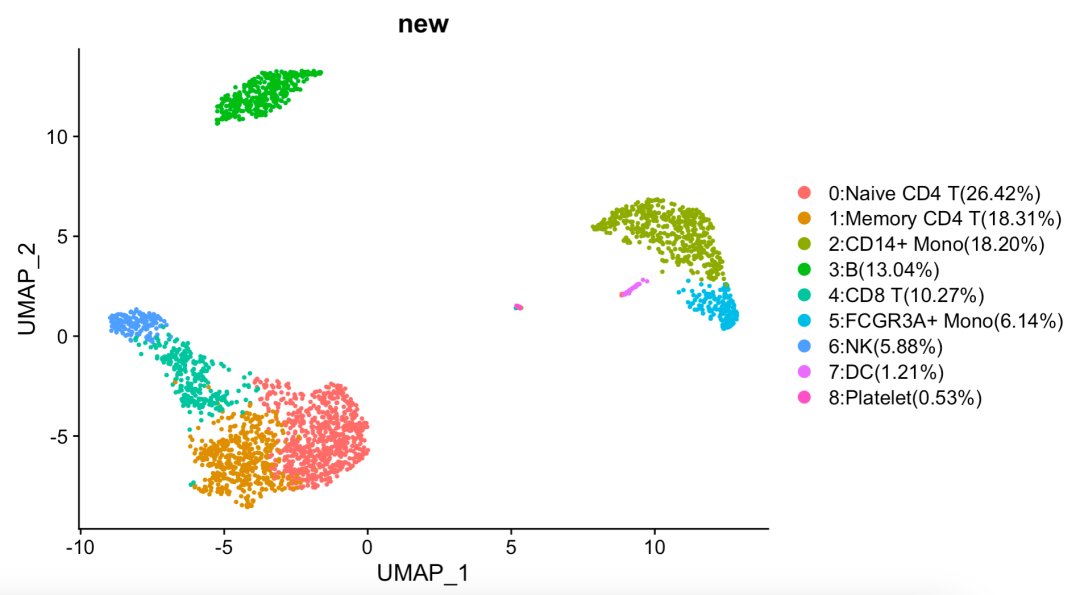
显示在图例
是不是很简单啊!
美化你的单细胞亚群比例图
单细胞数据分析里面最基础的就是降维聚类分群,参考前面的例子:人人都能学会的单细胞聚类分群注释 ,这个大家基本上问题不大了,使用seurat标准流程即可,不过它默认出图并不好看,详见以前我们做的投票:可视化单细胞亚群的标记基因的5个方法,下面的5个基础函数相信大家都是已经烂熟于心了:
- VlnPlot(pbmc, features = c("MS4A1", "CD79A"))
- FeaturePlot(pbmc, features = c("MS4A1", "CD79A"))
- RidgePlot(pbmc, features = c("MS4A1", "CD79A"), ncol = 1)
- DotPlot(pbmc, features = unique(features)) + RotatedAxis()
- DoHeatmap(subset(pbmc, downsample = 100), features = features, size = 3)
最近,郑州大学第一附属医院的史阳同学无私的分享了他对这些基础函数的改造,颜值说不上巅峰,但打败基础函数是没有问题的, 同时也算是抛砖引玉吧,希望广大生信技能树粉丝们都投稿分享自己的创作,投稿请发邮件到 jmzeng1314@163.com
仍然是以大家熟知的pbmc3k数据集为例
大家先安装这个数据集对应的包,并且对它进行降维聚类分群,参考前面的例子:人人都能学会的单细胞聚类分群注释 ,而且每个亚群找高表达量基因,都存储为Rdata文件。
# 0.安装R包 ----
# devtools::install_github('caleblareau/BuenColors')
# utils::install.packages(pkgs = "ggstatsplot")
# InstallData("pbmc3k")

# 1.加载R包和测试数据 ----
rm(list = ls())
library(SeuratData) #加载seurat数据集
getOption('timeout')
options(timeout = 10000)
data("pbmc3k")
sce <- pbmc3k.final
library(Seurat)

DimPlot(sce,reduction = "umap",label = TRUE)
unique(Idents(sce))
sce$celltype = Idents(sce)

# 2.单细胞分析基本流程 ----
# 主要是拿到 tSNE和Umap的坐标,因为默认的 pbmc3k.final 是没有的
sce <- NormalizeData(sce, normalization.method =  "LogNormalize",
                     scale.factor = 1e4)
sce <- FindVariableFeatures(sce,
                            selection.method = "vst", nfeatures = 2000)
sce <- ScaleData(sce)
sce <- RunPCA(object = sce, pc.genes = VariableFeatures(sce))
sce <- FindNeighbors(sce, dims = 1:15)
sce <- FindClusters(sce, resolution = 0.8)
set.seed(123)
sce <- RunTSNE(object = sce, dims = 1:15, do.fast = TRUE)
sce <- RunUMAP(object = sce, dims = 1:15, do.fast = TRUE)
DimPlot(object = sce, reduction = "umap",label = TRUE)
# 3.定义分组信息 ----
Idents(sce) = sce$celltype

# 4.寻找各个单细胞亚群的特征性高表达量基因----
sce.markers <- FindAllMarkers(object = sce,
                              only.pos = TRUE,
                              min.pct = 0.25,
                              thresh.use = 0.25)

save(sce, sce.markers, file = 'tmp.Rdata')
接下来改造 单细胞亚群比例图
先放一下改造效果图:
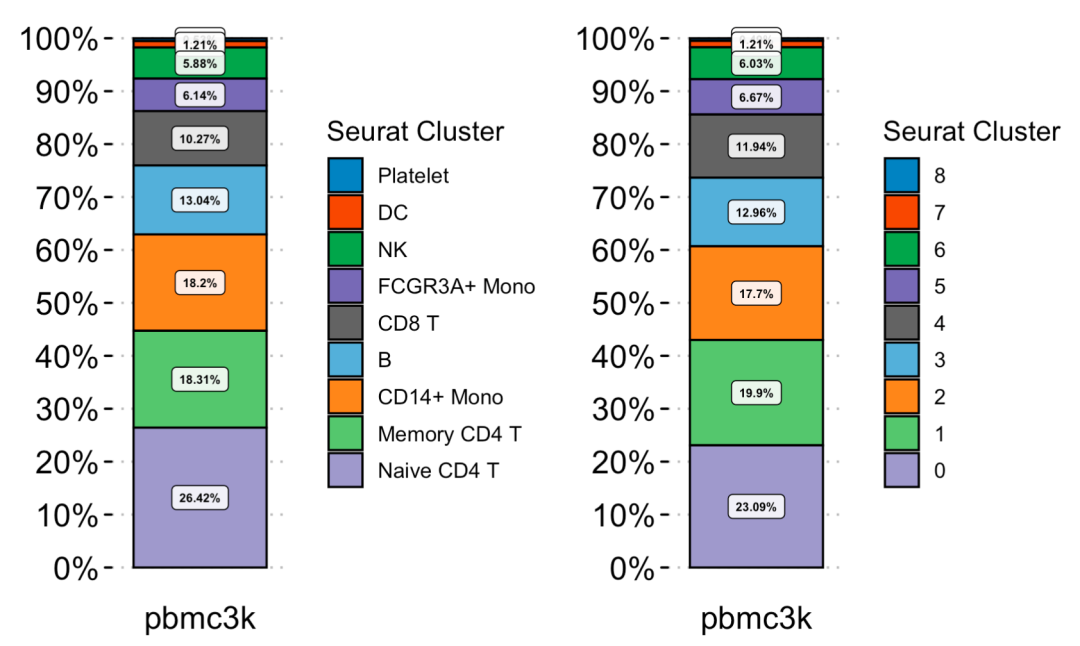
代码如下所示:
source('PropPlot.R')
table(sce$seurat_clusters, sce$celltype)
PropPlot(object = sce, groupBy = 'celltype') +
  PropPlot(object = sce, groupBy = 'seurat_clusters')
所有的细节都在 PropPlot.R 文件里面的 PropPlot 函数, 是自定义的,内容如下所示:
PropPlot <- function(object, groupBy){
  # (1)获取绘图数据
  plot_data = object@meta.data %>%
    dplyr::select(orig.ident, {{groupBy}}) %>%
    dplyr::rename(group = as.name(groupBy))

  # (2)绘图
  figure = ggbarstats(data = plot_data,
                      x = group, y = orig.ident,
                      package = 'ggsci',
                      palette = 'category20c_d3',
                      results.subtitle = FALSE,
                      bf.message = FALSE,
                      proportion.test = FALSE,
                      label.args = list(size = 2,
                                        fill = 'white',
                                        alpha = 0.85,
                                        family = 'Arial',
                                        fontface = 'bold'),
                      perc.k = 2,
                      title = '',
                      xlab = '',
                      legend.title = 'Seurat Cluster',
                      ggtheme = ggpubr::theme_pubclean()) +
    theme(axis.ticks.x = element_blank(),
          axis.ticks.y = element_line(color = 'black', lineend = 'round'),
          legend.position = 'right',
          axis.text.x = element_text(size = 15, color = 'black', family = 'Arial'),
          axis.text.y = element_text(size = 15, color = 'black', family = 'Arial'),
          legend.text = element_text(family = 'Arial', size = 10, color = 'black'),
          legend.title = element_text(family = 'Arial', size = 13, color = 'black'))

  # (3)去除柱子下面的样本量标识:
  gginnards::delete_layers(x = figure, match_type = 'GeomText')
}
当然了,这个 PropPlot.R 文件里面的 PropPlot 函数是可以自己重新定制化修改的哦!
可以看到两个命名体系差不多:
> table(sce$celltype,sce$seurat_clusters)

                 0   1   2   3   4   5   6   7   8
  Naive CD4 T  163 505   0   0  29   0   0   0   0
  Memory CD4 T 444  20   0   0  19   0   0   0   0
  CD14+ Mono     0   0 466   0   0  14   0   0   0
  B              1   0   0 342   1   0   0   0   0
  CD8 T          1   0   0   0 264   0   6   0   0
  FCGR3A+ Mono   0   0   0   0   0 162   0   0   0
  NK             0   0   0   0   2   0 153   0   0
  DC             0   0   0   0   0   0   0  32   0
  Platelet       0   0   1   0   0   0   0   0  13
所以,使用两种情况看比例,也差不多。
这样的基础认知,也可以看基础10讲:
- 01. 上游分析流程
- 02.课题多少个样品,测序数据量如何
- 03. 过滤不合格细胞和基因(数据质控很重要)
- 04. 过滤线粒体核糖体基因
- 05. 去除细胞效应和基因效应
- 06.单细胞转录组数据的降维聚类分群
- 07.单细胞转录组数据处理之细胞亚群注释
- 08.把拿到的亚群进行更细致的分群
- 09.单细胞转录组数据处理之细胞亚群比例比较
最基础的往往是降维聚类分群,参考前面的例子:人人都能学会的单细胞聚类分群注释
本文参与 腾讯云自媒体同步曝光计划,分享自微信公众号。
原始发表:2024-09-01,如有侵权请联系 cloudcommunity@tencent.com 删除
目录
腾讯云开发者

Copyright © 2013 - 2026 Tencent Cloud. All Rights Reserved. 腾讯云 版权所有
深圳市腾讯计算机系统有限公司 ICP备案/许可证号:粤B2-20090059  粤公网安备44030502008569号
腾讯云计算(北京)有限责任公司 京ICP证150476号 | 京ICP备11018762号