【25软考网工】第八章(2)路由器基础


一、路由器基础
1.路由器接口
主要用于局域网出口、广域网的骨干节点
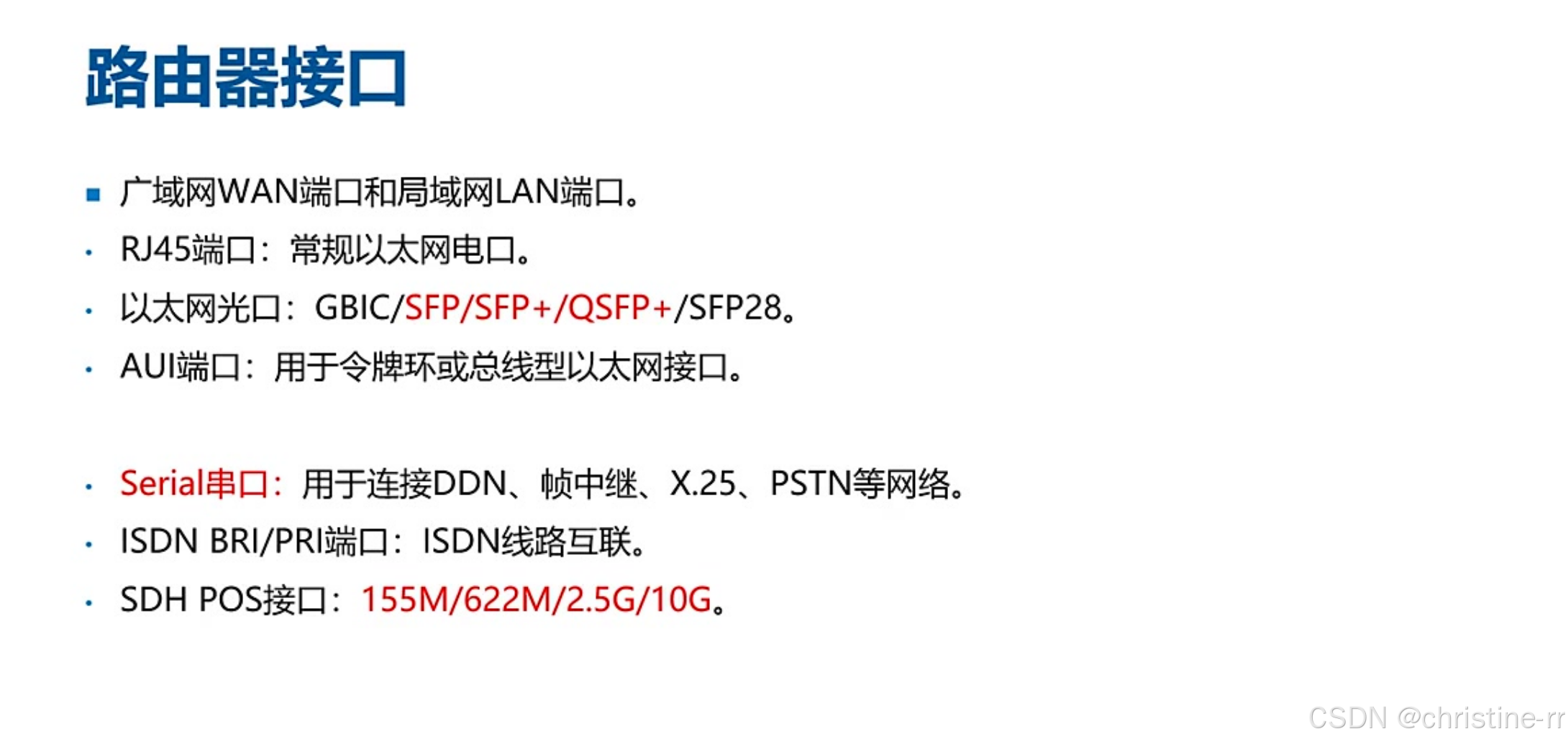
1)路由器面向局域网的接口
- RJ45端口: 常规以太网电口,用于连接双绞线以太网
- 以太网光口: 支持多种光模块类型,包括GBIC/SFP/SFP+/QSFP+/SFP28
- AUI端口: 用于令牌环或总线型以太网接口,现已被淘汰
- 应用场景: 路由器向内连接局域网作为网络出口,向外连接广域网
- 以太网交换机:RJ45端口和以太网端口
2)路由器面向广域网的接口
- Serial串口: 用于连接DDN、帧中继、X.25、PSTN等老式网络线路
- ISDN BRI/PRI接口:用于ISDN线路互联,BRI速率144k,PRI速率2.048M
- SDH POS接口: 支持155M/622M/2.5G/10G速率,用于骨干网连接
- 设备定位: 支持POS接口的设备一般为中高端路由器(如华为NE系列),企业级AR系列不支持
- 发展趋势: 基于时分复用的骨干网正逐步被以太网接入替代
2.设备管理方式
1)命令行管理
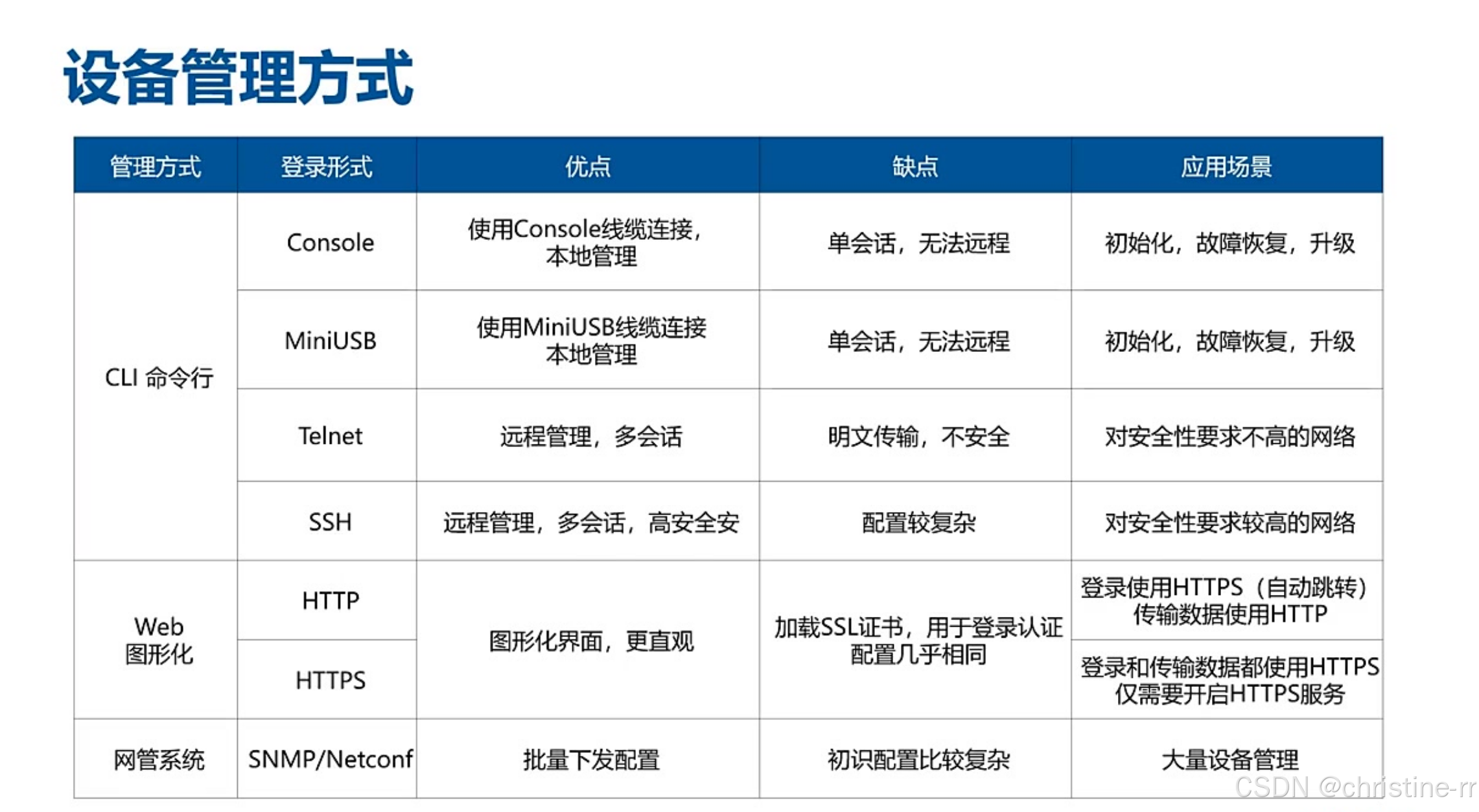
- 本地管理:
- Console口: 使用RJ45接口的Console线缆连接
- MiniUSB口: 使用USB线缆连接
- 特点: 本地登录,单会话、无法远程,适用于初始化、故障恢复和升级
- 远程管理:
- Telnet: 多会话、明文传输,安全性低
- SSH: 多会话、加密传输,安全性高但配置较复杂
2)图形化配置
- Web管理:
- HTTP: 不加密,端口80
- HTTPS: 加密,端口443,可配置自动跳转
- 特点: 图形化界面直观,适合配置复杂功能
- 适用设备: 防火墙、上网行为管理等应用层设备多用Web管理
3)网管系统
- 协议: 使用SNMP/Netconf协议进行批量管理
- 特点: 初始配置复杂,需配置团体名等参数
- 适用场景: 大量设备管理时使用,但日常配置仍以命令行更高效
3.应用案例
1) 例题:路由器接口问题(网工2014年5月)
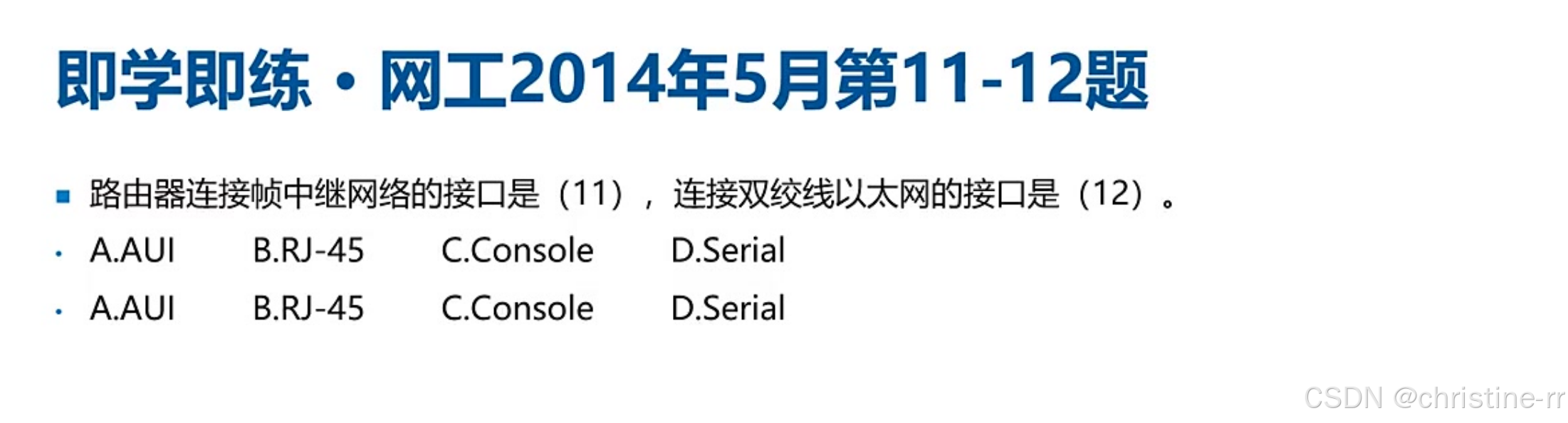
- 11题: 连接帧中继网络的接口是Serial串口,选D
- 12题: 连接双绞线以太网的接口是RJ-45,选B
- 关键点: 区分广域网接口和局域网接口类型
- 答案:(11)D (12)B
2)例题:路由器描述判断(网工2018年5月)

- A选项: 错误,串口和以太网口没有必然联系
- B选项: 错误,不同接口IP地址应在不同网段
- C选项: 正确,串口通常是点对点连接
- D选项: 错误,以太网默认是点对多点
- 参考答案: C
3)例题:路由器配置作用(网工2024年11月)
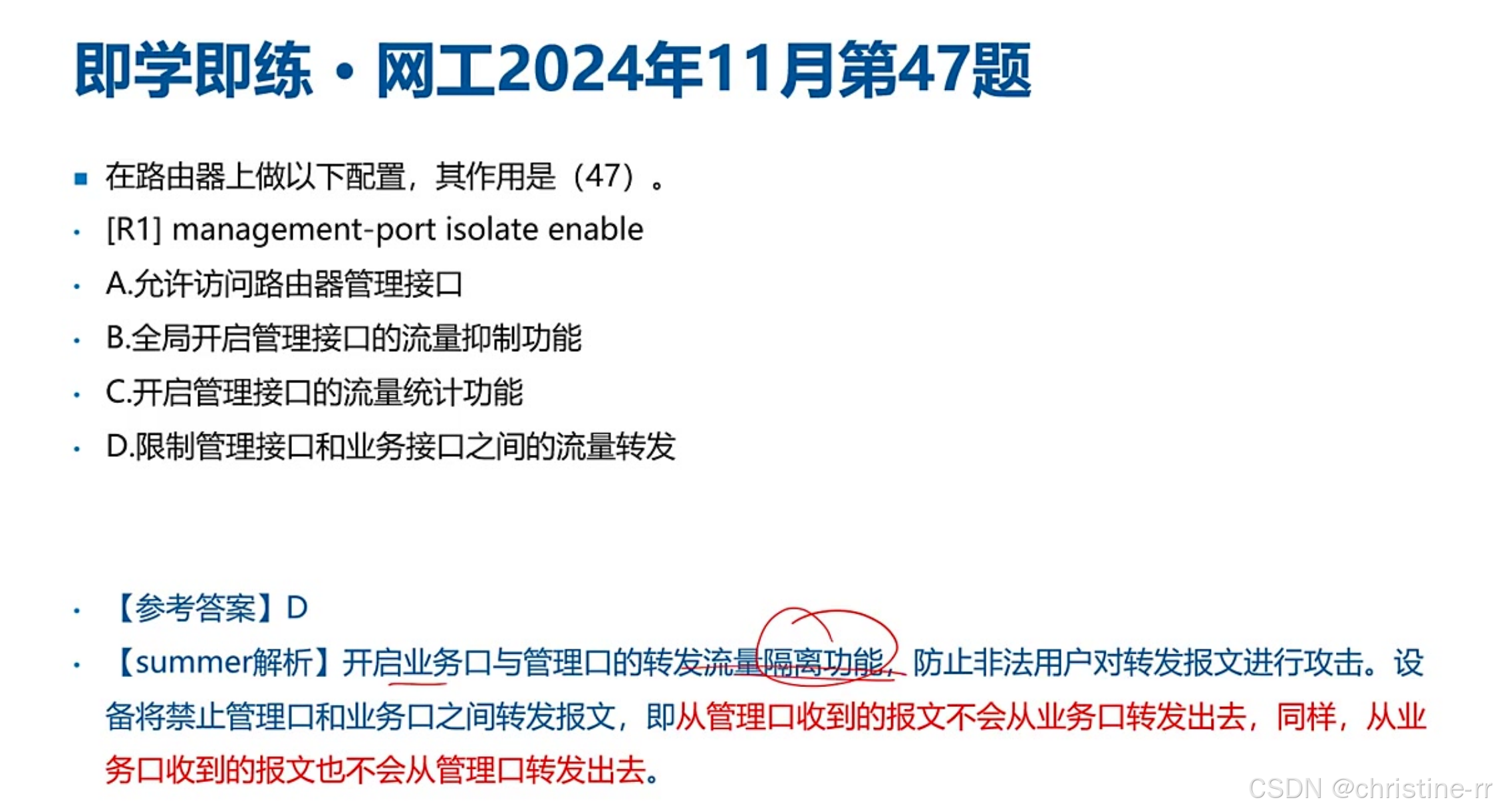
- 命令功能: 开启管理口与业务口的流量隔离
- 作用效果: 禁止管理口和业务口间的报文转发
- 安全意义: 防止非法用户通过转发报文进行攻击
- 参考答案: D
4.知识小结
知识点 | 核心内容 | 考试重点/易混淆点 | 难度系数 |
|---|---|---|---|
路由器接口类型 | 分为局域网接口(如以太网电口/光口)和广域网接口(如串口/SDH POS接口) | 广域网接口类型(串口/SDH POS/ISDN BRI&PRI)及速率(144k/2.048M/155M/622M/2.5G) | ⭐⭐⭐ |
广域网接口应用场景 | 串口用于DDN/帧中继等老式线路; SDH POS用于骨干网(如省厅-市局-区县层级互联) | POS接口速率记忆(155M/622M/2.5G)及现网替代趋势(以太网升级) | ⭐⭐⭐⭐ |
设备管理方式 | 命令行(Console/USB/SSH/Telnet)、图形化(HTTP/HTTPS)、网管系统(SNMP/NETCONF) | SSH与Telnet安全性对比、网管系统配置复杂度 | ⭐⭐ |
路由器与交换机区别 | 路由器支持广域网接口(如串口),交换机仅支持以太网接口; 路由器接口需不同网段 | 接口成对性(串口与以太网口无必然关联)、以太网默认点对多点特性 | ⭐⭐⭐ |
管理接口隔离功能 | 配置isolate enable限制管理口与业务口间流量转发 | 功能直译题(如“隔离”对应选项D) | ⭐ |
设备系列定位 | 华为AR系列(多功能企业级) vs. NE系列(高端骨干网,支持POS接口) | AR与NE系列适用场景对比 | ⭐⭐⭐ |
二、配置命令
以下是一些华为路由器详细的常用配置命令:
1.基础配置
- 进入系统视图:
system-view - 修改设备名称:
sysname [新主机名],例如sysname R1 - 保存配置:
save - 查看系统信息:
display version                  #查看设备版本信息
display current-configuration    #查看当前配置
display saved-configuration      #查看已保存配置
display device                   #查看硬件状态(CPU/内存)
display clock #显示系统时间- 重启设备:
reboot - 删除Flash中配置:
delete - 清除已保存配置:
reset saved-configuration - 恢复出厂配置:
set factory-configuration from default
2.接口配置
- 进入接口视图:
interface [接口类型] [接口编号],例如interface GigabitEthernet 0/0/1 - 配置接口IP地址:
ip address [IP地址] [子网掩码],例如ip address 192.168.1.1 24 - 启用接口:
undo shutdown - 关闭接口:
shutdown - 添加接口描述:
description [描述] - 创建子接口:
interface [接口类型] [接口编号].[子接口编号],例如interface GigabitEthernet 0/0/1.10 - 配置子接口关联VLAN:
dot1q termination vid [VLAN ID] - 启用ARP广播:
arp broadcast enable - 查看接口详细信息:
display interface [接口类型] [接口编号] - 查看接口IP摘要:
display ip interface brief
3.路由配置
1)静态路由:
- 配置静态路由:
ip route-static [目标网络] [子网掩码] [下一跳地址|接口编号] [reject|blackhole]- 例如
ip route-static 192.168.2.0 24 10.1.1.2
- 例如
- 配置默认路由:
ip route-static 0.0.0.0 0.0.0.0 [下一跳地址]
2)动态路由(RIP):
- 启用RIP进程:
rip 1 - 在指定网络上使能RIP:
network [网络地址]- 例如
network 192.168.1.0
- 例如
- 启用RIPv2:
version 2
3)动态路由(OSPF):
- 启用OSPF进程:
ospf 1 - 进入骨干区域:
area 0 - 宣告网段:
network [网络地址] [反掩码]- 例如
network 192.168.1.0 0.0.0.255
- 例如
4)查看相关配置
- 查看路由表:
display ip routing-table - 查看OSPF邻居:
display ospf peer - 查看RIP邻居:display rip 1 neighbor
4.安全配置
1)用户与权限:
- 创建加密用户:
local-user [用户名] password irreversible-cipher [密码] - 设置用户服务类型:
local-user [用户名] service-type [服务类型] - 设置用户权限等级:
local-user [用户名] privilege level [等级] - 设置特权密码:
super password [密码]
2)访问控制(ACL):
- 创建基本ACL:
acl [ACL编号]- 例如
acl 2000
- 例如
- 配置ACL规则:
rule [规则编号] {normal|special} {permit|deny} source [源地址] [源通配符]- 例如
rule normal permit source 192.168.1.0 0.0.0.255
- 例如
- 应用ACL到接口:
traffic-filter {inbound|outbound} acl [ACL编号]
3)配置SSH远程登录:
- 进入虚拟终端视图:
user-interface vty 0 4 - 设置密码认证模式:
authentication-mode password - 配置远程登录密码:
set authentication password cipher [密码] - 启用SSH服务:
stelnet server enable - 创建本地用户并设置SSH服务类型:
aaa
local-user [用户名] password cipher [密码]
local-user [用户名] service-type ssh- 启用SSH用户认证:
ssh user [用户名] authentication-type password
5.高级功能配置
1)NAT配置:
- 创建NAT地址池:
nat address-group [地址池编号] [起始IP地址] [结束IP地址]- 例如
nat address-group 1 202.100.1.10 202.100.1.20
- 例如
- 配置NAT规则:
nat outbound [ACL编号] address-group [地址池编号]
2)DHCP配置:
- 启用DHCP服务:
dhcp enable - 创建DHCP地址池:
ip pool [地址池名称]
network [网络地址]
mask [子网掩码]
gateway-list [网关地址]
dns-list [DNS服务器地址]- 在接口应用DHCP:
interface [接口类型] [接口编号],然后dhcp select global
3)STP配置:
- 启用STP:
stp enable - 关闭指定接口的STP:
stp disable
6.诊断与维护
- 1)连通性测试:
ping [IP地址]:测试网络连通性tracert [IP地址]:追踪路径
2)信息诊断:
display fib:查看转发信息库display arp:查看ARP表display mac-address:查看MAC地址表
3)开启/关闭调试
debugging all:开启所有调试信息(慎用,可能导致大量输出)。undo debugging all:关闭所有调试信息。debugging [module]:开启指定模块的调试(如debugging ospf)。
4)查看调试信息
- 调试信息默认输出到终端,可通过
terminal debugging开启终端调试,或通过logging buffered将日志保存到缓冲区。
三、BGP配置相关命令
1.BGP基础配置
进入BGP视图:
bgp [AS编号]- 例如
bgp 100,进入BGP视图,AS编号用于标识自治系统。
- 例如
router-id [IP地址]- 例如
router-id 1.1.1.1,配置BGP的Router ID,通常建议配置为LoopBack接口的IP地址。
- 例如
配置BGP邻居:
peer [邻居IP地址] as-number [邻居AS编号]- 例如
peer 10.1.2.2 as-number 100,指定对等体的IP地址及其所属的AS编号。
- 例如
进入IPv4单播地址族视图:
ipv4-family unicast,进入IPv4单播地址族视图,用于配置IPv4相关的BGP路由。
2.BGP路由策略配置
配置路由引入:
import-route static,配置引入静态路由到BGP中。network [网络地址] [掩码长度]- 例如
network 10.1.1.0 24,将本地路由表中的路由以静态方式加入到BGP路由表中,并发布给对等体。
- 例如
配置路由策略:
route-policy [策略名称] permit node [节点号]- 例如
route-policy admin permit node 10,配置名为admin的路由策略,其节点号为10,匹配模式为允许。
- 例如
if-match acl [ACL编号]- 例如
if-match acl 2001,配置基于ACL的匹配规则。
- 例如
apply local-preference [优先级值]- 例如
apply local-preference 120,配置指定BGP路由的本地优先级。
- 例如
apply community [团体属性值]- 例如
apply community 10:1,配置指定BGP路由的BGP团体属性。
- 例如
peer [邻居IP地址] route-policy [策略名称] import- 例如
peer 192.168.0.1 route-policy admin import,配置对来自对等体的路由指定路由策略。
- 例如
3.BGP路由汇总配置
自动路由汇总:
summary automatic,BGP根据自然掩码对子网路由进行汇总,该命令对BGP导入的路由进行汇总,这些路由可以是直连路由、静态路由、RIP路由、OSPF路由或IS - IS路由,但对于使用网络命令导入的路由,该命令无效。
手动路由汇总:
aggregate ipv4-address [IPv4地址] { mask | mask-length }- 例如
aggregate 10.1.1.1 16,要广告汇总的路由和具体的路由。
- 例如
aggregate ipv4-address [IPv4地址] { mask | mask-length }detail-suppressed仅广告汇总的路由。aggregate ipv4-address [IPv4地址] { mask | mask-length } suppress-policy route-policy-name,广告汇总的路由和满足指定路由策略的具体路由。aggregate ipv4-address [IPv4地址] { mask | mask-length } as-set,广告汇总的路由的as_set属性有助于检测路由环路。aggregate ipv4-address [IPv4地址] { mask | mask-length } attribute-policy route-policy-name,为汇总的路由设置属性。aggregate ipv4-address [IPv4地址] { mask | mask-length } origin-policy route-policy-name,汇总满足指定路由策略的具体路由。
4.BGP路由反射器配置
在路由反射器上配置:
peer [客户机IP地址] reflect-client- 例如
peer 10.1.3.2 reflect-client,配置RR及其客户机。
- 例如
5.BGP扩展团体属性配置
创建路由策略节点并进入路由策略视图:
route-policy [策略名称] { deny | permit } node [节点号]- 例如
route-policy ext-community-policy permit node 10。
- 例如
配置路由策略过滤条件(可选):
if-match [过滤条件],根据实际需求配置。
配置BGP路由信息的扩展团体属性:
apply extcommunity { rt { as-number:nn | ipv4-address:nn } } &<1 - 16> [ additive ]- 例如
apply extcommunity rt 100:1。
- 例如
- 或
apply extcommunity soo { site-of-origin } &<1 - 16> additive。
退出路由策略视图,进入BGP视图:
bgp [AS编号]。
进入BGP IPv4单播地址族视图:
ipv4-family unicast。
配置出方向的路由策略:
peer [邻居IP地址] route-policy [策略名称] export- 例如
peer 192.168.0.1 route-policy ext-community-policy export,将扩展团体属性传给对等体。
- 例如
将扩展团体属性发布给对等体:
peer [邻居IP地址] advertise-ext-community。
6.BGP查看与调试命令
查看BGP路由表:
display bgp routing-table,查看BGP路由表信息。display bgp routing-table [IPv4地址] [掩码长度],查看指定BGP路由的详细信息。
查看BGP邻居状态:
display bgp peer,查看BGP邻居的状态信息。
以下是华为路由器OSPF和RIP协议的详细配置命令:
四、OSPF配置相关命令
启用OSPF进程:
[Huawei] ospf [process-id],例如ospf 100,创建进程号为100的OSPF进程。
配置区域视图:
[Huawei-ospf-100] area [area-id],例如area 0,进入骨干区域0的配置视图。
宣告网络:
[Huawei-ospf-100-area-0.0.0.0] network [ip-address] [wildcard-mask]- 例如
network 192.168.1.0 0.0.0.255,宣告192.168.1.0/24网段。
- 例如
配置Router ID:
[Huawei] router-id [router-id]- 例如
router-id 1.1.1.1,需在OSPF进程外配置,建议手动指定避免冲突。
- 例如
虚链路配置:
[Huawei-ospf-100-area-0.0.0.1] vlink-peer [router-id]- 例如
vlink-peer 2.2.2.2,用于连接非骨干区域到骨干区域。
- 例如
路由汇总:
- ABR汇总:
[Huawei-ospf-100-area-0.0.0.1] abr-summary [ip-address] [mask]。 - ASBR汇总:
[Huawei-ospf-100] asbr-summary [ip-address] [mask]。
区域类型配置:
- Stub区域:
[Huawei-ospf-100-area-0.0.0.1] stub。 - NSSA区域:
[Huawei-ospf-100-area-0.0.0.1] nssa。
认证配置:
- 区域认证:
[Huawei-ospf-100-area-0.0.0.0] authentication-mode { simple | md5 } [password]。 - 接口认证:
[Huawei-GigabitEthernet0/0/0] ospf authentication-mode { simple | md5 } [password]。
调整接口开销:
[Huawei-GigabitEthernet0/0/0] ospf cost [value],默认值根据接口带宽自动计算。
修改OSPF优先级:
[Huawei-ospf-100] preference [value],默认值10(内部路由)、150(外部路由)。
默认路由注入:
[Huawei-ospf-100] default-route-advertise [always],always表示无条件发布默认路由。
DR/BDR控制:
[Huawei-GigabitEthernet0/0/0] ospf dr-priority [0-255],优先级为0时接口不参与选举。
查看与维护命令:
- 验证邻居关系:
display ospf peer [brief]。 - 查看路由表:
display ospf routing。 - 查看接口信息:
display ospf interface [interface-type interface-number]。 - 调试命令:
debugging ospf event terminal debugging,调试完成后使用undo debugging all关闭调试。
五、RIP配置命令
启用RIP协议:
[Huawei] rip [process-id],例如rip 1,创建RIP实例,实例ID为1。
设置RIP版本:
[Huawei-rip-1] version 2,设置RIP版本为2。
配置参与RIP的网络:
[Huawei-rip-1] network [network-address]- 例如
network 192.168.1.0,指定参与RIP的网络。
- 例如
启用RIP接口:
[Huawei] interface [interface-type] [interface-number]- 例如
interface GigabitEthernet0/0/0。
- 例如
[Huawei-GigabitEthernet0/0/0] rip [process-id] enable,在接口上启用RIP实例。
配置RIP认证:
- 配置接口认证类型和密码:
[Huawei-GigabitEthernet0/0/0] rip authentication-mode simple cipher MyPassword。 - 在RIP实例中启用认证:
[Huawei-rip-1] authentication-mode simple。
配置RIP计时器:
[Huawei-rip-1] timers [update] [invalid] [hold-down] [flush]- 例如
timers 30 180 180 240,分别设置更新定时器、失效定时器、持有定时器和刷新定时器。
- 例如
配置RIP路由过滤:
- 创建ACL:
[Huawei] acl 2000,[Huawei-acl-basic-2000] rule permit source 192.168.1.0 0.0.0.255。 - 创建路由策略:
[Huawei] route-policy FILTER permit node 10,[Huawei-route-policy] if-match acl 2000。 - 在RIP实例中应用路由策略:
[Huawei-rip-1] filter-policy FILTER export。
配置RIP被动接口:
[Huawei-rip-1] passive-interface GigabitEthernet0/0/1,将指定接口配置为被动接口。
查看与维护命令:
- 查看RIP路由表:
display rip [process-id] routing-table。 - 清除RIP路由表:
reset rip [process-id]。 - 查看RIP统计信息:
display rip [process-id] statistics。 - 调试RIP协议:
debugging rip packet,调试完成后使用undo debugging all关闭调试。
本文参与 腾讯云自媒体同步曝光计划,分享自作者个人站点/博客。
原始发表:2026-01-13,如有侵权请联系 cloudcommunity@tencent.com 删除
评论
登录后参与评论
推荐阅读
目录
腾讯云开发者

Copyright © 2013 - 2026 Tencent Cloud. All Rights Reserved. 腾讯云 版权所有
深圳市腾讯计算机系统有限公司 ICP备案/许可证号:粤B2-20090059  粤公网安备44030502008569号
腾讯云计算(北京)有限责任公司 京ICP证150476号 | 京ICP备11018762号