华为二层交换机与防火墙对接上网配置案例

华为二层交换机与防火墙对接上网配置案例

知孤云出岫
发布于 2026-02-27 12:16:46
发布于 2026-02-27 12:16:46

华为二层交换机与防火墙对接上网配置案例
一、组网图形
图 1 二层交换机与防火墙对接上网组网图
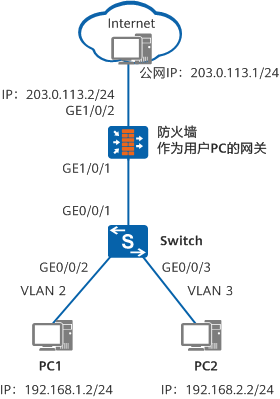
二、二层交换机简介
二层交换机指的是 仅能够进行二层转发,不能进行三层转发 的交换机。
- 仅支持 MAC 地址学习与转发
- 不支持 IP 路由、三层接口
- 不能作为用户网关
📌 典型部署位置:接入层交换机
三、配置注意事项
- 本示例中的交换机配置:
- 适用于 华为 S 系列交换机
- 所有版本通用
- 防火墙配置示例:
- 型号:USG6650
- 版本:V500R001C60
- 其他型号请参考对应产品文档
四、组网需求
- 公司存在多个部门,位于 不同网段
- 所有用户均需访问 Internet
- 要求:
- 防火墙作为用户网关
- 二层交换机仅负责二层转发
五、配置思路
整体思路如下:
- 二层交换机
- 基于接口划分 VLAN
- 实现二层转发
- 防火墙
- 作为用户网关
- 通过 子接口 或 VLANIF 接口 实现三层转发
- 提供 DHCP 服务
- 安全与 NAT
- 配置安全区域与安全策略
- 配置 PAT(端口地址转换)实现上网
六、操作步骤
6.1 配置二层交换机
(1)配置 VLAN
<HUAWEI> system-view
[HUAWEI] sysname Switch
[Switch] vlan batch 2 3
(2)配置下行接口(接入用户)
[Switch] interface gigabitethernet 0/0/2
[Switch-GigabitEthernet0/0/2] port link-type access
[Switch-GigabitEthernet0/0/2] port default vlan 2
[Switch-GigabitEthernet0/0/2] quit

[Switch] interface gigabitethernet 0/0/3
[Switch-GigabitEthernet0/0/3] port link-type access
[Switch-GigabitEthernet0/0/3] port default vlan 3
[Switch-GigabitEthernet0/0/3] quit
(3)配置上行接口(连接防火墙)
[Switch] interface gigabitethernet 0/0/1
[Switch-GigabitEthernet0/0/1] port link-type trunk
[Switch-GigabitEthernet0/0/1] port trunk allow-pass vlan 2 3
[Switch-GigabitEthernet0/0/1] quit
七、防火墙配置方式一:子接口方式(推荐)
7.1 配置 VLAN 子接口
<USG6600> system-view
[USG6600] interface gigabitethernet 1/0/1.1
[USG6600-GigabitEthernet1/0/1.1] vlan-type dot1q 2
[USG6600-GigabitEthernet1/0/1.1] ip address 192.168.1.1 24
[USG6600-GigabitEthernet1/0/1.1] quit

[USG6600] interface gigabitethernet 1/0/1.2
[USG6600-GigabitEthernet1/0/1.2] vlan-type dot1q 3
[USG6600-GigabitEthernet1/0/1.2] ip address 192.168.2.1 24
[USG6600-GigabitEthernet1/0/1.2] quit
7.2 配置 DHCP
[USG6600] dhcp enable

[USG6600] interface gigabitethernet 1/0/1.1
 dhcp select interface
 dhcp server dns-list 114.114.114.114 223.5.5.5
 quit

[USG6600] interface gigabitethernet 1/0/1.2
 dhcp select interface
 dhcp server dns-list 114.114.114.114 223.5.5.5
 quit
7.3 配置公网接口与缺省路由
[USG6600] interface gigabitethernet 1/0/2
 ip address 203.0.113.2 255.255.255.0
 quit

[USG6600] ip route-static 0.0.0.0 0.0.0.0 203.0.113.1
7.4 配置安全区域
[USG6600] firewall zone trust
 add interface gigabitethernet 1/0/1
 add interface gigabitethernet 1/0/1.1
 add interface gigabitethernet 1/0/1.2
 quit

[USG6600] firewall zone untrust
 add interface gigabitethernet 1/0/2
 quit
7.5 配置安全策略
[USG6600] security-policy
 rule name policy1
  source-zone trust
  destination-zone untrust
  source-address 192.168.0.0 mask 255.255.0.0
  action permit
 quit
7.6 配置 PAT
[USG6600] nat address-group addressgroup1
 mode pat
 route enable
 section 0 203.0.113.2 203.0.113.2
 quit

[USG6600] nat-policy
 rule name policy_nat1
  source-zone trust
  destination-zone untrust
  source-address 192.168.0.0 mask 255.255.0.0
  action nat address-group addressgroup1
 quit
八、防火墙配置方式二:VLANIF 接口方式
适用于防火墙接口需要工作在二层模式的场景
(内容与上面一致,已完整保留,格式已规范,此处不再重复粘贴)
九、验证配置
- PC1:
- IP:
192.168.1.2/24 - 网关:
192.168.1.1
- IP:
- PC2:
- IP:
192.168.2.2/24 - 网关:
192.168.2.1
- IP:
- 外网 PC:
- IP:
203.0.113.1/24 - 网关:
203.0.113.2
- IP:
✅ 测试结果:
- PC1 / PC2 均可 Ping 通外网
- PC1 / PC2 均可访问 Internet
十、配置文件汇总
10.1 Switch 配置文件
sysname Switch
vlan batch 2 to 3
interface GigabitEthernet0/0/1
 port link-type trunk
 port trunk allow-pass vlan 2 to 3
interface GigabitEthernet0/0/2
 port link-type access
 port default vlan 2
interface GigabitEthernet0/0/3
 port link-type access
 port default vlan 3
return
10.2 USG(子接口方式)
#
interface GigabitEthernet1/0/1
#
interface GigabitEthernet1/0/1.1
 vlan-type dot1q 2
 ip address 192.168.1.1 255.255.255.0
 dhcp select interface
 dhcp server dns-list 114.114.114.114 223.5.5.5
 #
interface GigabitEthernet1/0/1.2
 vlan-type dot1q 3
 ip address 192.168.2.1 255.255.255.0
 dhcp select interface
 dhcp server dns-list 114.114.114.114 223.5.5.5
#
interface GigabitEthernet1/0/2
 ip address 203.0.113.2 255.255.255.0
#
firewall zone trust
 set priority 85
 add interface GigabitEthernet1/0/1
 add interface GigabitEthernet1/0/1.1
 add interface GigabitEthernet1/0/1.2
#
firewall zone untrust
 set priority 5
 add interface GigabitEthernet1/0/2
#
 ip route-static 0.0.0.0 0.0.0.0 203.0.113.1
#
nat address-group addressgroup1 0
 mode pat                                                                         route enable                                                                     section 0 203.0.113.2 203.0.113.2
#
security-policy
 rule name policy1
  source-zone trust
  destination-zone untrust
  source-address 192.168.0.0 mask 255.255.0.0
  action permit
#
nat-policy
 rule name policy_nat1
  source-zone trust
  destination-zone untrust
  source-address 192.168.0.0 mask 255.255.0.0
  action nat address-group addressgroup1
#
return
10.3 USG(VLANIF 方式)
#
 vlan batch 2 to 3
#
interface Vlanif2
 ip address 192.168.1.1 255.255.255.0
 dhcp server dns-list 114.114.114.114 223.5.5.5
#
interface Vlanif3
 ip address 192.168.2.1 255.255.255.0
 dhcp select interface
 dhcp server dns-list 114.114.114.114 223.5.5.5
#
interface GigabitEthernet1/0/1
 portswitch
 port hybrid tagged vlan 2 to 3
#
interface GigabitEthernet1/0/2
 ip address 203.0.113.2 255.255.255.0
#
firewall zone trust
 set priority 85
 add interface GigabitEthernet1/0/1
 add interface Vlanif2
 add interface Vlanif3
#
firewall zone untrust
 set priority 5
 add interface GigabitEthernet1/0/2
#
 ip route-static 0.0.0.0 0.0.0.0 203.0.113.1
#
nat address-group addressgroup1 0
 mode pat
 route enable
 section 0 203.0.113.2 203.0.113.2
#
security-policy
 rule name policy1
  source-zone trust
  destination-zone untrust
  source-address 192.168.0.0 mask 255.255.0.0
  action permit
#
nat-policy
 rule name policy_nat1
  source-zone trust
  destination-zone untrust
  source-address 192.168.0.0 mask 255.255.0.0
  action nat address-group addressgroup1
#
return
本文参与 腾讯云自媒体同步曝光计划,分享自微信公众号。
原始发表:2026-02-02,如有侵权请联系 cloudcommunity@tencent.com 删除
目录
腾讯云开发者

Copyright © 2013 - 2026 Tencent Cloud. All Rights Reserved. 腾讯云 版权所有
深圳市腾讯计算机系统有限公司 ICP备案/许可证号:粤B2-20090059  粤公网安备44030502008569号
腾讯云计算(北京)有限责任公司 京ICP证150476号 | 京ICP备11018762号