MySQL数据库(四)


前言
本文讲述索引和事务,以及JDBC。 是关于MySQL的最后一弹啦~~ 重点小知识:MySQL数据库的存储结构是B+树!!
一、索引
为了加快查询速度,数据库引入了索引 index
primary key / unique / foreign key 会自动创建索引
(一)查看索引
show index from 表名;(二)创建索引
create index 索引名 on 表名(列名);(三)删除索引
drop index 索引名 on 表名;注意事项:
- 对于插入、删除数据频率高的表,不适用索引;
- 对于某列修改频率高的,该列不适用索引;
- 通过某列或某几列的条件查询频率高的,可以对这些列创建索引。
二、事务
(一)基础概念
- 事务:保证多条语句要么全部执行成功,要么全部执行失败。
- 回滚:一条语句执行一半出错后,选择恢复成未执行该语句的状态,把数据还原成未执行该语句之前的状态。
- 数据库里面专门有个记录事务的日志。
- 并发:服务器同时处理多个客户端的请求。
根据事务的特点可知,使用事务执行SQL,开销更大,效率更低。
事务四大特性:原子性、一致性、持久性、隔离性。
(二)事务代码
start transaction; -- 开启事务
-- 执行多条sql
rollback/commit; -- 回滚或提交
(三)并发
并发是指服务器同时处理多个客户端的请求。
并发处理事务,可能遇到的问题以及解决办法:
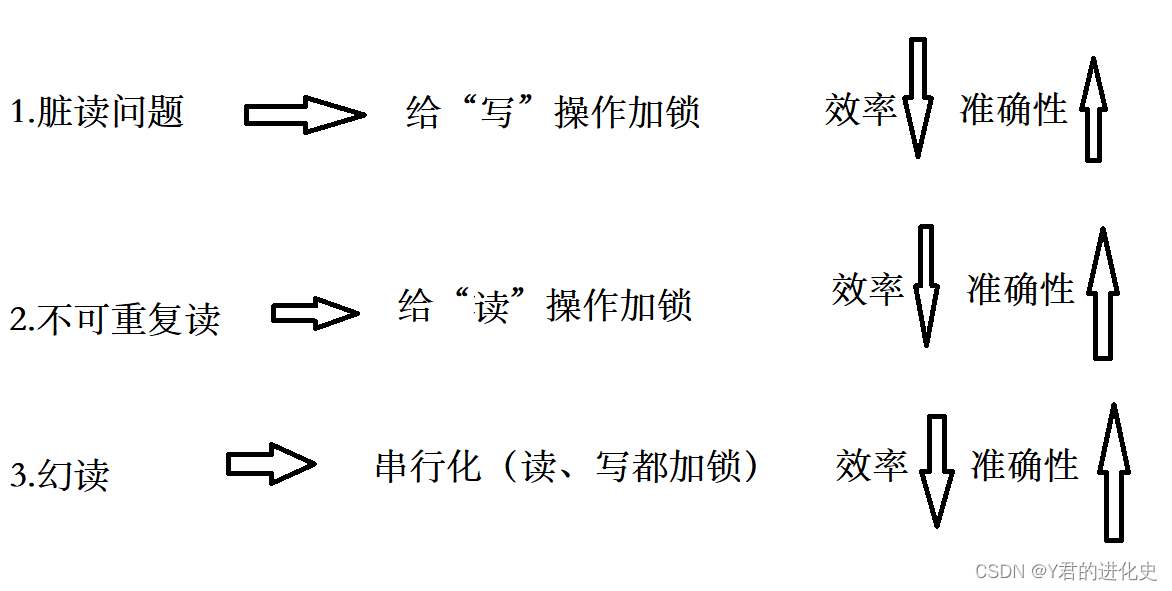
三、JDBC编程
对于JDBC,数据库的插入、删除、修改的操作是类似的(数据库的插入、删除、修改操作,本文只讲解插入操作),但是查询操作是不一样的。
(一)插入操作
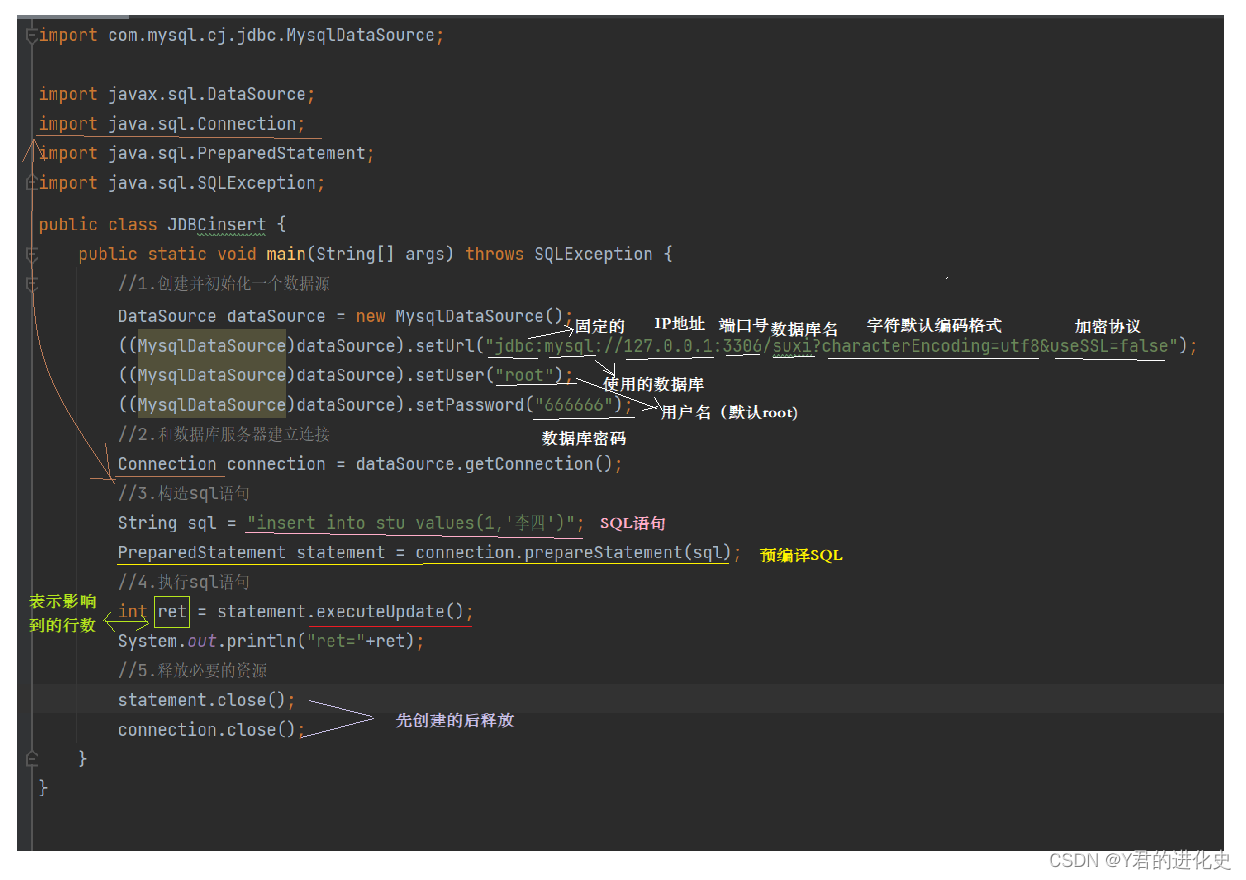
代码:
import com.mysql.cj.jdbc.MysqlDataSource;

import javax.sql.DataSource;
import java.sql.Connection;
import java.sql.PreparedStatement;
import java.sql.SQLException;


public class JDBCinsert {
    public static void main(String[] args) throws SQLException {
        //1.创建并初始化一个数据源
        DataSource dataSource = new MysqlDataSource();
        ((MysqlDataSource)dataSource).setUrl("jdbc:mysql://127.0.0.1:3306/suxi?characterEncoding=utf8&useSSL=false");
        ((MysqlDataSource)dataSource).setUser("root");
        ((MysqlDataSource)dataSource).setPassword("666666");
        //2.和数据库服务器建立连接
        Connection connection = dataSource.getConnection();
        //3.构造sql语句
        String sql = "insert into stu values(1,'李四')";
        PreparedStatement statement = connection.prepareStatement(sql);
        //4.执行sql语句
        int ret = statement.executeUpdate();
        System.out.println("ret="+ret);
        //5.释放必要的资源
        statement.close();
        connection.close();
    }
}
对于代码中第三条构造sql,也可以替换成:
String sql = "insert into stu values(?,?)";// ? 是占位符
PreparedStatement statement = connection.prepareStatement(sql);
statement.setInt(1,id);
statement.setString(2,name);
对于代码中第四条执行sql,插入,删除,修改使用的方法都是executeUpdate(),查找则是executeQuery().
(二)查询操作
和插入操作比较,查询操作不同的地方在于sql语句和第四点执行sql语句,以及第五点释放必要的资源,故这里只讲解不同的地方
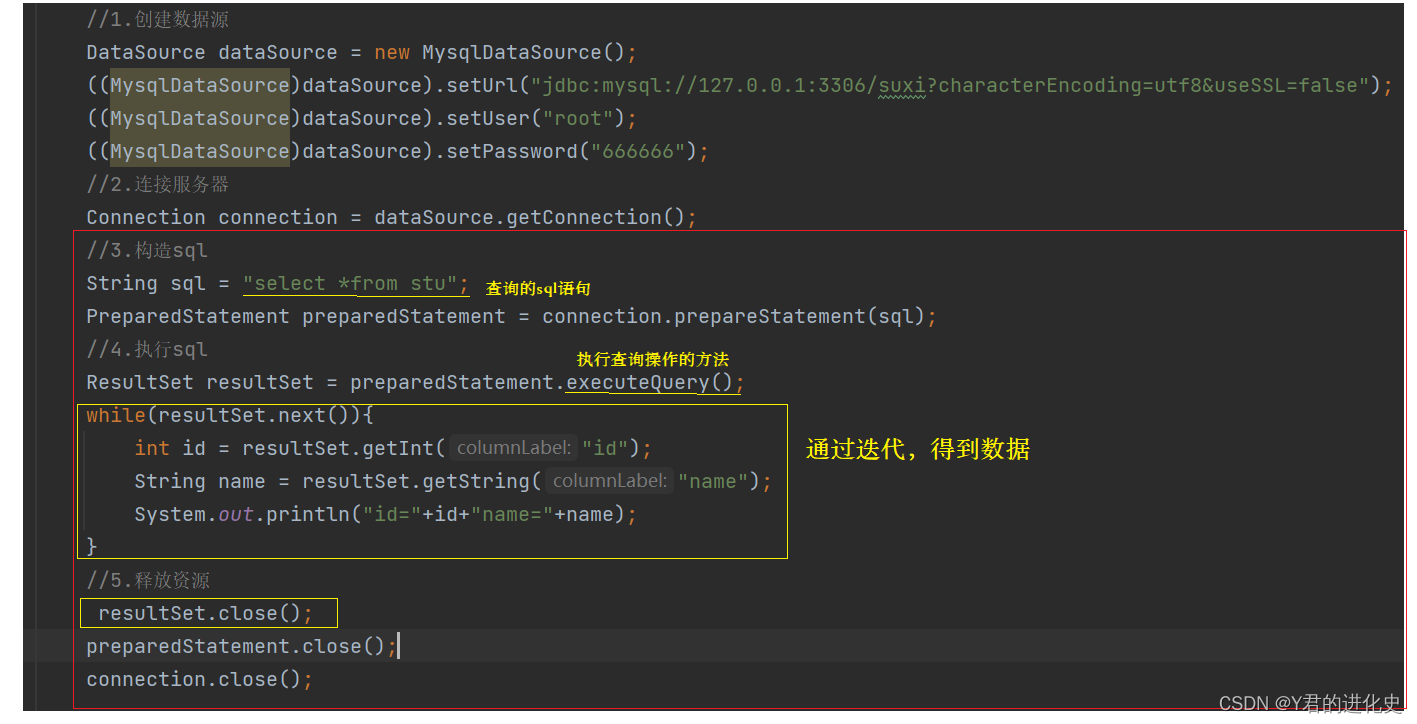
代码:
        //1.创建数据源
        DataSource dataSource = new MysqlDataSource();
        ((MysqlDataSource)dataSource).setUrl("jdbc:mysql://127.0.0.1:3306/suxi?characterEncoding=utf8&useSSL=false");
        ((MysqlDataSource)dataSource).setUser("root");
        ((MysqlDataSource)dataSource).setPassword("666666");
        //2.连接服务器
        Connection connection = dataSource.getConnection();
        //3.构造sql
        String sql = "select *from stu";
        PreparedStatement preparedStatement = connection.prepareStatement(sql);
        //4.执行sql
        ResultSet resultSet = preparedStatement.executeQuery();
        while(resultSet.next()){
            int id = resultSet.getInt("id");
            String name = resultSet.getString("name");
            System.out.println("id="+id+"name="+name);
        }
        //5.释放资源
         resultSet.close();
        preparedStatement.close();
        connection.close();
结语
关于MySQL,博主更文就到这里啦,我们下次再见~
这篇博客如果对你有帮助,给博主一个免费的点赞以示鼓励,欢迎各位🔎点赞👍评论收藏⭐,谢谢!!!
本文参与 腾讯云自媒体同步曝光计划,分享自作者个人站点/博客。
原始发表:2023-08-01,如有侵权请联系 cloudcommunity@tencent.com 删除
目录
腾讯云开发者

Copyright © 2013 - 2026 Tencent Cloud. All Rights Reserved. 腾讯云 版权所有
深圳市腾讯计算机系统有限公司 ICP备案/许可证号:粤B2-20090059  粤公网安备44030502008569号
腾讯云计算(北京)有限责任公司 京ICP证150476号 | 京ICP备11018762号