
无法让VSCode与NodeJs应用程序协同工作
无法让VSCode与NodeJs应用程序协同工作
提问于 2018-11-10 14:04:40
我正在尝试在代码上调试我的应用程序。我的package.json上有以下配置
"scripts": {
    "build": "rimraf dist/ && babel ./ --out-dir dist/ --ignore ./node_modules,./.babelrc,./package.json,./npm-debug.log --copy-files",
    "start": "npm run build && node --inspect=12345 dist/app.js"
}我在我的Node应用上使用ES6,这就是为什么我的build配置有点混乱的原因。
当我运行npm start时,一切正常,我可以使用我的应用程序。
现在,为了尝试调试它,我设置了以下launch配置:
"configurations": [
    {
        "type": "node",
        "name": "Attach to Remote",
        "request": "attach",
        "port": 12345
    },
    {
        "type": "node",
        "request": "launch",
        "name": "Launch Program",
        "program": "${workspaceFolder}\\dist\\app.js"
    }
]
两者都“工作”:VS代码切换到“调试模式”,但我不能击中任何断点。它们都变灰了:
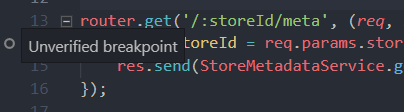
我试过用this的答案来修正,但没能让它起作用.
有什么帮助吗?
提前感谢!
回答 2
Stack Overflow用户
回答已采纳
发布于 2018-11-10 17:05:34
我发现我刚刚从我的--source-maps命令中漏掉了.- VSCode能够找到断点。所以基本上解决办法是:
将--source-maps添加到构建命令中:
"scripts": {
    "build": "rimraf dist/ && babel ./ --out-dir dist/ --ignore ./node_modules,./.babelrc,./package.json,./npm-debug.log --copy-files --source-maps",
    "start": "npm run build && node --inspect=12345 dist/app.js"
}我配置了一个launch如下:
"configurations": [
    {
        "type": "node",
        "request": "launch",
        "name": "Launch Program",
        "program": "${workspaceFolder}\\dist\\app.js",
        "preLaunchTask": "npm: build"
    }
]
希望它能帮到别人!
Stack Overflow用户
发布于 2018-11-10 14:57:05
我使用的是VS代码v1.28.2,我可以同时调试这两种方式。
1)内置调试器(菜单->调试->开始调试)
2)使用node inspect index.js启动应用程序。在这种情况下,您必须在代码中使用debugger;关键字声明断点。然后,当处于调试模式并在断点中停止时,继续在命令行中键入cont。
希望它能帮上忙
页面原文内容由Stack Overflow提供。腾讯云小微IT领域专用引擎提供翻译支持
原文链接:
https://stackoverflow.com/questions/53239745
复制相关文章
相似问题
腾讯云开发者

Copyright © 2013 - 2026 Tencent Cloud. All Rights Reserved. 腾讯云 版权所有
深圳市腾讯计算机系统有限公司 ICP备案/许可证号:粤B2-20090059  粤公网安备44030502008569号
腾讯云计算(北京)有限责任公司 京ICP证150476号 | 京ICP备11018762号