
Google Sheet API:只在第一张纸上打印- Java
Google Sheet API:只在第一张纸上打印- Java
提问于 2018-06-22 20:31:42
我能够操纵第一张纸上的数据,但我不能在第二张。在API页面上,它声明范围必须指示工作表选项卡名。因此,我这样做了,它编译和运行,但它输入数据到Sheet1,而不是第二页。
--这就是标签的样子:
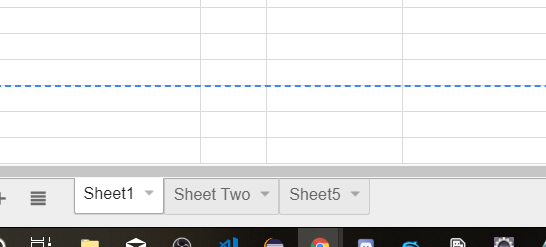
。
非常感谢您的任何帮助,谢谢
import com.google.api.client.auth.oauth2.Credential;
import com.google.api.client.extensions.java6.auth.oauth2.AuthorizationCodeInstalledApp;
import com.google.api.client.extensions.jetty.auth.oauth2.LocalServerReceiver;
import com.google.api.client.googleapis.auth.oauth2.GoogleAuthorizationCodeFlow;
import com.google.api.client.googleapis.auth.oauth2.GoogleClientSecrets;
import com.google.api.client.googleapis.javanet.GoogleNetHttpTransport;
import com.google.api.client.http.HttpTransport;
import com.google.api.client.http.javanet.NetHttpTransport;
import com.google.api.client.json.jackson2.JacksonFactory;
import com.google.api.client.json.JsonFactory;
import com.google.api.client.util.store.FileDataStoreFactory;
import com.google.api.services.sheets.v4.SheetsScopes;
import com.google.api.services.sheets.v4.model.*;
import com.google.api.services.sheets.v4.Sheets;

import java.io.FileInputStream;
import java.io.IOException;
import java.io.InputStream;
import java.io.InputStreamReader;
import java.util.ArrayList;
import java.util.Arrays;
import java.util.List;


public class SheetsQuickstart {
private static final String APPLICATION_NAME = "CSC131";
private static final java.io.File DATA_STORE_DIR = new java.io.File(System.getProperty("user.home"), ".credentials//sheets.googleapis.com-java-quickstart.json");
private static FileDataStoreFactory DATA_STORE_FACTORY;
private static final JsonFactory JSON_FACTORY = JacksonFactory.getDefaultInstance();
private static HttpTransport HTTP_TRANSPORT;
private static final List<String> SCOPES = Arrays.asList( SheetsScopes.SPREADSHEETS );
private static String spreadsheetId = "1BLt5iz1udvdrbxPAoHbgxNtpqgKmV_fvvAKGWPJekyM";

static {
    try {
        HTTP_TRANSPORT = GoogleNetHttpTransport.newTrustedTransport();
        DATA_STORE_FACTORY = new FileDataStoreFactory(DATA_STORE_DIR);
    } catch (Throwable t) {
        t.printStackTrace();
        System.exit(1);
    }
}

public static Credential authorize() throws IOException {
    InputStream in = new FileInputStream("client_secret.json");
    GoogleClientSecrets clientSecrets = GoogleClientSecrets.load(JSON_FACTORY, new InputStreamReader(in));
    GoogleAuthorizationCodeFlow flow = new GoogleAuthorizationCodeFlow.Builder(HTTP_TRANSPORT, JSON_FACTORY, clientSecrets, SCOPES)
            .setDataStoreFactory(DATA_STORE_FACTORY)
            .setAccessType("offline")
            .build();
    Credential credential = new AuthorizationCodeInstalledApp(flow, new LocalServerReceiver()).authorize("user");
    System.out.println("Credentials saved to " + DATA_STORE_DIR.getAbsolutePath());
    return credential;
}


public static Sheets getSheetsService() throws IOException {
    Credential credential = authorize();
    return new Sheets.Builder(HTTP_TRANSPORT, JSON_FACTORY, credential)
            .setApplicationName(APPLICATION_NAME)
            .build();
}


/********************* Stores comment in cell *****************/
public static void inputComment(int col, String Comment, String ID)throws IOException{
    Sheets service = getSheetsService();
    final String range = "Sheet Two!C2:C26";
    ValueRange response = service.spreadsheets().values().get(spreadsheetId, range).execute();
    List<List<Object>> element = response.getValues();
    int cellRow = 0;
    for (List row : element) {
        cellRow++;
        if(ID.equals(row.get(0))){
            printInfo(cellRow,col,Comment);
            break;
        }
    }
}


/********************* Prints everything *****************/
public static void printInfo(int row, int count, String Date) throws IOException{
    Sheets service = getSheetsService();
    List<Request> requests = new ArrayList<>();

    List<CellData> values = new ArrayList<>();
    values.add(new CellData().setUserEnteredValue(new ExtendedValue().setStringValue((Date))));
    requests.add(new Request()
        .setUpdateCells(new UpdateCellsRequest()
        .setStart(new GridCoordinate().setSheetId(0).setRowIndex(row).setColumnIndex(count+6))
        .setRows(Arrays.asList(new RowData().setValues(values)))
        .setFields("userEnteredValue,userEnteredFormat.backgroundColor")));
    BatchUpdateSpreadsheetRequest batchUpdateRequest = new BatchUpdateSpreadsheetRequest().setRequests(requests);
    service.spreadsheets().batchUpdate(spreadsheetId, batchUpdateRequest).execute();
}
}
回答 1
Stack Overflow用户
回答已采纳
发布于 2018-06-22 22:06:18
看起来问题就在printInfo()中--注意new GridCoordinate().setSheetId(0)。
如果有疑问,sheetId来自SheetProperties,例如来自Spreadsheet.getSheets()....getProperties()。
页面原文内容由Stack Overflow提供。腾讯云小微IT领域专用引擎提供翻译支持
原文链接:
https://stackoverflow.com/questions/50995202
复制相关文章
相似问题
腾讯云开发者

Copyright © 2013 - 2026 Tencent Cloud. All Rights Reserved. 腾讯云 版权所有
深圳市腾讯计算机系统有限公司 ICP备案/许可证号:粤B2-20090059  粤公网安备44030502008569号
腾讯云计算(北京)有限责任公司 京ICP证150476号 | 京ICP备11018762号