
反应-工具提示剪辑
反应-工具提示剪辑
提问于 2018-06-05 02:31:28
所以我试着想办法解决我的困境。
因此,我面临的问题是,如果我将React工具提示放置在List元素中,它将被裁剪。如果我将放在底部,它就没有效果(这是合乎逻辑的,因为它不知道什么索引在地图之外。所以我被困在这里试图找出如何防止剪裁。我试着把z指数设置为无效。我觉得反应工具提示和/或与样式相结合的位置可以解决这个问题。我觉得答案是正确的,并不复杂,但我无法得到这个合作。提前谢谢。
下面是代码的样子:
const styles = {
  listContainer: {
    maxHeight: this.props.listMaxHeight ? this.props.listMaxHeight : '30vh',
    overflowY: 'auto',
    border: '.05vmin solid',
    borderColor: fullWhite,
  },
};

const commentCard = () => {
  if (typeof(data.md5hash) === 'string' && data.md5hash.length > 0) {
    return (
      <div>
        <div style={styles.listContainer}>
          <List>
            {comments.map((item, index) => (
              <ListItem
                id={index}
                key={index}
                leftAvatar={ <Avatar src={item.avatar} />}
                rightIconButton={
                  <IconMenu
                    disableGutters={true}
                    iconButtonElement={
                      <IconButton>
                        <MoreVertIcon color={grey400} />
                      </IconButton>
                    }>
                    <MenuItem>
                      <IconButton
                        disabled={this.checkUserRights(index)}
                        onClick={() => this.editComment(index)}
                        data-tip='Edit'
                        data-for={`sf${index}`}>
                        <FontIcon className="far fa-edit" />
                      </IconButton>
                    </MenuItem>
                    <MenuItem>
                      <IconButton
                        disabled={this.checkUserRights(index)}
                        onClick={() => this.deleteComment(index)}
                        data-tip='Delete'
                        data-for={`sf${index}`}>
                        <FontIcon className="far fa-trash-alt" />
                      </IconButton>
                    </MenuItem>
                    <ReactTooltip
                      id={`sf${index}`}
                      place='left'
                    />
                  </IconMenu>
                }
                primaryText={
                  // not relevant
                }
                secondaryText={
                  // not relevant
                }
              />
            ))}
          </List>
        </div>
        <div style={styles.actionsContainer}>
          // this is a container for the comments text area and buttons
        </div>
      </div>);
  } else {
    return null;
  }
};
编辑:
好的,我有点明白是什么阻挡了它,但不知道它的修复方法。
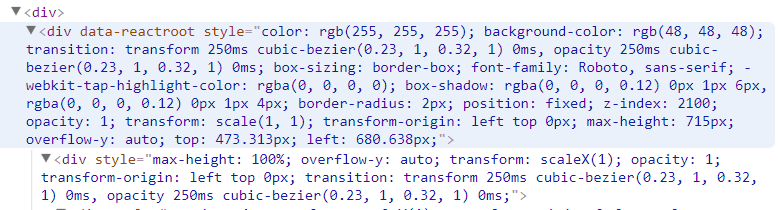
这两个元素都有overflowY: auto,但我需要溢出:可见。我不知道该怎么改变这一切。
回答 2
Stack Overflow用户
回答已采纳
发布于 2018-06-06 03:54:49
在里面提供一个className
<ReactTooltip
  className="reacttooltip"
  id={`sf${index}`}
  place='left'
/>
在css文件或任何样式化方法(sass或样式组件)中,您可以为该类添加样式,
.reacttooltip {
  overflow: visible;
}Stack Overflow用户
发布于 2021-07-19 13:59:36
如果使用React,请尝试使用反应门户。
门户的一个典型用例是父组件存在溢出:隐藏或z索引样式,但您需要子组件直观地“释放”其容器。例如,对话框、悬停卡和工具提示。
页面原文内容由Stack Overflow提供。腾讯云小微IT领域专用引擎提供翻译支持
原文链接:
https://stackoverflow.com/questions/50691192
复制相关文章
相似问题
腾讯云开发者

Copyright © 2013 - 2026 Tencent Cloud. All Rights Reserved. 腾讯云 版权所有
深圳市腾讯计算机系统有限公司 ICP备案/许可证号:粤B2-20090059  粤公网安备44030502008569号
腾讯云计算(北京)有限责任公司 京ICP证150476号 | 京ICP备11018762号