
PowerBI和Azure AD无头登录
我正在尝试将PowerBI仪表板嵌入到我的客户MVC门户中。我的客户没有AAD帐户,所以他们不能登录到网站时,他们登录到我的MVC网站与个人的权威。
我已经在PowerBI/AAD上注册了我的应用程序,并拥有了ClientID和秘密。我调用AAD并获得授权代码,然后使用该代码获得成功返回的雅典令牌。
当我使用访问令牌获得一个仪表板时,它会被403禁忌拒绝。
我已经看过了来自微软的所有示例,但是它们需要一个用户登录提示。我已经回顾了引用AcquireToken方法的ADAL2.0代码,但这在ADAL3中被废弃,取而代之的是具有不同参数的AcquireTokenAsync,我在下面的示例中使用了这一点。
下面是获取令牌的函数:
    protected AuthenticationResult GetAccessToken()
    {
        string pBiUser = Properties.Settings.Default.PowerBIUser;
        string pBiPwd = Properties.Settings.Default.PowerBIPwd;
        string pBiClientId = Properties.Settings.Default.PowerBIClientId;
        string pBiSecret = Properties.Settings.Default.PowerBIClientSecret;
        TokenCache TC = new TokenCache();
        ClientCredential CC = new ClientCredential(pBiClientId,pBiSecret);
        string AU = Properties.Settings.Default.PowerBIAuthority;
        Microsoft.IdentityModel.Clients.ActiveDirectory.AuthenticationContext authenticationContext
            = new Microsoft.IdentityModel.Clients.ActiveDirectory.AuthenticationContext(AU, TC);
        AuthenticationResult result = authenticationContext.AcquireTokenAsync("https://analysis.windows.net/powerbi/api"
            ,CC).Result;

        if (result == null)
        {
            throw new InvalidOperationException("Failed to obtain the PowerBI token");
        }

        return result;
}然后,我使用结果令牌并调用。响应接收到403:
    protected PBIDashboards GetDashboards(AuthenticationResult authResult)
    {
        PBIDashboards pbiDashboards = new PBIDashboards();
        var baseAddress = new Uri("https://api.powerbi.com");
        using (var httpClient = new System.Net.Http.HttpClient {BaseAddress = baseAddress})
        {
            httpClient.DefaultRequestHeaders.TryAddWithoutValidation("authorization",
                "Bearer " + authResult.AccessToken);
            using (**var response** = httpClient.GetAsync("v1.0/myorg/dashboards").Result)
            {
                string responseData = response.Content.ReadAsStringAsync().Result;

                //Deserialize JSON string
                pbiDashboards = JsonConvert.DeserializeObject<PBIDashboards>(responseData);

                if (pbiDashboards != null)
                {
                    var gridViewDashboards = pbiDashboards.value.Select(dashboard => new
                    {
                        Id = dashboard.id,
                        DisplayName = dashboard.displayName,
                        EmbedUrl = dashboard.embedUrl
                    });
                }
            }
        }
        return pbiDashboards;
}回答 2
Stack Overflow用户
发布于 2017-03-29 19:10:58
经过大量研究,您可以直接进行AJAX调用以获得令牌:
    private async Task<string> GetAccessToken()
    {
        string pBiUser = Properties.Settings.Default.PowerBIUser;
        string pBiPwd = Properties.Settings.Default.PowerBIPwd;
        string pBiClientId = Properties.Settings.Default.PowerBIClientId;
        string pBiSecret = Properties.Settings.Default.PowerBIClientSecret;
        string pBITenant = Properties.Settings.Default.PowerBITenantId;

        string tokenEndpointUri = "https://login.microsoftonline.com/"+pBITenant+"/oauth2/token";

        var content = new FormUrlEncodedContent(new[]
            {
        new KeyValuePair<string, string>("grant_type", "password"),
        new KeyValuePair<string, string>("username", pBiUser),
        new KeyValuePair<string, string>("password", pBiPwd),
        new KeyValuePair<string, string>("client_id", pBiClientId),
        new KeyValuePair<string, string>("client_secret", pBiSecret),
        new KeyValuePair<string, string>("resource", "https://analysis.windows.net/powerbi/api")
        });

        using (var client = new HttpClient())
        {
            HttpResponseMessage res = client.PostAsync(tokenEndpointUri, content).Result;

            string json = await res.Content.ReadAsStringAsync();

            AzureAdTokenResponse tokenRes = JsonConvert.DeserializeObject<AzureAdTokenResponse>(json);

            return tokenRes.AccessToken;
        }
    }
有了字符串AccessToken之后,就可以调用仪表板请求了。
protected PBIDashboards GetDashboards(string token)
    {
        PBIDashboards pbiDashboards = new PBIDashboards();
        var baseAddress = new Uri("https://api.powerbi.com");
        using (var httpClient = new System.Net.Http.HttpClient {BaseAddress = baseAddress})
        {
            httpClient.DefaultRequestHeaders.TryAddWithoutValidation("authorization",
                "Bearer " + token);
            using (var response = httpClient.GetAsync("v1.0/myorg/dashboards").Result)
            {
                string responseData = response.Content.ReadAsStringAsync().Result;

                //Deserialize JSON string
                pbiDashboards = JsonConvert.DeserializeObject<PBIDashboards>(responseData);

                if (pbiDashboards != null)
                {
                    var gridViewDashboards = pbiDashboards.value.Select(dashboard => new
                    {
                        Id = dashboard.id,
                        DisplayName = dashboard.displayName,
                        EmbedUrl = dashboard.embedUrl
                    });
                }
            }
        }
        return pbiDashboards;
    }
这将为您提供仪表板列表和调用Javascript中的PowerBI API以构建嵌入式页面的仪表板Id。我使用隐藏的输入字段来存储访问令牌,并嵌入URL以传递给Javascript调用。
// check if the embed url was selected
var embedUrl = document.getElementById('embed').value;
if (embedUrl === "")
    return;

// get the access token.
accessToken = document.getElementById('token').value;

// Embed configuration used to describe the what and how to embed.
// This object is used when calling powerbi.embed.
// You can find more information at https://github.com/Microsoft/PowerBI-JavaScript/wiki/Embed-Configuration-Details.
var config = {
    type: 'dashboard',
    accessToken: accessToken,
    embedUrl: embedUrl
};

// Grab the reference to the div HTML element that will host the dashboard.
var dashboardContainer = document.getElementById('dashboard');

// Embed the dashboard and display it within the div container.
var dashboard = powerbi.embed(dashboardContainer, config);Stack Overflow用户
发布于 2017-03-20 03:23:45
基于错误消息(403),该问题与权限有关。
当我们使用客户端凭证流为Power获取访问令牌时,AFAIK不是这样的权限。您可以引用下图的权限:
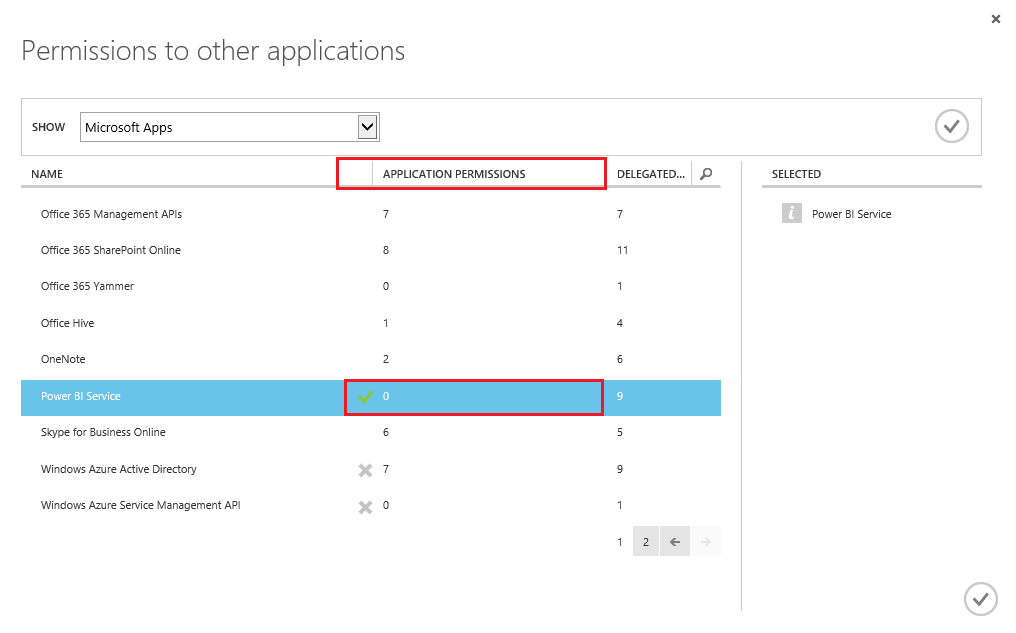
为了在没有用户交互的情况下获得Power的令牌,我们可以使用资源所有者密码凭据流。您可以使用第三方库PowerBI.Api.Client,它已经实现了这一点。
https://stackoverflow.com/questions/42868033
复制相似问题
腾讯云开发者

Copyright © 2013 - 2026 Tencent Cloud. All Rights Reserved. 腾讯云 版权所有
深圳市腾讯计算机系统有限公司 ICP备案/许可证号:粤B2-20090059  粤公网安备44030502008569号
腾讯云计算(北京)有限责任公司 京ICP证150476号 | 京ICP备11018762号