
通知操作图标未显示在可穿戴设备上
我试图在通知中添加一个动作,并在可穿戴设备上显示动作按钮。下面的代码显示了如何创建一个操作并将其添加到NotificationCompat中,该操作将使用NotificationManagerCompat交付,如下所示:https://developer.android.com/training/wearables/notifications/creating.html#Deliver
    NotificationCompat.Action declineActionDark = new NotificationCompat.Action(R.drawable.done_black, getString(R.string.accept), acceptInvitationPendingIntent);
    NotificationCompat.Action acceptActionDark = new NotificationCompat.Action(R.drawable.clear_black, getString(R.string.decline), declineInvitationPendingIntent);
    NotificationCompat.Action declineActionLight = new NotificationCompat.Action(R.drawable.done_white, getString(R.string.accept), acceptInvitationPendingIntent);
    NotificationCompat.Action acceptActionLight = new NotificationCompat.Action(R.drawable.clear_white, getString(R.string.decline), declineInvitationPendingIntent);

    NotificationCompat.WearableExtender wearableExtender =
            new NotificationCompat.WearableExtender()
                    .addAction(declineActionLight)
                    .addAction(acceptActionLight);

    Uri defaultSoundUri = RingtoneManager.getDefaultUri(RingtoneManager.TYPE_NOTIFICATION);
    Notification notification = new NotificationCompat.Builder(getApplicationContext())
            .setContentTitle(getApplicationContext().getResources().getString(R.string.app_name))
            .setContentText(message)
            .setSound(defaultSoundUri)
            .setSmallIcon(R.drawable.place_white)
            .setLargeIcon(bitmap)
            .setStyle(new NotificationCompat.BigTextStyle().bigText(message))
            .addAction(declineActionDark)
            .addAction(acceptActionDark)
            .setAutoCancel(true)
            .setPriority(Notification.PRIORITY_HIGH)
            .extend(wearableExtender)
            .build();
    NotificationManagerCompat notificationManager = NotificationManagerCompat.from(getApplicationContext());
    notificationManager.notify(notificationId, notification);
正如你所看到的,我使用两种不同的图像,一个暗的和一个光的检查标记和下降图像。这是因为我希望在我的Marshmallow测试设备的亮通知区域有一个暗图像,在可穿戴操作按钮的相当黑暗的背景中有一个光线图像。
这里的问题是,可穿戴设备根本不显示图标。请参阅运行Android6.0.1的可穿戴硬件的以下屏幕截图:
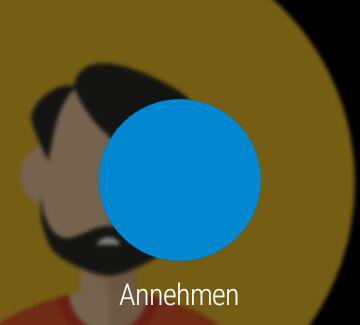
在现实中,没有黑角。这似乎是安卓穿戴屏幕截图工具的一个错误。但是,我想在动作按钮上显示图标。作为项目中的所有可绘图,done_white/_black和clear_white/黑色都是矢量可绘制的。我已经试过用PNG作为抽屉,但它们也不起作用。
回答 1
Stack Overflow用户
发布于 2016-06-28 13:14:30
我也有同样的问题,因为我使用SVG文件。当我把它改成PNG时,它就开始工作了。
解决方案:使用PNG代替向量SVG
https://stackoverflow.com/questions/37342157
复制相似问题
腾讯云开发者

Copyright © 2013 - 2026 Tencent Cloud. All Rights Reserved. 腾讯云 版权所有
深圳市腾讯计算机系统有限公司 ICP备案/许可证号:粤B2-20090059  粤公网安备44030502008569号
腾讯云计算(北京)有限责任公司 京ICP证150476号 | 京ICP备11018762号