
我怎么才能把两个不同的花车放在一起?
我怎么才能把两个不同的花车放在一起?
提问于 2015-09-11 08:07:13
我有两个浮动,一个在屏幕的左边和一个右边。我的目标是将左浮动移到屏幕的右侧,但不将其移动到另一个浮动的右侧。我无法在HTML中更改它们的顺序,因此第一个浮动当前处于优先位置。我是不是忽略了什么?如果没有,我还有其他选择吗?
jsFiddle: http://jsfiddle.net/h7y9bwre/
HTML:
<!-- Section 1 -->
<div class="left">
    <p>Some Text</p>
    <p>Other Stuff</p>
</div>

<!-- Section 2 -->
<div class="right">
    <img src="http://placehold.it/30x30" />
    <img src="http://placehold.it/30x30" />
</div>
“第1节”必须保持在HTML中的“第2节”之上。
当前:
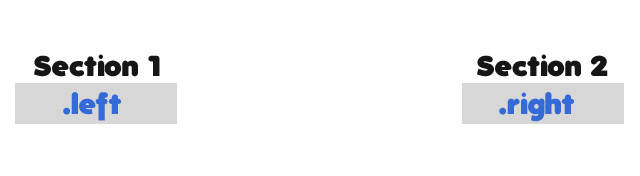
目标:

回答 7
Stack Overflow用户
回答已采纳
发布于 2015-09-11 08:55:05
你不需要用浮子来做这个。只需将包装设置为内联块,并将它们对齐到右边。
.right,
.left {
  display: inline-block;
}
#bar-container {
  text-align: right;
}
Stack Overflow用户
发布于 2015-09-11 08:25:16
您可以覆盖当前的CSS,使<div>与右对齐,使其成为inline-block。
#bar-container {width: 100%;}
.left, .right {width: 50%;}
.left {float: left;}
.right {float: right; }

p {display: inline-block; padding: 0 1%}

.clearfix:after {
     visibility: hidden;
     display: block;
     font-size: 0;
     content: " ";
     clear: both;
     height: 0;
     }
.clearfix { display: inline-block; }
/* start commented backslash hack \*/
* html .clearfix { height: 1%; }
.clearfix { display: block; }
/* close commented backslash hack */


/**
 * YOUR STYLES
 */


#bar-container {
  text-align: right;
}

.left, .right {
  display: inline-block;
  float: none;
  vertical-align: middle;
  width: auto;
}

.left {
  min-width: 200px;
}<div id="bar-container" class="clearfix">
<div class="left">
<p>Some Text</p>
<p>Other Stuff</p>
</div>
<div class="right">
<img src="http://placehold.it/30x30" />
<img src="http://placehold.it/30x30" />
</div>
</div>
Stack Overflow用户
发布于 2015-09-11 08:34:19
flexbox可以做到这一点
#bar-container {
    width: 100%;
    display: flex;
    justify-content: flex-end;
}
#bar-container div {
    border:1px solid red;
}
p {
    display: inline-block;
    padding: 0 1%;
    margin: 0;
}<div id="bar-container" class="clearfix">
<div class="left">
<p>Some Text</p>
<p>Other Stuff</p>
</div>
<div class="right">
<img src="http://placehold.it/30x30" />
<img src="http://placehold.it/30x30" />
</div>
</div>
页面原文内容由Stack Overflow提供。腾讯云小微IT领域专用引擎提供翻译支持
原文链接:
https://stackoverflow.com/questions/32518592
复制相关文章
相似问题
腾讯云开发者

Copyright © 2013 - 2026 Tencent Cloud. All Rights Reserved. 腾讯云 版权所有
深圳市腾讯计算机系统有限公司 ICP备案/许可证号:粤B2-20090059  粤公网安备44030502008569号
腾讯云计算(北京)有限责任公司 京ICP证150476号 | 京ICP备11018762号