
在Delphi中Google Chrome样式的玻璃标签
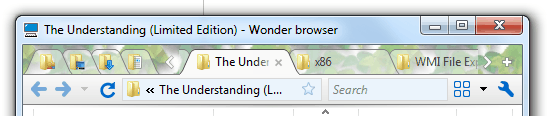
我正在尝试在Delphi应用程序中实现Windows 7中的Google样式选项卡。
这方面的内容如下:
- 选项卡可能延伸到非客户端领域,就像它们在google chrome上一样。当玻璃启用时,
- 会正确地使用Vista和Windows 7,
- 选项卡的工作方式与google一样,看起来像google,而不是玻璃。

我发现我必须克服的挑战是:
- 如何使控件(VCL控件)扩展到非客户端区域?(这样做的一个很好的例子是VCL源代码中包含的丝带控件,但我还没有见过其他人这么做,而且需要一些邪恶的黑客才能让function)
- How正确地在玻璃上绘制位图?(DWM API)一个related question已经回答了这个问题,在这里,这个问题也是我提出的。
回答 4
Stack Overflow用户
发布于 2010-10-13 17:03:22
你不想要一个完整的玻璃窗口,但你将不得不自己画标签,因为没有一个控制,我知道,这将给你的确切外观,你的寻找。如果使用当前窗体的GlassFrame属性,则启用它并将顶部设置为选项卡所需的高度,在此区域放置一个油漆框,并使用GDI+调用手动绘制选项卡。在EDN (http://cc.embarcadero.com/Download.aspx?id=26950)上有一个很好的库。如果不使用GDI+,您将能够绘制到油漆框,但黑色将变得透明。使用GDI+,您可以自由地画到玻璃的任何颜色。例如:

来源:
unit Unit6;

interface

uses
  Windows, Messages, SysUtils, Variants, Classes, Graphics, Controls, Forms,
  Dialogs, GdiPlusHelpers, GdiPlus, StdCtrls, ExtCtrls;

type
  TForm6 = class(TForm)
    pb1: TPaintBox;
    procedure pb1Paint(Sender: TObject);
  private
    { Private declarations }
   public
    { Public declarations }
  end;

var
  Form6: TForm6;

implementation

{$R *.dfm}

procedure TForm6.pb1Paint(Sender: TObject);
var
  Graphics : IGPGraphics;
  Brush: IGPSolidBrush;
  FontFamily: IGPFontFamily;
  Font: IGPFont;
  Point: TGPPointF;
  Pen: IGPPen;
begin
  Graphics := Pb1.ToGPGraphics;
  Brush := TGPSolidBrush.Create(TGPColor.Create(255, 0, 0, 0));
  FontFamily := TGPFontFamily.Create('Consolas');
  Font := TGPFont.Create(FontFamily, 12, FontStyleRegular, UnitPoint);
  Point.Initialize(1, 0);
  Graphics.TextRenderingHint := TextRenderingHintAntiAlias;
  Graphics.DrawString('GDI+ Black Text', Font, Point, Brush);
  Pen := TGPPen.Create(TGPColor.Create(255, 0, 0, 0));
  Graphics.DrawLine(Pen, 0, 0, 200, 100);
end;

end.
表格:
object Form6: TForm6
  Left = 0
  Top = 0
  Caption = 'Form6'
  ClientHeight = 282
  ClientWidth = 418
  Color = clBtnFace
  Font.Charset = DEFAULT_CHARSET
  Font.Color = clWindowText
  Font.Height = -11
  Font.Name = 'Tahoma'
  Font.Style = []
  GlassFrame.Enabled = True
  GlassFrame.Top = 22
  OldCreateOrder = False
  PixelsPerInch = 96
  TextHeight = 13
  object pb1: TPaintBox
    Left = 0
    Top = 0
    Width = 313
    Height = 105
    OnPaint = pb1Paint
  end
end编辑更新为反别名文本,以使它看起来更好。
Stack Overflow用户
发布于 2012-12-12 15:48:51
我刚刚完成了Delphi的一个相当完整的实现。
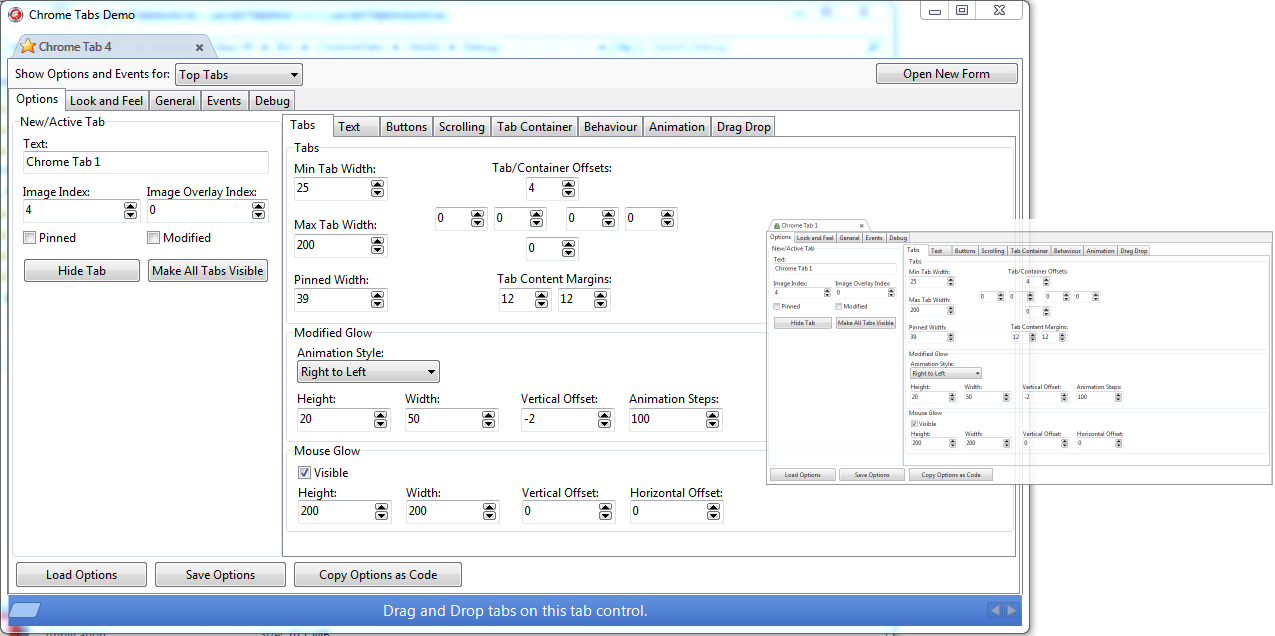
这些特点包括:
完全可配置的外观和感觉--包括渐变、透明和自定义选项卡形状--在标题栏中使用Aero
- 工作于Vista玻璃
- tab移动动画
H 110 tab过渡性样式效果(在颜色和alpha级别之间淡出)<代码>H 211H 112容器内的<图像显示选项卡和用户单击关闭按钮H 217H 118流体调整选项卡时,当用户单击关闭按钮H 217H 118流体调整选项卡时,可以将其放置在左侧,当dragging
Smart选项卡内容显示隐藏/显示项目时,右或浮动的全功能滚动包括自动滚动,根据选项卡宽度所有者绘制任何项目右到左文本钉住的选项卡
H 132选项卡--这两个选项卡都呈现并显示有动画辉光<代码>H 235<代码>H 136选项卡和重叠图像<代码>H 237<代码>H 138鼠标越辉<代码>H 239/代码><代码>H 140许多events
Load/save外观和选项,以及stream/fileGenerate外观和感觉选项的选项: Delphi代码<代码<245><代码>代码>>代码>代码>>
您可以在这里下载源代码和完整的演示/编辑器:http://code.google.com/p/delphi-chrome-tabs/
Stack Overflow用户
发布于 2011-06-30 01:26:26
https://stackoverflow.com/questions/3924720
复制相似问题
腾讯云开发者

Copyright © 2013 - 2026 Tencent Cloud. All Rights Reserved. 腾讯云 版权所有
深圳市腾讯计算机系统有限公司 ICP备案/许可证号:粤B2-20090059  粤公网安备44030502008569号
腾讯云计算(北京)有限责任公司 京ICP证150476号 | 京ICP备11018762号