
如何为Android中的测试配置Kotlin
如何为Android中的测试配置Kotlin
提问于 2022-07-19 07:29:27
我刚开始在我的Android项目中使用Kotlin。该项目编译并运行。
但是,当我试图将一个测试文件从Java转换到Kotlin时,我会得到一个对话框:"Kotlin在项目中没有配置,您必须在项目中配置Kotlin,然后再执行转换。“
这是我的build.gradle文件
import com.android.ddmlib.IDevice
import com.android.ddmlib.NullOutputReceiver

apply plugin: 'com.android.application'
apply plugin: 'kotlin-android'

// ==================================================================================================
int MILLIS_IN_MINUTE = 1000 * 60
int minutesSinceEpoch = System.currentTimeMillis() / MILLIS_IN_MINUTE

android {
    compileSdkVersion rootProject.ext.compileSdkVersion

    defaultConfig {
        applicationId "smartloc.truckphone"
        minSdkVersion 19
        targetSdkVersion 32
        versionName rootProject.ext.versionName

        multiDexEnabled true

        vectorDrawables.useSupportLibrary = true

        testInstrumentationRunner "smartloc.truckphone.toolsForInstrTests.instrTestImplementations.instrTestSuperclasses.InstrTestMockRunner"
        testInstrumentationRunnerArguments clearPackageData: 'true'
        testOptions {
            execution 'ANDROIDX_TEST_ORCHESTRATOR'
            animationsDisabled = true
        }
    }

    buildTypes {
        debug {
            shrinkResources false
            minifyEnabled false
            ext.enableCrashlytics = false
            ext.alwaysUpdateBuildId = true
        }
        release {
            shrinkResources true
            minifyEnabled true
            proguardFiles getDefaultProguardFile('proguard-android.txt'), 'proguard-rules.pro'
            crunchPngs false
        }
        applicationVariants.all { variant ->
            variant.outputs.each { output ->
                output.versionCodeOverride = minutesSinceEpoch
                output.versionNameOverride = minutesSinceEpoch + "-" + variant.flavorName
            }
        }
    }

    flavorDimensions 'stage'
    productFlavors {
        dev {
            dimension 'stage'
            versionNameSuffix "-dev"
            minSdkVersion 19
            resConfigs 'en', 'hdpi'
        }
        uiAutomator {
            dimension "stage"
            versionNameSuffix "-uiauto"
            minSdkVersion 19
            resConfigs 'pl', 'en', 'hdpi'
        }
        prod {
            dimension 'stage'
            versionNameSuffix "-prod"
            minSdkVersion 19
        }
    }
    testOptions {
        unitTests {
            returnDefaultValues = true
            includeAndroidResources = true
        }
        animationsDisabled = true
    }
    compileOptions {
        sourceCompatibility JavaVersion.VERSION_1_8
        targetCompatibility JavaVersion.VERSION_1_8
    }
    sourceSets {
        androidTest.assets.srcDirs += files("$projectDir/schemas".toString())
        androidTestUiAutomator.assets.srcDirs += files("$projectDir/schemas".toString())
    }
    buildFeatures {
        dataBinding true
        viewBinding true
    }
    bundle {
        language {
            enableSplit = true
        }
    }
    lint {
        abortOnError false
    }
}

dependencies {
    implementation "androidx.multidex:multidex:2.0.1"
    implementation 'androidx.core:core-ktx:1.9.0-alpha05'
    implementation 'androidx.lifecycle:lifecycle-viewmodel-ktx:2.5.0'
    implementation "org.jetbrains.kotlin:kotlin-stdlib-jdk7:$kotlin_version"

    implementation 'com.google.firebase:firebase-core:16.0.3'
    implementation 'com.google.firebase:firebase-messaging:17.3.2'
    implementation 'com.google.android.gms:play-services-analytics:18.0.1'
    implementation 'com.google.code.gson:gson:2.9.0'

    implementation fileTree(dir: 'libs', include: ['*.jar'])
    implementation "com.android.support:support-compat:28.0.0"
    implementation 'com.google.android.gms:play-services-location:20.0.0'

    // ..ANDROIDX...................................................................................
    implementation "androidx.lifecycle:lifecycle-extensions:2.2.0"
    implementation 'androidx.appcompat:appcompat:1.4.2'
    implementation 'androidx.constraintlayout:constraintlayout:2.1.4'
    implementation 'androidx.localbroadcastmanager:localbroadcastmanager:1.1.0'
    implementation 'androidx.test.espresso:espresso-idling-resource:3.4.0'

    // ..LIVE DATA..................................................................................
    def lifecycle_version = '2.5.0'
    def savedstate_version = '2.5.0'
    implementation "androidx.lifecycle:lifecycle-viewmodel-ktx:$lifecycle_version"
    implementation "androidx.lifecycle:lifecycle-livedata-ktx:$lifecycle_version"
    implementation "androidx.lifecycle:lifecycle-viewmodel-savedstate:$savedstate_version"
    implementation "androidx.lifecycle:lifecycle-common-java8:$lifecycle_version"
    testImplementation "androidx.arch.core:core-testing:2.1.0"

    // ..LOMBOK.....................................................................................
    def lombok_version = '1.18.24'
    //noinspection AnnotationProcessorOnCompilePath
    compileOnly "org.projectlombok:lombok:$lombok_version"
    annotationProcessor "org.projectlombok:lombok:$lombok_version"
    //noinspection AnnotationProcessorOnCompilePath
    testCompileOnly "org.projectlombok:lombok:$lombok_version"
    testAnnotationProcessor "org.projectlombok:lombok:$lombok_version"
    //noinspection AnnotationProcessorOnCompilePath
    androidTestCompileOnly "org.projectlombok:lombok:$lombok_version"
    androidTestAnnotationProcessor "org.projectlombok:lombok:$lombok_version"

    // ..DAGGER 2...................................................................................
    def dagger_version = '2.42'
    implementation "com.google.dagger:dagger:$dagger_version"
    annotationProcessor "com.google.dagger:dagger-compiler:$dagger_version"
    implementation "com.google.dagger:dagger-android:$dagger_version"
    annotationProcessor "com.google.dagger:dagger-android-processor:$dagger_version"
    implementation 'com.google.android.material:material:1.6.1'


    // UNIT TESTS ..................................................................................
    testImplementation "org.jetbrains.kotlin:kotlin-stdlib-jdk7:$kotlin_version"

    testImplementation 'androidx.test:core:1.4.0'
    testImplementation 'androidx.test:runner:1.4.0'
    testImplementation 'androidx.test:rules:1.4.0'
    testImplementation 'androidx.test.ext:junit:1.1.3'

    testImplementation 'org.robolectric:robolectric:4.8.1'

    testImplementation 'junit:junit:4.13.2'

    testImplementation 'org.mockito:mockito-core:4.6.1'


    // INSTRUMENTED TESTS ..........................................................................
    androidTestImplementation "org.jetbrains.kotlin:kotlin-stdlib-jdk7:$kotlin_version"
    androidTestCompileOnly "org.jetbrains.kotlin:kotlin-stdlib-jdk7:$kotlin_version"

    androidTestImplementation 'androidx.test.ext:junit:1.1.3'
    androidTestImplementation 'androidx.test.espresso:espresso-core:3.4.0'
    androidTestImplementation 'androidx.test:core:1.4.0'
    androidTestImplementation 'androidx.test:runner:1.4.0'
    androidTestImplementation 'androidx.test:rules:1.4.0'
    androidTestImplementation 'androidx.test.uiautomator:uiautomator:2.2.0'
    androidTestUtil 'androidx.test:orchestrator:1.4.1'

    androidTestImplementation 'junit:junit:4.13.2'

    androidTestImplementation 'org.mockito:mockito-android:4.6.1'
    androidTestImplementation 'org.mockito:mockito-core:4.6.1'

    androidTestImplementation 'org.hamcrest:hamcrest-library:2.2'

    uiAutomatorImplementation 'androidx.test.uiautomator:uiautomator:2.2.0'
}

IDevice.metaClass.setZeroScale {
    delegate.executeShellCommand("settings put global ${it}_scale 0", NullOutputReceiver.receiver, 1, TimeUnit.SECONDS)
}

// ==================================================================================================
apply plugin: 'com.google.gms.google-services'
repositories {
    mavenCentral()
}回答 2
Stack Overflow用户
发布于 2022-08-28 09:41:08
Android Studio中可能存在的bug
解决办法:
project
- Conversions中的
- 创建一个新的空Kotlin文件,-> Kotlin现在将运行
- ,删除空Kotlin文件
Stack Overflow用户
发布于 2022-07-19 07:45:00
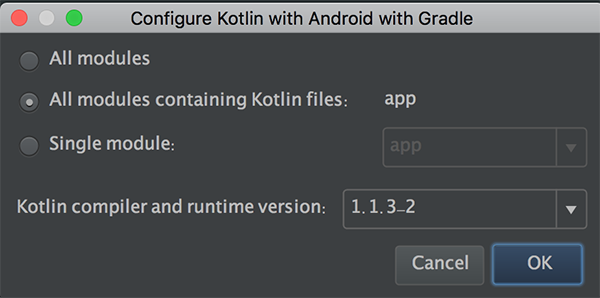
如果不添加kotlin依赖项,然后开始转换,则显示“kotlin未配置”。
如何自己做,Tools > Kotlin > configure kotlin in project,然后按下按钮。
然后设置默认值。尤其是Kotiln编译器和运行时版本必须是最新版本。
页面原文内容由Stack Overflow提供。腾讯云小微IT领域专用引擎提供翻译支持
原文链接:
https://stackoverflow.com/questions/73032776
复制相关文章
相似问题
腾讯云开发者

Copyright © 2013 - 2026 Tencent Cloud. All Rights Reserved. 腾讯云 版权所有
深圳市腾讯计算机系统有限公司 ICP备案/许可证号:粤B2-20090059  粤公网安备44030502008569号
腾讯云计算(北京)有限责任公司 京ICP证150476号 | 京ICP备11018762号