
希望使用React创建Gmail,如可刷卡(NotResponseNative)
希望使用React创建Gmail,如可刷卡(NotResponseNative)
提问于 2022-06-02 07:39:59
我想让Gmail像反应Js中的刷卡一样,
我已经创建了UI和all,并使用UseGeature实现了滑动,目前,我使用UseEffect来隐藏或显示左或右按钮,它创建了一个20 is的移动,然后跳到所需的宽度,就像我使用UseEffect显示/隐藏按钮一样,但是动画并不光滑,
所以我试着用两层,最底层的按钮和顶层的主卡,但是现在我不能在刷卡后点击按钮,即使它们是可见的,因为卡片的lop层仍然存在,顶部后来有一个触摸的动作,所以不能通过它来传播触摸。
如果我用useEffect更改Z索引的话,我可以点击按钮,但是它再次使动画变得不太好,
有没有人提出过这样的建议,我可以参考它或任何其他建议。
提前感谢
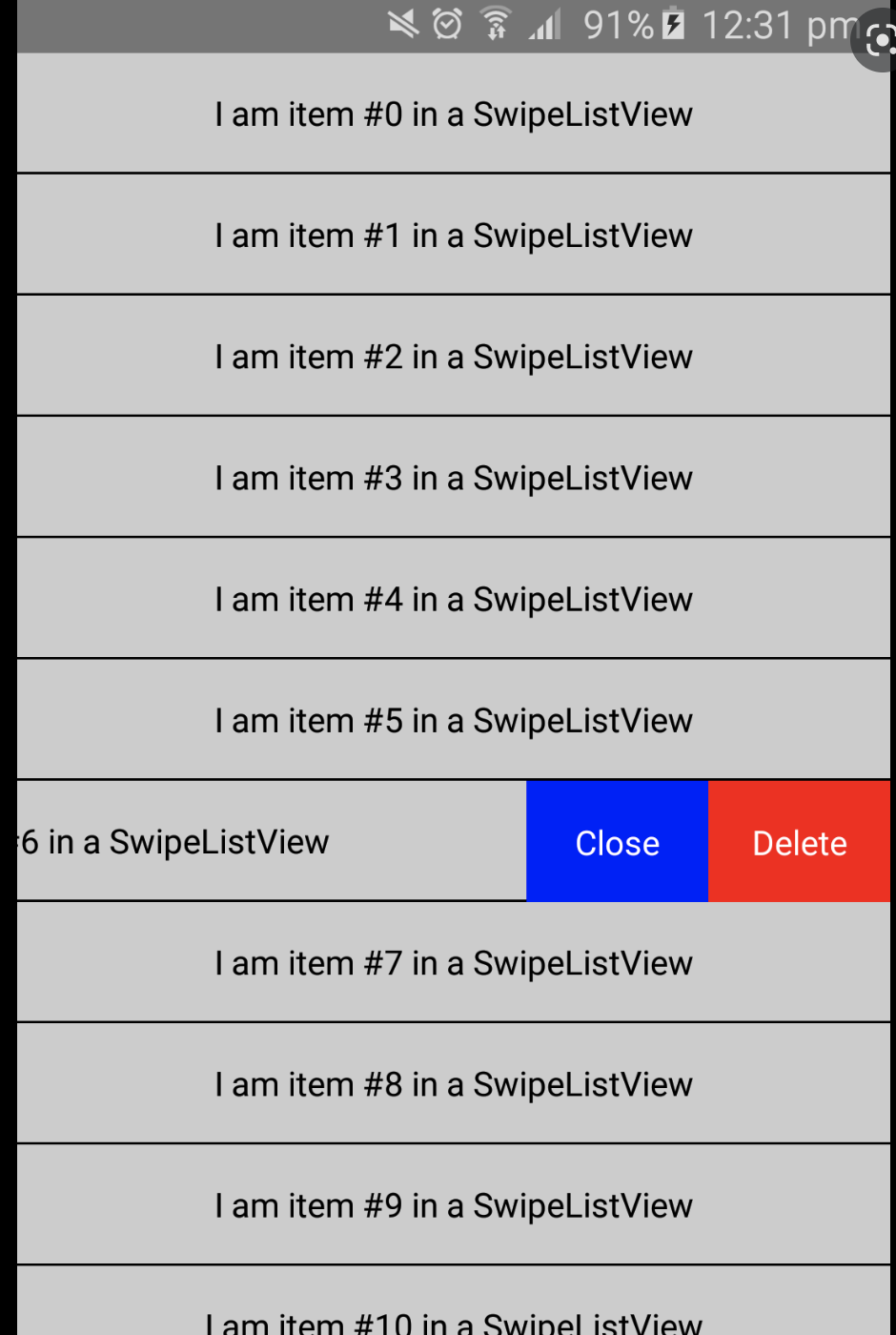
(这不是实际的UI)
回答 1
Stack Overflow用户
发布于 2022-06-02 08:43:37
这能帮到你吗?
$.fn.extend({
    createBtn: function () {
        var elmWidth = $("li", $(this)).width(),
            listType = $(this).listview("option", "inset") ? true : false,
            btnWidth = elmWidth < 300 && listType ? "35%" : elmWidth > 300 && !listType ? "25%" : "20%";
        $("li", $(this)).each(function () {
            var text = $(this).html();
            $(this).html($("<div/>", {
                class: "wrapper"
            }).append($("<div/>", {
                class: "go"
            }).text("Save").width(btnWidth)).append($("<div/>", {
                class: "item"
            }).text(text)).append($("<div/>", {
                class: "del"
            }).text("Delete").width(btnWidth)).css({
                left: "-" + btnWidth
            }).on("swipeleft swiperight vclick tap", function (e) {

                $(this).revealBtn(e, btnWidth);
            }) /**/ );
        });
    },
    revealBtn: function (e, x) {
        var check = this.check(x),
            swipe = e.type;
        if (check == "closed") {
            swipe == "swiperight" ? this.open(e, x, "left") : swipe == "swipeleft" ? this.open(e, x, "right") : setTimeout(function () {
                this.close(e);
            }, 0);
            e.stopImmediatePropagation();
        }
        if (check == "right" || check == "left") {
            swipe == "swiperight" ? this.open(e, "left") : swipe == "swipeleft" ? this.open(e, x, "right") : setTimeout(function () {
                this.close(e);
            }, 0);
            e.stopImmediatePropagation();
        }
        if (check !== "closed" && e.isImmediatePropagationStopped() && (swipe == "vclick" || swipe == "tap")) {
            this.close(e);
        }
    },
    close: function (e) {
        var check = this.check();
        this.css({
            transform: "translateX(0)"
        });
    },
    open: function (e, x, dir) {
        var posX = dir == "left" ? x : "-" + x;
        $(this).css({
            transform: "translateX(" + posX + ")"
        });
    },
    check: function (x) {
        var matrix = this.css("transform").split(" "),
            posY = parseInt(matrix[matrix.length - 2], 10),
            btnW = (this.width() * parseInt(x) / 100) / 1.1;
        return isNaN(posY) ? "closed" : posY >= btnW ? "left" : posY <= "-" + btnW ? "right" : "closed";
    }
});

$(document).on("pagecreate", function () {
    $("ul").createBtn();
});div[data-roler="header"] h1 {
background: #f90 !important;
}
li {
padding: 0 !important;
}
li .wrapper {
display: block;
height: 100%;
width: auto;
position: relative;
-webkit-transition: -webkit-transform 300ms ease;
-moz-transition: -moz-transform 300ms ease;
transition: transform 300ms ease;
}
.wrapper .go, .wrapper .item, .wrapper .del {
display: inline-block;
padding: 0.9em;
text-shadow: none;
border-style: none;
-webkit-box-sizing: border-box;
-moz-box-sizing: border-box;
box-sizing: border-box;
}
.wrapper .item {
width: 100%;
height: 100%;
}
.wrapper .go, .wrapper .del {
height: 100%;
text-align:center;
font-weight: bold;
border-width: 1px 0;
border-style: solid;
border-color: #ddd;
}
.wrapper .go {
background: #009925;
border-color: #009925;
}
.wrapper .del {
background: #F90101;
border-color: #F90101;
}<html>
<head>
<meta name="viewport" content="width=device-width, initial-scale=1">
<link rel="stylesheet" href="https://code.jquery.com/mobile/1.4.2/jquery.mobile-1.4.2.min.css" />
<script src="https://code.jquery.com/jquery-1.9.1.min.js"></script>
<script src="https://code.jquery.com/mobile/1.4.2/jquery.mobile-1.4.2.min.js"></script>
</head>
<body>
<div data-role="page">
<div data-role="header" data-position="fixed">
<h1>Test</h1>
</div>
<div role="main" class="ui-content">
<ul data-role="listview">
<li>Swipe me 1</li>
<li>Swipe me 2</li>
<li>Swipe me 3</li>
<li>Swipe me 4</li>
<li>Swipe me 5</li>
</ul>
</div>
<div data-role="footer" data-position="fixed" data-theme="a" data-tap-toggle="false">
<h1>Hallo</h1>
</div>
</div>
</body>
</html>
页面原文内容由Stack Overflow提供。腾讯云小微IT领域专用引擎提供翻译支持
原文链接:
https://stackoverflow.com/questions/72472399
复制相关文章
相似问题
腾讯云开发者

Copyright © 2013 - 2026 Tencent Cloud. All Rights Reserved. 腾讯云 版权所有
深圳市腾讯计算机系统有限公司 ICP备案/许可证号:粤B2-20090059  粤公网安备44030502008569号
腾讯云计算(北京)有限责任公司 京ICP证150476号 | 京ICP备11018762号