
循环Vlookup VBA
我有两个excel文件,其中我需要通过VBA将数据从一个excel文件拉到另一个带有vlookup函数的excel文件。我放置了下面的代码,并试图使其动态。
第一段代码如下,
Sub Lookup()


' Identifying first and last row

    Const wsName As String = "TB"
    Const hTitle As String = "India"

    Dim wb As Workbook: Set wb = ThisWorkbook
    Dim ws As Worksheet: Set ws = wb.Worksheets(wsName)

    Dim hCell As Range
    Set hCell = ws.Cells.Find(hTitle, , xlFormulas, xlWhole, xlByRows)
    If hCell Is Nothing Then Exit Sub ' header not found

    Dim Col As Long: Col = hCell.Column
    Dim fRow As Long: fRow = hCell.Row
    Dim lRow As Long: lRow = ws.Cells(ws.Rows.Count, Col).End(xlUp).Row

    Debug.Print (fRow)
    Debug.Print (lRow)
上面的代码帮助我在A列中找到"India“,并识别其第一行和最后一行。因为我将在下一步中放置vlookup。
为了从另一个excel文件中放置vlookup,我使用了以下代码
'Placing vlookup

    Dim rw As Long, x As Range
    Dim extwbk As Workbook, twb As Workbook

    Set twb = ThisWorkbook
    Set extwbk = Workbooks.Open("D:\TB_1.xlsx")
        Set x = extwbk.Worksheets("SAP TB").Range("B6:I1048576")

    With twb.Sheets("TBs - Macros")
        For rw = fRow To lRow
            .Cells(rw, 10) = Application.Vlookup(.Cells(fRow, 2).Value2, x, 7, 0)
        Next rw

    End With

    extwbk.Close savechanges:=False
End Sub
上面的代码准确地选择了第一个Vlookup值并将其粘贴到整个列范围,我认为我在放置一个循环时出错了,因为只有第一个值被复制和粘贴到整个范围。(如以下快照所示)
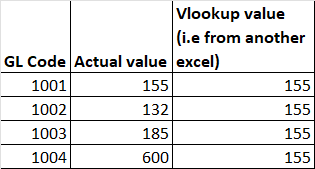
可以看出,155是正确的选择公式,但相同的粘贴在整个列。
示例数据在下面的链接中共享。https://drive.google.com/drive/folders/1inrofeT6v9P0ISEcmbswvpxMMCq5TaV0?usp=sharing的帮助将不胜感激!
回答 1
Stack Overflow用户
发布于 2022-04-19 12:01:20
您不需要在该代码区域中进行任何迭代。如果数组的参数是具有更多行的范围,则VLookup函数能够返回该数组。请将此部分替换为:
    With twb.Sheets("TBs - Macros")
        For rw = fRow To lRow
            .Cells(rw, 10) = Application.Vlookup(.Cells(fRow, 2).Value2, x, 7, 0)
        Next rw

    End With
有了这个:
   Dim wsM As Worksheet, rngVLk As Range, rngB As Range

   Set wsM = Twb.Sheets("TBs - Macros")
   Set rngVLk = wsM.Range("J" & fRow, "J" & lRow)
   Set rngB = wsM.Range("B" & fRow, "B" & lRow)
rngVLk.value = Application.VLookup(rngB, x, 7, False)为了避免您所面临的问题,请在模块的顶部编写Option Explicit。如果使用的变量以前没有声明,这将不允许您运行一段代码,并将显示/选择它。
https://stackoverflow.com/questions/71924016
复制相似问题
腾讯云开发者

Copyright © 2013 - 2026 Tencent Cloud. All Rights Reserved. 腾讯云 版权所有
深圳市腾讯计算机系统有限公司 ICP备案/许可证号:粤B2-20090059  粤公网安备44030502008569号
腾讯云计算(北京)有限责任公司 京ICP证150476号 | 京ICP备11018762号