🚗 汽车模拟器:一款极致真实的网页版驾驶游戏(含源码解析)
原创

你可能玩过不少驾驶游戏,但这款《汽车模拟器》绝对值得你体验:
✅ 无需下载,打开浏览器即玩
✅ 真实物理引擎,完美模拟车辆动力学
✅ 多视角切换,第一人称/第三人称自由选择
✅ 代码结构清晰,Unity WebGL开发典范
✅ 性能优化到位,低配设备也能流畅运行
在线体验:https://game.haiyong.site/cars-simulator
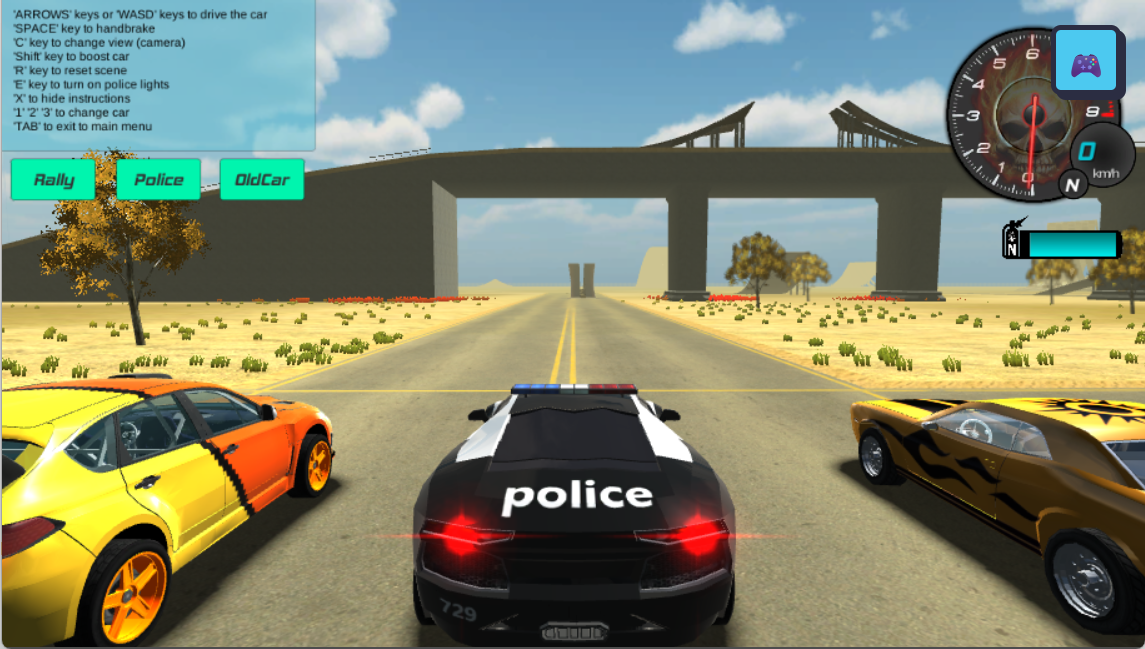
🎮 游戏架构解析:轻量级WebGL实现
先看游戏页面的核心HTML结构,简洁到令人惊讶:
<!DOCTYPE html>
<html>
  <head>
    <script src="Build/UnityLoader.js"></script>
    <script>
      var gameInstance = UnityLoader.instantiate(
        "gameContainer",
        "Build/cars-simulator-v2.json"
      );
    </script>
  </head>
  <body>
    <div id="gameContainer" style="width:100vw; height:100vh;"></div>
    <a href="https://game.haiyong.site/" class="more-games-btn">🎮</a>
  </body>
</html>
✅ 关键组件说明:
元素 | 作用 | 技术亮点 |
|---|---|---|
| Unity游戏挂载点 | 100vw/vh实现全屏自适应 |
UnityLoader | WebGL加载器 | 异步加载游戏资源 |
cars-simulator-v2.json | 游戏主包 | 包含压缩后的场景和代码 |
🏎️ 车辆物理系统实现
游戏的核心在于真实车辆物理模拟,主要依靠Unity的WheelCollider组件:
// 车辆控制核心代码简化版
public class CarController : MonoBehaviour {
    public WheelCollider[] wheels;
    public float maxTorque = 2000f;
    public float maxSteerAngle = 30f;

    void FixedUpdate() {
        // 键盘输入处理
        float steer = Input.GetAxis("Horizontal") * maxSteerAngle;
        float torque = Input.GetAxis("Vertical") * maxTorque;

        // 四轮驱动实现
        foreach(var wheel in wheels) {
            if(wheel.transform.localPosition.z > 0) // 后轮驱动
                wheel.motorTorque = torque;
            if(wheel.transform.localPosition.x != 0) // 转向轮
                wheel.steerAngle = steer;
        }
    }
}
🔧 物理参数调优技巧:
// 在Inspector中调整这些参数获得最佳手感
wheelCollider.forwardFriction = new WheelFrictionCurve{
    extremumSlip = 0.4f,
    extremumValue = 1,
    asymptoteSlip = 0.8f,
    asymptoteValue = 0.5f,
    stiffness = 1.2f
};
🌆 场景渲染优化策略
游戏采用多层级优化方案保证流畅度:
- LOD系统(细节层次):
void Update() {
    float dist = Vector3.Distance(transform.position, cam.position);
    if(dist > 500f) {
        highDetailModel.SetActive(false);
        lowDetailModel.SetActive(true);
    }
}- 动态加载关键代码:
IEnumerator LoadSceneAsync(string sceneName) {
    AsyncOperation op = SceneManager.LoadSceneAsync(sceneName,
                              LoadSceneMode.Additive);
    op.allowSceneActivation = false;

    while(op.progress < 0.9f) {
        yield return null;
    }

    op.allowSceneActivation = true;
}- 性能监控面板实现:
// 在Unity WebGL模板中添加
Module.setStatus = function(text) {
    if(text.indexOf("Downloading") >= 0) {
        showLoadingProgress(text);
    }
};
🎛️ 输入控制系统详解
游戏支持多设备输入的统一处理:
public class InputManager : MonoBehaviour {
    public float GetSteering() {
        #if UNITY_WEBGL
        return Input.GetAxis("Horizontal");
        #elif MOBILE
        return touchInput.GetSteering();
        #endif
    }

    public float GetThrottle() {
        // 类似实现...
    }
}
📱 移动端触摸控制关键代码:
// 在JavaScript插件中暴露接口
mergeInto(LibraryManager.library, {
    GetTouchInput: function() {
        return getMobileJoystickValue();
    }
});
🛠️ 性能优化实战技巧
- 内存管理:void OnDestroy() { Resources.UnloadUnusedAssets(); System.GC.Collect(); }
- WebGL专属优化:#if UNITY_WEBGL Application.targetFrameRate = 60; QualitySettings.antiAliasing = 2; #endif
- 资源压缩方案:// 在Unity导出设置中: Texture Compression: ASTC 6x6 Audio: Vorbis Quality 50%
🔍 深度技术问答
Q: 游戏如何实现真实的车辆漂移效果?
A: 通过调整WheelCollider的侧向摩擦参数:
wheelCollider.sidewaysFriction = new WheelFrictionCurve{
    stiffness = driftMode ? 0.8f : 1.2f
};
Q: 多场景无缝衔接如何实现?
A: 使用异步加载+玩家区域触发:
void OnTriggerEnter(Collider other) {
    if(other.CompareTag("LoadTrigger")) {
        StartCoroutine(LoadNextScene());
    }
}
💡 开发实战建议
- 改造方向:
- 添加氮气加速系统
- 实现车辆损坏物理
- 开发多人联机模式
- 学习要点:
- Unity WebGL导出设置
- WheelCollider参数调优
- 浏览器性能分析工具使用
- 调试技巧:// 在浏览器控制台查看性能 console.log(Module.ctx.getExtension("WEBGL_debug_renderer_info"));
🏁 总结:技术型驾驶体验
《汽车模拟器》展示了WebGL游戏的高性能潜力,其代码值得反复研究
开发启示录:
- 浏览器已能运行高品质3D游戏
- Unity WebGL是跨平台利器
- 物理引擎调优决定游戏手感
原创声明:本文系作者授权腾讯云开发者社区发表,未经许可,不得转载。
如有侵权,请联系 cloudcommunity@tencent.com 删除。
原创声明:本文系作者授权腾讯云开发者社区发表,未经许可,不得转载。
如有侵权,请联系 cloudcommunity@tencent.com 删除。
评论
登录后参与评论
推荐阅读
目录
腾讯云开发者

Copyright © 2013 - 2026 Tencent Cloud. All Rights Reserved. 腾讯云 版权所有
深圳市腾讯计算机系统有限公司 ICP备案/许可证号:粤B2-20090059  粤公网安备44030502008569号
腾讯云计算(北京)有限责任公司 京ICP证150476号 | 京ICP备11018762号