TUIKit 默认实现了文本、图片、语音、视频、文件等基本消息类型的发送和展示,如果这些消息类型满足不了您的需求,您可以新增自定义消息类型。
自定义消息
如果基本消息类型不能满足您的需求,您可以根据实际业务需求自定义消息。
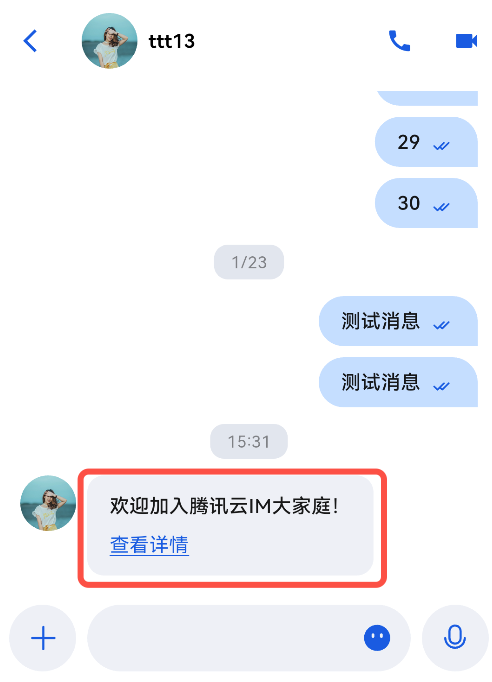
下文以发送一条可跳转至浏览器的超文本作为自定义消息为例,帮助您快速了解实现流程。
如下图所示:
下面我们分步骤讲解使用自定义消息。
展示自定义消息
自定义消息是在
CustomMessageView.ets 中渲染的,消息内容以 String 格式,存储于 CustomMessagePayload.customData 中,建议使用 JSON 格式。展示自定义消息基本逻辑:解析时,将 JSON String 解析成对象,用于实例化一个预定义的类型,以该对象内的数据,渲染自定义消息体。
1. 定义一个数据结构,用于自定义消息解析后的对象,并提供一个解析方法,通过 JSON 对其实例化。
以上述包含链接及文本的自定义消息格式举例:
export interface CustomMessage {businessID: string;text: string;link: string;}export function parseCustomMessage(customData?: string): CustomMessage {const result: CustomMessage = { businessID: '', text: '', link: '' };if (!customData || customData.length === 0) {return result;}try {const info = JSON.parse(customData) as Record<string, string | number | boolean | object>;const businessID = info['businessID'];const text = info['text'];const link = info['link'];result.businessID = typeof businessID === 'string' ? businessID : '';result.text = typeof text === 'string' ? text : '';result.link = typeof link === 'string' ? link : '';} catch (e) {console.error('[CustomMessageView] parse error:', e);}return result;}
2. 在
CustomMessageViewContent 组件的 build 方法中对自定义消息的解析结果按 businessID 分发,得到 CustomMessage 数据对象后,通过 buildTextLinkMessage 渲染消息。示例代码如下:
import { MessageInfo, CustomMessagePayload } from '@tencentcloud/atomicxcore';import { ThemeState, MessageRenderContext } from '@tencentcloud/atomicx';import { common, Want } from '@kit.AbilityKit';import { BusinessError } from '@kit.BasicServicesKit';// text_link 类型的自定义消息 businessID 标识,需与发送端约定保持一致const CUSTOM_BUSINESS_ID_TEXT_LINK: string = 'text_link';@Componentexport struct CustomMessageViewContent {@StorageLink('ThemeState') themeState: ThemeState = ThemeState.getInstance();@State message?: MessageInfo = undefined;@ObjectLink messagePayload: CustomMessagePayload;@State private customMessage: CustomMessage = { businessID: '', text: '', link: '' };aboutToAppear() {this.customMessage = parseCustomMessage(this.messagePayload?.customData);}aboutToUpdate() {this.customMessage = parseCustomMessage(this.messagePayload?.customData);}build() {// 处理 text_link 类型的自定义消息if (this.customMessage.businessID === CUSTOM_BUSINESS_ID_TEXT_LINK) {this.buildTextLinkMessage();} else {this.buildUnsupportedCustomMessage();}}@Builderprivate buildTextLinkMessage() {Column() {if (this.customMessage.text.length > 0) {Text(this.customMessage.text).fontSize(15).fontColor(this.message?.isSentBySelf ?this.themeState.colors.textColorAntiPrimary :this.themeState.colors.textColorPrimary).maxLines(999).wordBreak(WordBreak.BREAK_ALL).width('100%')}if (this.customMessage.link.length > 0) {Text($r('app.string.custom_message_view_details')).fontSize(15).fontColor(this.message?.isSentBySelf ?this.themeState.colors.textColorAntiPrimary :this.themeState.colors.textColorLink).decoration({ type: TextDecorationType.Underline }).margin({ top: 6 }).width('100%').onClick(() => {this.openLink(this.customMessage.link);})}}.alignItems(HorizontalAlign.Start).padding({ left: 8, right: 8, top: 8, bottom: 6 })}@Builderprivate buildUnsupportedCustomMessage() {Text($r('app.string.message_tips_unsupport_custom')).fontSize(15).fontColor(this.message?.isSentBySelf ?this.themeState.colors.textColorAntiPrimary :this.themeState.colors.textColorPrimary).padding({ left: 8, right: 8, top: 8, bottom: 8 })}private openLink(link: string): void {if (!link || link.length === 0) {return;}try {const context = getContext(this) as common.UIAbilityContext;const wantInfo: Want = {action: 'ohos.want.action.viewData',entities: ['entity.system.browsable'],uri: link};context.startAbility(wantInfo).catch((err: BusinessError) => {console.error(`[CustomMessageView] openLink failed: ${err.code}, ${err.message}`);});} catch (e) {console.error(`[CustomMessageView] openLink exception: ${e}`);}}}@Builderexport function CustomMessageView(context: MessageRenderContext) {if (context.message && context.message.messagePayload) {CustomMessageViewContent({message: context.message,messagePayload: context.message.messagePayload as CustomMessagePayload})}}
3. 在
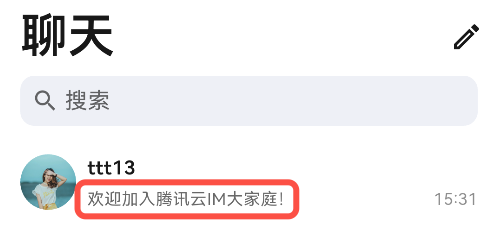
MessageUtils.ets 中的 getMessageAbstract 方法里,对增加的自定义消息类型进行解析,用于生成在会话列表中的文字摘要。示例代码如下:
static getMessageAbstract(messageInfo?: MessageInfo): string | Resource {if (!messageInfo) {return '';}switch (messageInfo.messageType) {// 省略其他类型消息// 自定义消息文字摘要case MessageType.CUSTOM: {const customPayload = messageInfo.messagePayload as CustomMessagePayload | undefined;const dataStr = customPayload?.customData;if (!dataStr) {return $r('app.string.message_tips_unsupport_custom');}try {const customInfo = JSON.parse(dataStr) as Record<string, string | number | boolean | object>;// 省略其他自定义消息解析// 解析增加的自定义消息if (customInfo && customInfo['businessID'] === 'text_link') {const text = customInfo['text'];if (typeof text === 'string' && text.length > 0) {return text;}return $r('app.string.message_tips_unsupport_custom');}return $r('app.string.message_tips_unsupport_custom');} catch (e) {return $r('app.string.message_tips_unsupport_custom');}}default:return '';}}
效果如下:
发送自定义消息
发送自定义消息基本步骤:创建一条自定义消息,将要发送的内容转成 JSON String 格式放入
customData 中,并调用 MessageInputStore 的 sendMessage 接口发送。示例代码如下:
import {MessageInputStore,CustomSendMessagePayload,SendMessageOption} from '@tencentcloud/atomicxcore';import { CompletionHandlerAdapter } from '../../basecomponent/utils/CompletionHandlers';// this.conversationID 为当前会话的唯一标识(C2C 会话为 'c2c_userID' 格式,群会话为 'group_groupID' 格式),// 通常由聊天页面的路由参数、@Prop 属性或全局状态管理传入,需在打开聊天页时确保已赋值// 创建 MessageInputStore 对象const messageInputStore: MessageInputStore = MessageInputStore.create(this.conversationID);// 构造自定义消息 payloadconst customData: string = JSON.stringify({'businessID': 'text_link','text': '欢迎加入腾讯云 IM 大家庭!','link': 'https://cloud.tencent.com/document/product/269/3794'} as Record<string, string>);const payload = new CustomSendMessagePayload(customData, // customData:JSON String,会话列表 & 消息渲染都基于该字段解析'CustomTextLinkMessage', // description:离线推送的默认展示文案'' // extensionInfo:透传的扩展字段,可选);const option = new SendMessageOption();option.needReadReceipt = false;// 发送消息messageInputStore.sendMessage(payload, option, new CompletionHandlerAdapter(() => {console.log('[CustomMessage] send success');},(code: number, desc: string) => {console.error(`[CustomMessage] send failed: code=${code}, desc=${desc}`);}));


