TUIKit 是基于 IM SDK 的一款 UI 组件库,通过 UI 组件快速实现聊天、会话、群组等功能。本文介绍如何快速集成 TUIKit 并实现核心功能。
标准版界面效果如下图所示:
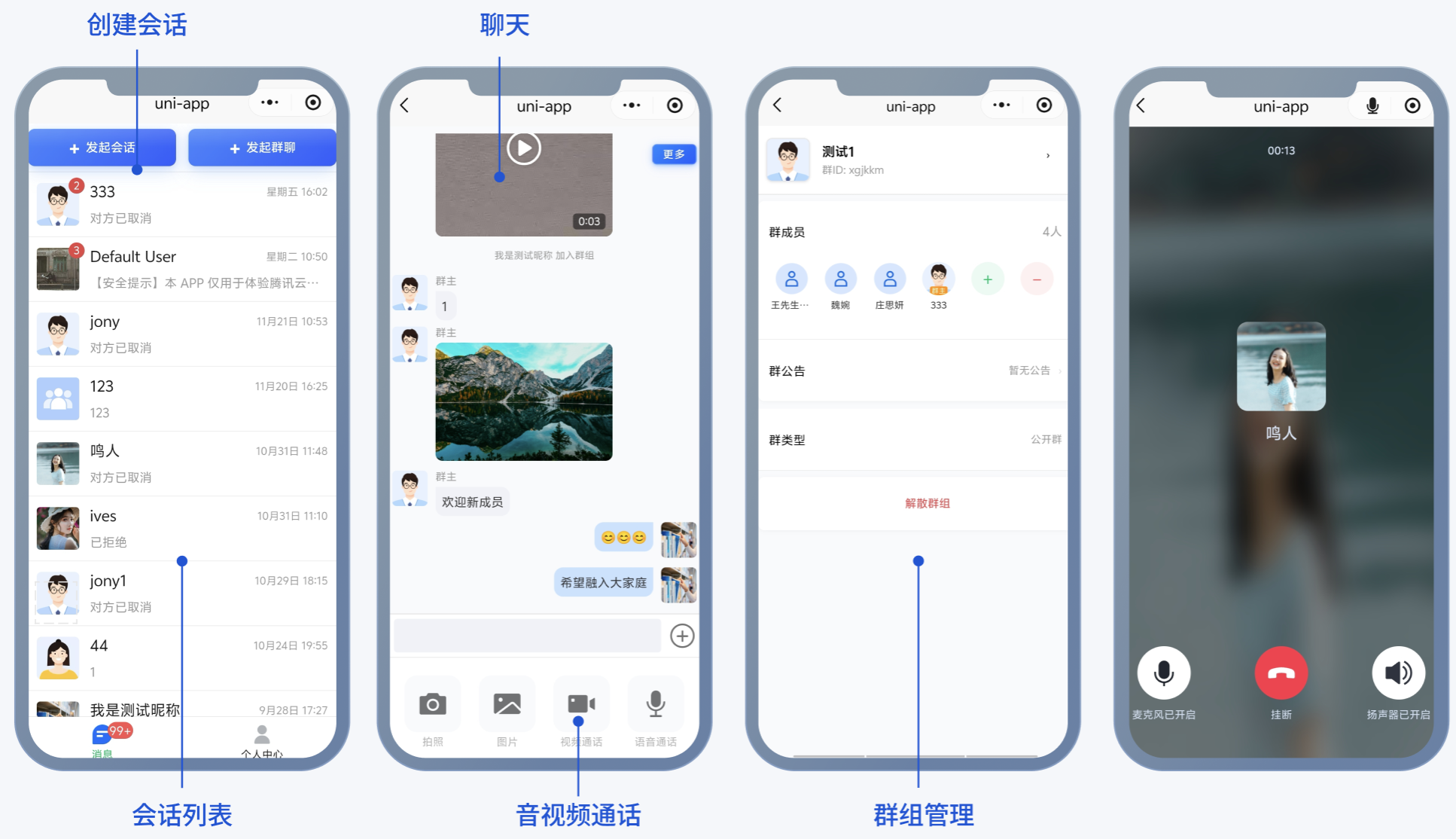
版本对比
针对用户不同场景的诉求和体积要求,TUIKit 推出了多个版本的 UI 组件 ,您可以根据实际业务需求选择集成最适合的版本。
前提条件
HBuilderX 需要升级到最新版本
TypeScript / JavaScript (TUIKit 使用 ts 语言开发,支持在 js 或者 ts 项目中集成)
Vue2/Vue3
sass(sass-loader 版本 ≤ 10.1.1)
node( node > 12.13.0 ,推荐使用 Node.js 官方 LTS 版本 16.17.0)
npm(版本请与 node 版本匹配)
小程序域名白名单信息请参考:小程序域名白名单配置信息
创建项目
1. 打开 HBuilderX,在菜单栏中选择 “文件-新建-项目”,创建一个名为
chat-example 的 uni-app 项目。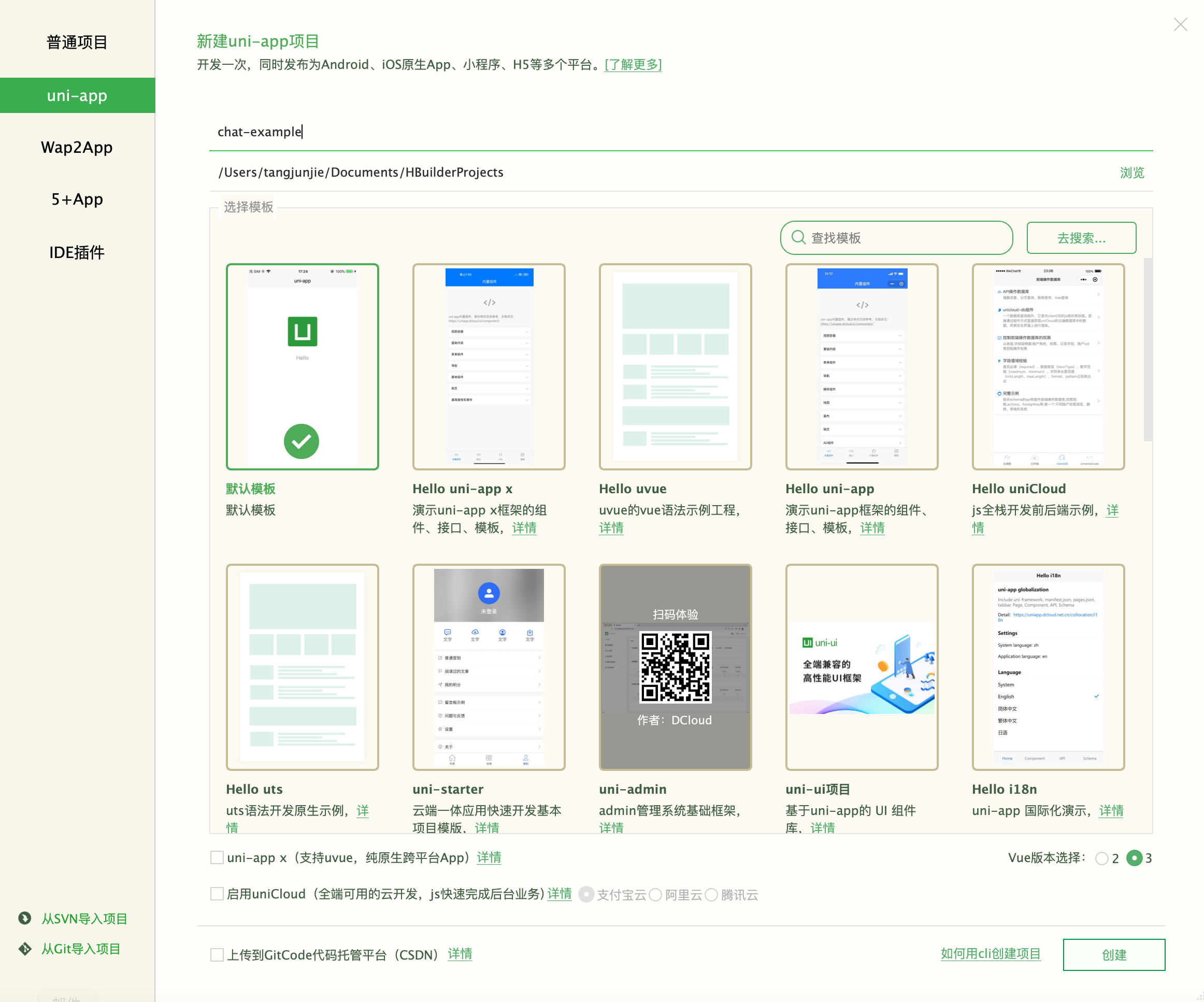
2. 在终端输入
npm init -y,创建 package.json 文件。npm init -y
1. 全局安装 vue-cli:
npm install -g @vue/cli
2. 通过 cli 创建项目:
npx degit dcloudio/uni-preset-vue#vite chat-example
npx degit dcloudio/uni-preset-vue#vite-ts chat-example
3. 创建完成后,切换到项目所在目录:
cd chat-example
下载及导入组件
步骤1:安装依赖
1. 下载组件。
npm i tuikit-atomicx-uniapp-wx-standard
npm i tuikit-atomicx-uniapp-wx-standard@vue2
2. 拷贝源码。
mkdir -p ./TUIKit && cp -r node_modules/tuikit-atomicx-uniapp-wx-standard/ ./TUIKit
xcopy node_modules\\tuikit-atomicx-uniapp-wx-standard .\\TUIKit /i /e
mkdir -p ./src/TUIKit && cp -r node_modules/tuikit-atomicx-uniapp-wx-standard/ ./src/TUIKit
xcopy node_modules\\tuikit-atomicx-uniapp-wx-standard .\\src\\TUIKit /i /e
步骤2:获取 SDKAppID、userID 和 UserSig
注意:
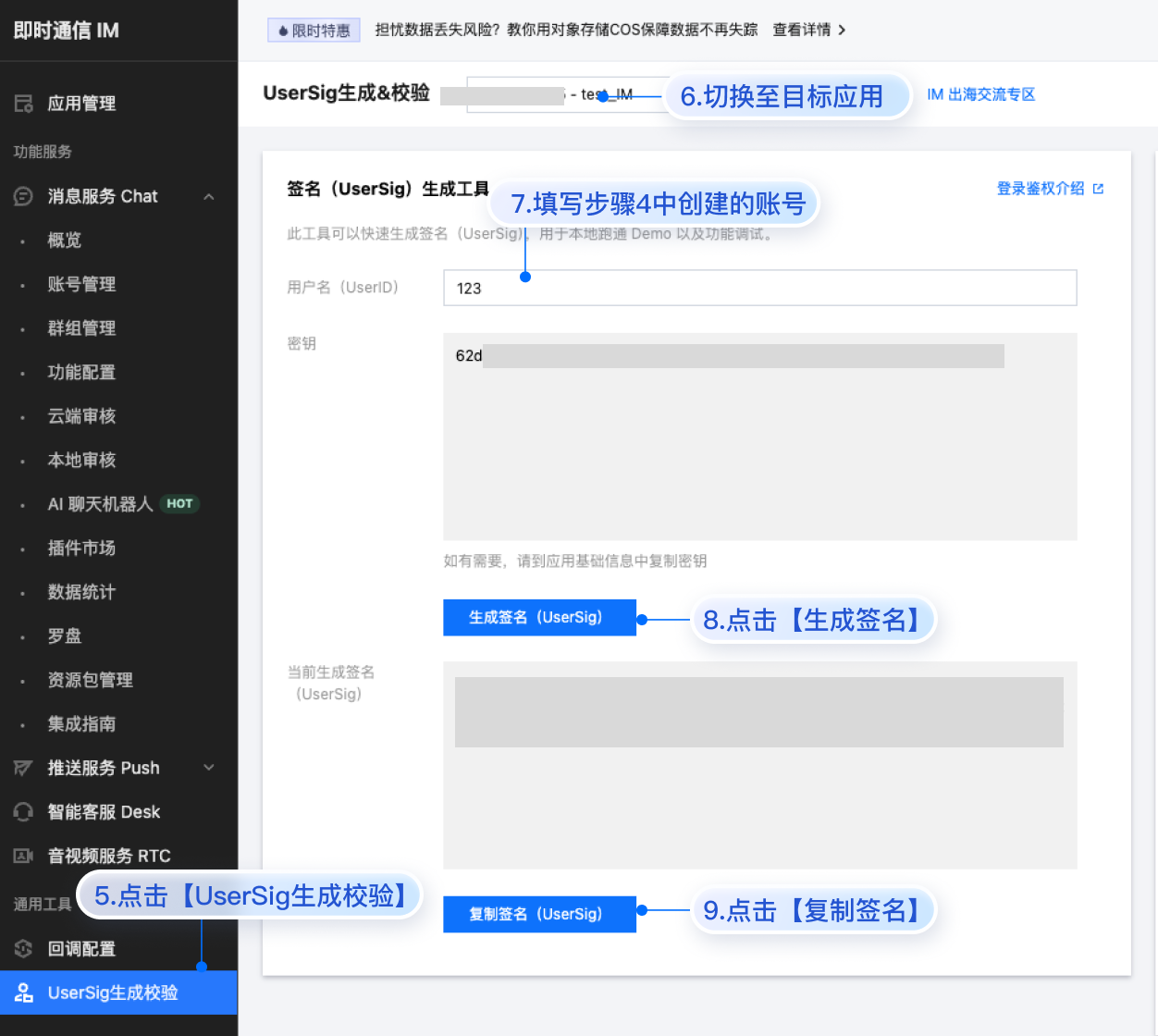
SDKAppID:在 即时通信 IM 控制台 > 应用管理 单击创建新应用,获取 SDKAppID。
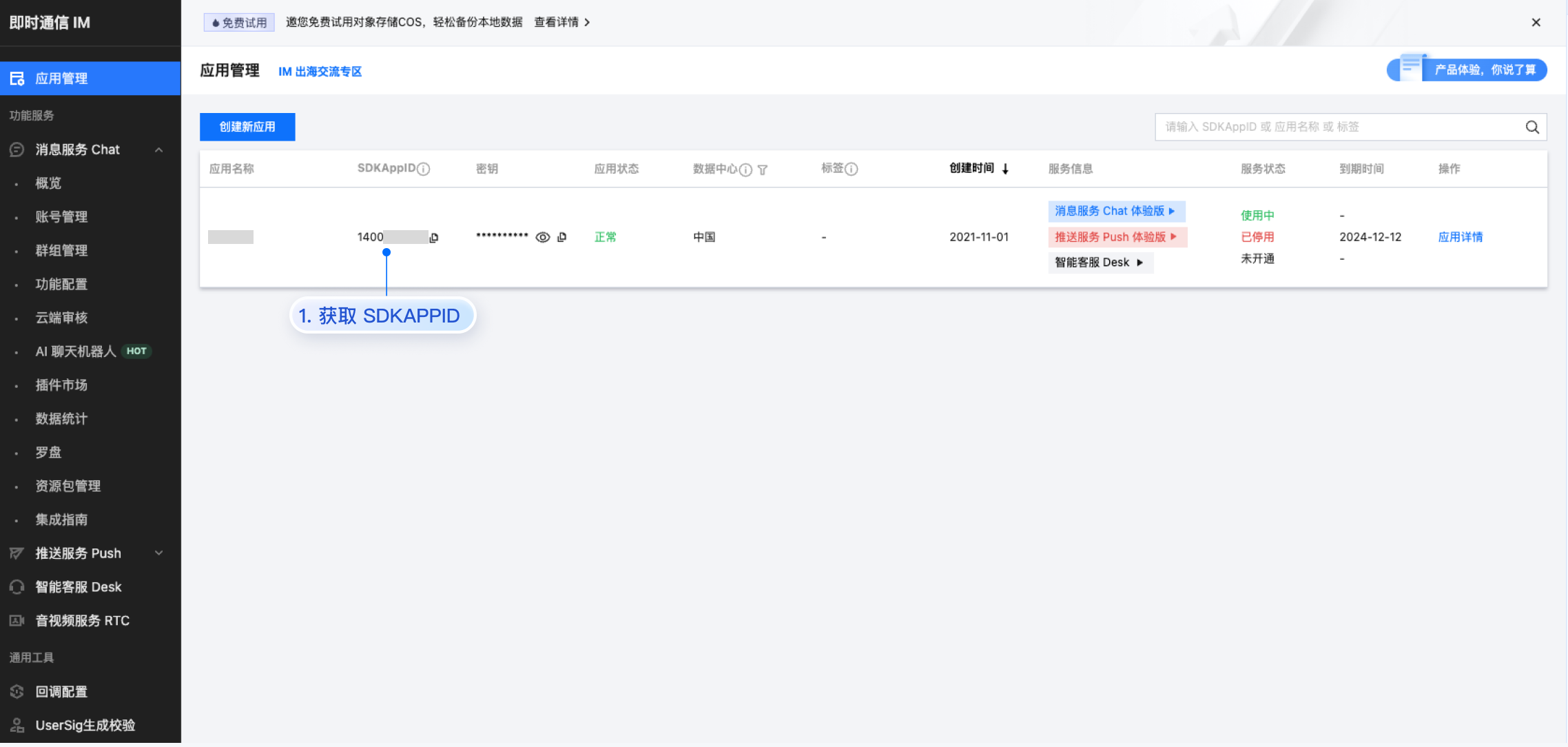
userID:单击 即时通信 IM 控制台 > 消息服务 Chat > 账号管理,切换至目标应用所在账号,您可以创建 2~3 个账号用于体验单聊、群聊的功能。
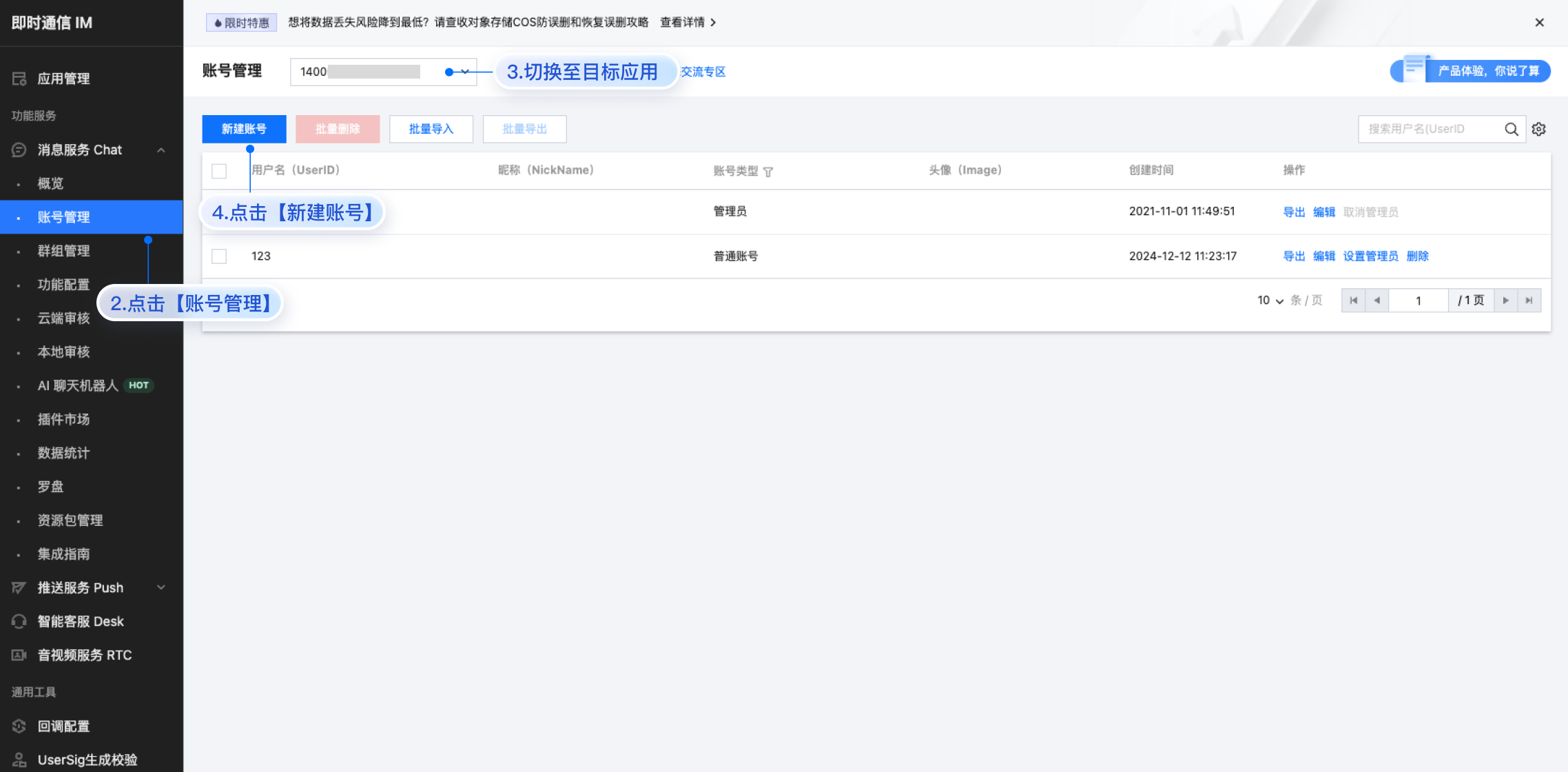
userSig:单击 即时通信 IM 控制台 > 开发工具 > UserSig 生成校验,切换至目标应用所在账号,填写创建的 userID,即可生成 userSig。
引入组件
注意:
请根据您的项目类型选择下列任意一种集成方式。
主包接入
主包接入
注意:
请检查以下页面文件是否已存在。如果不存在,请按照指定的路径结构新建对应文件。
Vue3 使用组合式 API (Composition API) 实现。
一. 创建登录页面
请将以下内容复制到
pages/login/login.vue 文件。<template><view class="container"><view class="login-section"><text class="title">用户登录</text><input class="input-box" v-model="userID" placeholder="请输入用户ID" placeholder-style="color:#BBBBBB;" /><button class="login-btn" @click="handleLogin">登录</button></view></view></template><script lang="ts" setup>import { ref } from 'vue'import { useLoginState } from '../../TUIKit'const userID = ref('')const handleLogin = async () => {// 必填信息// 测试TUIKit时可以从腾讯云IM控制台获取userSig// 生产环境部署请从您的服务器获取// 查看文档:https://cloud.tencent.com/document/product/269/32688await useLoginState().login({userId: userID.value,userSig: '',sdkAppId: 0, // 这里替换您的 sdkAppId})wx.$globalCallPagePath = 'TUIKit/components/CallView/CallView'; // 配置全局监听页面路径uni.switchTab({ url: '/pages/conversation/conversation' })}</script><style scoped>.container { padding: 40px; height: 100vh; }.login-section { display: flex; flex-direction: column; align-items: center; margin-top: 100px; }.title { font-size: 24px; font-weight: bold; margin-bottom: 40px; }.input-box { width: 80%; height: 50px; border: 1px solid #DDD; border-radius: 8px; padding: 0 15px; margin-bottom: 20px; }.login-btn { width: 80%; height: 50px; background: #006EFF; color: white; border-radius: 8px; }</style>
二. 创建发起会话页面
请将以下内容复制到
pages/createConversation/createConversation.vue 文件。<template><view class="create-conversation-page"><UserPicker :maxCount="maxCount" @confirm="handleConfirm" /><CreateGroup v-if="showGroupForm" @close="handleCloseGroupForm" @submit="handleGroupSubmit" /></view></template><script lang="ts" setup>import { ref } from 'vue';import { onLoad } from '@dcloudio/uni-app';import { useConversationListState } from '../../TUIKit/index';import UserPicker from '../../TUIKit/components/UserPicker/UserPicker.vue';import CreateGroup from '../../TUIKit/components/Group/CreateGroup.vue';const { setActiveConversation, createGroupConversation } = useConversationListState();const maxCount = ref(Number.POSITIVE_INFINITY);const isGroupMode = ref(false);const showGroupForm = ref(false);const selectedUserIDs = ref<string[]>([]);const isLoading = ref(false);onLoad((options) => {const { mode } = options;isGroupMode.value = mode === 'createGroupConversation';if (!isGroupMode.value) maxCount.value = 1;const title = isGroupMode.value ? '选择群成员' : '选择用户';uni.setNavigationBarTitle({ title });});const handleConfirm = async (userIDs: string[]) => {if (userIDs.length === 0) return;selectedUserIDs.value = userIDs;if (isGroupMode.value) {showGroupForm.value = true;} else {await handleCreateC2CConversation(userIDs[0]);}};const handleGroupSubmit = async (groupInfo: any) => {isLoading.value = true;try {uni.showLoading({ title: '创建群聊中...', mask: true });const conversation = await createGroupConversation({...groupInfo,type: 'Public',inviteOption: 'FreeAccess',memberList: selectedUserIDs.value.map(userID => ({ userID }))});uni.hideLoading();uni.showToast({ title: '群聊创建成功', icon: 'success', duration: 1500 });await setActiveConversation(conversation.conversationID);uni.redirectTo({ url: '/pages/chat/chat' });} catch (error) {uni.hideLoading();console.error('创建群聊失败:', error);uni.showToast({ title: '创建群聊失败', icon: 'none', duration: 2000 });} finally {isLoading.value = false;}};const handleCreateC2CConversation = async (userID: string) => {try {await setActiveConversation(`C2C${userID}`);uni.redirectTo({ url: '/pages/chat/chat' });} catch (error) {console.error('打开会话失败:', error);uni.showToast({ title: '打开会话失败', icon: 'none' });}};const handleCloseGroupForm = () => { showGroupForm.value = false; }</script><style lang="scss" scoped>.create-conversation-page{height:100vh;background-color:#f8f9fa;}</style>
三. 创建会话列表页面
请将以下内容复制到
pages/conversation/conversation.vue 文件。<template><view><view class="action-buttons"><view class="action-button" @click="handleCreateConversation"><text class="button-icon">+</text><text class="button-text">发起会话</text></view><view class="action-button" @click="handleCreateGroupConversation"><text class="button-icon">+</text><text class="button-text">发起群聊</text></view></view><Conversation :onConversationSelect="handleConversationSelect"></Conversation><view v-if="!conversationList?.length" class="empty-guide"><text class="guide-text">暂无会话,点击上方按钮开始聊天</text></view></view></template><script lang="ts" setup>import { onShow } from '@dcloudio/uni-app'import { watch } from 'vue';import Conversation from '../../TUIKit/components/ConversationList/ConversationList.vue'import { useConversationListState } from '../../TUIKit';const { conversationList, setActiveConversation, totalUnRead } = useConversationListState();const updateTabBarBadge = () => {const tabBarList = ['pages/profile/profile', 'pages/conversation/conversation']const pages = getCurrentPages()const currentPage = pages[pages.length - 1]?.routeconst isTabBarPage = currentPage && tabBarList.includes(currentPage)if (!isTabBarPage) returnif (totalUnRead.value > 0) {uni.setTabBarBadge({ index: 0, text: totalUnRead.value > 99 ? '99+' : totalUnRead.value.toString() });}};watch(totalUnRead, updateTabBarBadge, { immediate: true });const handleConversationSelect = (conversation) => {const { conversationID } = conversationsetActiveConversation(conversationID);uni.navigateTo({ url: '/pages/chat/chat' });}onShow(() => {if (totalUnRead.value > 0) {uni.setTabBarBadge({ index: 0, text: totalUnRead.value > 99 ? '99+' : totalUnRead.value.toString() });} else {uni.removeTabBarBadge({ index: 0 });}});const handleCreateConversation = () => {uni.navigateTo({ url: '/pages/createConversation/createConversation?mode=createC2CConversation' })};const handleCreateGroupConversation = () => {uni.navigateTo({ url: '/pages/createConversation/createConversation?mode=createGroupConversation' })};</script><style scoped>.action-buttons { display: flex; justify-content: space-between; padding: 6px; background-color: #fff; border-bottom: 1px solid #f0f0f0; }.action-button { display: flex; align-items: center; justify-content: center; width: 48%; height: 42px; background: linear-gradient(135deg, #4086FF 0%, #2E5CFF 100%); border-radius: 8px; box-shadow: 0 6px 20px rgba(64, 134, 255, 0.25), 0 2px 6px rgba(64, 134, 255, 0.15); transition: all 0.3s ease; cursor: pointer; gap: 6px; position: relative; overflow: hidden; }.action-button:active { transform: translateY(1px); box-shadow: 0 4px 15px rgba(64, 134, 255, 0.2), 0 1px 4px rgba(64, 134, 255, 0.1); }.action-button::before { content: ''; position: absolute; top: 0; left: 0; right: 0; height: 50%; background: linear-gradient(180deg, rgba(255, 255, 255, 0.15) 0%, transparent 100%); border-radius: 8px 8px 0 0; }.button-icon { font-size: 20px; font-weight: bold; color: #fff; }.button-text { font-size: 14px; font-weight: 500; color: #fff; text-align: center; }.empty-guide { display: flex; flex-direction: column; align-items: center; justify-content: center; padding: 40px 20px; }.guide-text { font-size: 16px; color: red; margin-bottom: 20px; }.input-container { width: 80%; display: flex; flex-direction: column; align-items: center; }.userid-input { width: 100%; height: 40px; padding: 0 10px; margin-bottom: 15px; border: 1px solid #eee; border-radius: 6px; font-size: 14px; }.placeholder-style { color: #ccc; }.guide-btn { width: 50%; line-height: 40px; height: 40px; background-color: #07c160; color: white; border-radius: 6px; font-size: 16px; }</style>
四. 创建聊天页面
请将以下内容复制到
pages/chat/chat.vue 文件。<template><div class="TUIChat"><div v-if="isInGroup" class="more-float" @click="goToGroupSetting"><div class="more-text">更多</div></div><MessageList /><MessageInput /></div></template><script lang="ts" setup>import MessageInput from '../../TUIKit/components/MessageInput/MessageInput.vue';import MessageList from '../../TUIKit/components/MessageList/MessageList.vue';import { useGroupSettingState } from '../../TUIKit';const { isInGroup } = useGroupSettingState()const goToGroupSetting = () => {uni.navigateTo({url: '/TUIKit/components/Group/GroupSettings'});};</script><style lang="scss" scoped>.TUIChat{display:flex;flex-direction:column;width:100vw;height:100vh;overflow:hidden;position:relative;}.more-float{position:absolute;top:20px;right:8px;z-index:20;background:linear-gradient(135deg,#4086FF 0%,#2E5CFF 100%);backdrop-filter:blur(10px);border-radius:12rpx;padding:6rpx 12rpx;display:flex;align-items:center;justify-content:center;gap:4rpx;box-shadow:0 2rpx 8rpx rgba(64,134,255,0.3),0 4rpx 16rpx rgba(64,134,255,0.2),0 8rpx 24rpx rgba(64,134,255,0.15);cursor:pointer;transition:all 0.2s ease;border:1rpx solid rgba(255,255,255,0.2);min-width:80rpx;height:36rpx;}.more-float:active{transform:scale(0.95);box-shadow:0 1rpx 4rpx rgba(64,134,255,0.4),0 2rpx 8rpx rgba(64,134,255,0.3),0 4rpx 12rpx rgba(64,134,255,0.2);}.more-icon{color:white;font-size:20px;font-weight:bold;line-height:1;}.more-text{color:white;font-size:12px;font-weight:500;letter-spacing:0.5rpx;text-shadow:0 1rpx 2rpx rgba(0,0,0,0.1);}</style>
五. 创建个人中心页面
请将以下内容复制到
pages/profile/profile.vue 文件。<template><view class="toc-profile-container"><view class="profile-card"><view class="avatar-section"><image class="avatar" v-if="loginUserInfo.avatarUrl" :src="loginUserInfo.avatarUrl" mode="aspectFill" /><view class="avatar-placeholder" v-else><text class="placeholder-text">未设置头像</text></view><view class="user-info"><text class="username">{{ loginUserInfo.userName || '未设置昵称' }}</text><text class="user-id">userID: {{ loginUserInfo.userId }}</text></view></view></view><view class="edit-area"><view class="input-group"><text class="input-label">修改昵称</text><input class="input-field" v-model="editNick" placeholder="请输入新昵称" /></view><view class="input-group"><text class="input-label">修改头像</text><input class="input-field" v-model="editAvatar" placeholder="请输入头像URL" /></view></view><view class="action-area"><button class="save-btn" @click="handleSave">保存设置</button><button class="logout-btn" @click="handleLogout">退出登录</button></view></view></template><script lang="ts" setup>import { ref } from 'vue'import { useLoginState } from '../../TUIKit'const { loginUserInfo, setSelfInfo, logout } = useLoginState()const editNick = ref('')const editAvatar = ref('')const handleSave = async () => {try {const updateData = {...(editNick.value && { userName: editNick.value }),...(editAvatar.value && { avatarUrl: editAvatar.value })}if (Object.keys(updateData).length === 0) {return uni.showToast({ title: '请至少修改一项信息', icon: 'none' })}await setSelfInfo(updateData)uni.showToast({ title: '修改成功', icon: 'none' })} catch (error) {uni.showToast({ title: '修改失败', icon: 'none' })}}const handleLogout = async () => {try {await logout()uni.showToast({ title: '退出成功', icon: 'none' })setTimeout(() => { uni.reLaunch({ url: '/pages/login/login' }) }, 1500)} catch (error) {uni.showToast({ title: '退出失败', icon: 'none' })}}</script><style scoped>.toc-profile-container{background-color:#f8f9fa;max-width:100vw;max-height:100vh;padding:16px;}.profile-card{background:white;border-radius:12px;padding:20px;margin-bottom:16px;box-shadow:0 2px 8px rgba(0,0,0,0.05);}.avatar-section{display:flex;align-items:center;}.avatar{width:72px;height:72px;border-radius:50%;background-color:#f0f2f5;}.avatar-placeholder{width:72px;height:72px;border-radius:50%;background-color:#f0f2f5;display:flex;align-items:center;justify-content:center;}.placeholder-text{color:#8c8c8c;font-size:14px;}.user-info{margin-left:16px;flex:1;}.username{font-size:18px;font-weight:500;color:#1a1a1a;display:block;margin-bottom:4px;}.user-id{font-size:14px;color:#8c8c8c;}.edit-area{background:white;border-radius:12px;padding:16px;margin-bottom:16px;box-shadow:0 2px 8px rgba(0,0,0,0.05);}.input-group{margin-bottom:16px;}.input-group:last-child{margin-bottom:0;}.input-label{font-size:14px;color:#8c8c8c;display:block;margin-bottom:8px;}.input-field{width:100%;height:48px;padding:0 16px;border:1px solid #e8e8e8;border-radius:8px;font-size:16px;background-color:#fafafa;}.action-area{display:flex;gap:12px;}.save-btn{flex:1;background-color:#07C160;color:white;height:48px;line-height:48px;border-radius:8px;font-size:16px;border:none;}.logout-btn{flex:1;background-color:white;color:#ff4d4f;height:48px;line-height:48px;border-radius:8px;font-size:16px;border:1px solid #ff4d4f;}</style>
六. 配置页面路由
请将以下内容复制到
pages.json 文件。注意:
tabBar 的图标资源需要配置在
iconPath 字段中,请将空字符串替换为实际的图标路径。{"pages": [{"path": "pages/login/login","style": {"navigationBarTitleText": "uni-app"}},{"path": "pages/conversation/conversation","style": {"navigationBarTitleText": "uni-app"}},{"path": "pages/profile/profile","style": {"navigationBarTitleText": "uni-app"}},{"path": "pages/chat/chat","style": {"navigationBarTitleText": "uni-app"}},{"path": "pages/createConversation/createConversation","style": {"navigationBarTitleText": "uni-app"}},{"path": "TUIKit/components/Group/GroupSettings","style": {"navigationBarTitleText": "群设置"}}],"tabBar": {"list": [{"pagePath": "pages/conversation/conversation","text": "消息","iconPath": "",},{"pagePath": "pages/profile/profile","iconPath": "","text": "个人中心"}]},"globalStyle": {"navigationBarTextStyle": "black","navigationBarTitleText": "uni-app","navigationBarBackgroundColor": "#F8F8F8","backgroundColor": "#F8F8F8"},"uniIdRouter": {}}
Vue2 使用选项式 API (Options API) 实现。
一. 创建登录页面
请将以下内容复制到
pages/login/login.vue 文件。<template><view class="container"><view class="login-section"><text class="title">用户登录</text><input class="input-box" v-model="userID" placeholder="请输入用户ID" placeholder-style="color:#BBBBBB;" /><button class="login-btn" @click="handleLogin">登录</button></view></view></template><script lang="ts">// @ts-nocheckimport { useLoginState } from '../../TUIKit'export default {data() {return {userID: ''}},methods: {async handleLogin() {// 必填信息// 测试TUIKit时可以从腾讯云IM控制台获取userSig// 生产环境部署请从您的服务器获取// 查看文档:https://cloud.tencent.com/document/product/269/32688await useLoginState().login({userId: this.userID,userSig: '',sdkAppId: 0, // 这里替换您的 sdkAppId})wx.$globalCallPagePath = 'TUIKit/components/CallView/CallView'; // 配置全局监听页面路径uni.switchTab({ url: '/pages/conversation/conversation' })}}}</script><style scoped>.container{padding:40px;height:100vh;}.login-section{display:flex;flex-direction:column;align-items:center;margin-top:100px;}.title{font-size:24px;font-weight:bold;margin-bottom:40px;}.input-box{width:80%;height:50px;border:1px solid #DDD;border-radius:8px;padding:0 15px;margin-bottom:20px;}.login-btn{width:80%;height:50px;background:#006EFF;color:white;border-radius:8px;}</style>
二. 创建发起会话页面
请将以下内容复制到
pages/createConversation/createConversation.vue 文件。<template><view class="create-conversation-page"><UserPicker :maxCount="maxCount" @confirm="handleConfirm" /><CreateGroup v-if="showGroupForm" @close="handleCloseGroupForm" @submit="handleGroupSubmit" /></view></template><script>import { useConversationListState } from '../../TUIKit';import UserPicker from '../../TUIKit/components/UserPicker/UserPicker.vue';import CreateGroup from '../../TUIKit/components/Group/CreateGroup.vue';const { createGroupConversation, setActiveConversation } = useConversationListState();export default {components: { UserPicker, CreateGroup },data() {return { maxCount: 100, isGroupMode: false, showGroupForm: false, selectedUserIDs: [], isLoading: false }},onLoad(options) {const { mode } = options;this.isGroupMode = mode === 'createGroupConversation';if (!this.isGroupMode) this.maxCount = 1;uni.setNavigationBarTitle({ title: this.isGroupMode ? '选择群成员' : '选择用户' });},methods: {async handleConfirm(userIDs) {if (userIDs.length === 0) return;this.selectedUserIDs = userIDs;if (this.isGroupMode) {this.showGroupForm = true;} else {await this.handleCreateC2CConversation(userIDs[0]);}},async handleGroupSubmit(groupInfo) {this.isLoading = true;try {uni.showLoading({ title: '创建群聊中...', mask: true });const conversation = await createGroupConversation({ ...groupInfo, type: 'Public', inviteOption: 'FreeAccess', memberList: this.selectedUserIDs.map(userID => ({ userID })) });uni.hideLoading();uni.showToast({ title: '群聊创建成功', icon: 'success', duration: 1500 });await setActiveConversation(conversation.conversationID);uni.redirectTo({ url: '/pages/chat/chat' });} catch (error) {uni.hideLoading();console.error('创建群聊失败:', error);uni.showToast({ title: '创建群聊失败', icon: 'none', duration: 2000 });} finally {this.isLoading = false;}},async handleCreateC2CConversation(userID) {try {await setActiveConversation(`C2C${userID}`);uni.redirectTo({ url: '/pages/chat/chat' });} catch (error) {console.error('打开会话失败:', error);uni.showToast({ title: '打开会话失败', icon: 'none' });}},handleCloseGroupForm() {this.showGroupForm = false;}}}</script><style lang="scss" scoped>.create-conversation-page { height: 100vh; background-color: #f8f9fa; }</style>
三. 创建会话列表页面
请将以下内容复制到
pages/conversation/conversation.vue 文件。<template><view><view class="action-buttons"><view class="action-button" @click="handleCreateConversation"><text class="button-icon">+</text><text class="button-text">发起会话</text></view><view class="action-button" @click="handleCreateGroupConversation"><text class="button-icon">+</text><text class="button-text">发起群聊</text></view></view><Conversation :onConversationSelect="handleConversationSelect"></Conversation><view v-if="!conversationList || !conversationList.length" class="empty-guide"><text class="guide-text">暂无会话,点击上方按钮开始聊天</text></view></view></template><script>import Conversation from '../../TUIKit/components/ConversationList/ConversationList.vue'import { useConversationListState } from '../../TUIKit';const conversationState = useConversationListState();export default {components: {Conversation},data() {return {inputUserID: '',conversationList: conversationState.conversationList || [],totalUnRead: conversationState.totalUnRead || 0}},watch: {totalUnRead(newVal) {this.updateTabBarBadge();}},mounted() {this.$watch(() => conversationState.conversationList,(newVal) => {this.conversationList = newVal || [];},{ immediate: true, deep: true });this.$watch(() => conversationState.totalUnRead,(newVal) => {this.totalUnRead = newVal || 0;},{ immediate: true });},onShow() {this.updateTabBarBadge();},methods: {updateTabBarBadge() {const tabBarList = ['pages/profile/profile', 'pages/conversation/conversation'];const pages = getCurrentPages();const currentPage = pages[pages.length - 1] ? pages[pages.length - 1].route : '';const isTabBarPage = currentPage && tabBarList.includes(currentPage);if (!isTabBarPage) {return;}if (this.totalUnRead > 0) {uni.setTabBarBadge({index: 0,text: this.totalUnRead > 99 ? '99+' : this.totalUnRead.toString()});} else {uni.removeTabBarBadge({ index: 0 });}},handleConversationSelect(conversation) {const { conversationID } = conversation;conversationState.setActiveConversation(conversationID);uni.navigateTo({url: '/pages/chat/chat',});},// 发起会话handleCreateConversation() {uni.navigateTo({url: '/pages/createConversation/createConversation?mode=createC2CConversation'});},// 发起群聊handleCreateGroupConversation() {uni.navigateTo({url: '/pages/createConversation/createConversation?mode=createGroupConversation'});}}}</script><style scoped>.action-buttons { display: flex; justify-content: space-between; padding: 6px; background-color: #fff; border-bottom: 1px solid #f0f0f0; }.action-button { display: flex; align-items: center; justify-content: center; width: 48%; height: 42px; background: linear-gradient(135deg, #4086FF 0%, #2E5CFF 100%); border-radius: 8px; box-shadow: 0 6px 20px rgba(64, 134, 255, 0.25), 0 2px 6px rgba(64, 134, 255, 0.15); transition: all 0.3s ease; cursor: pointer; gap: 6px; position: relative; overflow: hidden; }.action-button:active { transform: translateY(1px); box-shadow: 0 4px 15px rgba(64, 134, 255, 0.2), 0 1px 4px rgba(64, 134, 255, 0.1); }.action-button::before { content: ''; position: absolute; top: 0; left: 0; right: 0; height: 50%; background: linear-gradient(180deg, rgba(255, 255, 255, 0.15) 0%, transparent 100%); border-radius: 8px 8px 0 0; }.button-icon { font-size: 20px; font-weight: bold; color: #fff; }.button-text { font-size: 14px; font-weight: 500; color: #fff; text-align: center; }.empty-guide { display: flex; flex-direction: column; align-items: center; justify-content: center; padding: 40px 20px; }.guide-text { font-size: 16px; color: red; margin-bottom: 20px; }.input-container { width: 80%; display: flex; flex-direction: column; align-items: center; }.userid-input { width: 100%; height: 40px; padding: 0 10px; margin-bottom: 15px; border: 1px solid #eee; border-radius: 6px; font-size: 14px; }.placeholder-style { color: #ccc; }.guide-btn { width: 50%; line-height: 40px; height: 40px; background-color: #07c160; color: white; border-radius: 6px; font-size: 16px; }</style>
四. 创建聊天页面
请将以下内容复制到
pages/chat/chat.vue 文件。<template><div class="TUIChat"><div v-if="isInGroup" class="more-float" @click="goToGroupSetting"><div class="more-text">更多</div></div><MessageList /><MessageInput /></div></template><script>import MessageInput from '../../TUIKit/components/MessageInput/MessageInput.vue';import MessageList from '../../TUIKit/components/MessageList/MessageList.vue';import { useGroupSettingState } from '../../TUIKit';export default {components: {MessageInput,MessageList},computed: {isInGroup() {const { isInGroup } = useGroupSettingState();return isInGroup;}},methods: {goToGroupSetting() {uni.navigateTo({url: '/TUIKit/components/Group/GroupSettings'});}}}</script><style lang="scss" scoped>.TUIChat{display:flex;flex-direction:column;width:100vw;height:100vh;overflow:hidden;position:relative;}.more-float{position:absolute;top:20px;right:8px;z-index:20;background:linear-gradient(135deg,#4086FF 0%,#2E5CFF 100%);backdrop-filter:blur(10px);border-radius:12rpx;padding:6rpx 12rpx;display:flex;align-items:center;justify-content:center;gap:4rpx;box-shadow:0 2rpx 8rpx rgba(64,134,255,0.3),0 4rpx 16rpx rgba(64,134,255,0.2),0 8rpx 24rpx rgba(64,134,255,0.15);cursor:pointer;transition:all 0.2s ease;border:1rpx solid rgba(255,255,255,0.2);min-width:80rpx;height:36rpx;}.more-float:active{transform:scale(0.95);box-shadow:0 1rpx 4rpx rgba(64,134,255,0.4),0 2rpx 8rpx rgba(64,134,255,0.3),0 4rpx 12rpx rgba(64,134,255,0.2);}.more-icon{color:white;font-size:20px;font-weight:bold;line-height:1;}.more-text{color:white;font-size:12px;font-weight:500;letter-spacing:0.5rpx;text-shadow:0 1rpx 2rpx rgba(0,0,0,0.1);}</style>
五. 创建个人中心页面
请将以下内容复制到
pages/profile/profile.vue 文件。<template><view class="toc-profile-container"><view class="profile-card"><view class="avatar-section"><image class="avatar" v-if="loginUserInfo.avatarUrl" :src="loginUserInfo.avatarUrl" mode="aspectFill" /><view class="avatar-placeholder" v-else><text class="placeholder-text">未设置头像</text></view><view class="user-info"><text class="username">{{ loginUserInfo.userName || '未设置昵称' }}</text><text class="user-id">userID: {{ loginUserInfo.userId }}</text></view></view></view><view class="edit-area"><view class="input-group"><text class="input-label">修改昵称</text><input class="input-field" v-model="editNick" placeholder="请输入新昵称" /></view><view class="input-group"><text class="input-label">修改头像</text><input class="input-field" v-model="editAvatar" placeholder="请输入头像URL" /></view></view><view class="action-area"><button class="save-btn" @click="handleSave">保存设置</button><button class="logout-btn" @click="handleLogout">退出登录</button></view></view></template><script>import { useLoginState } from '../../TUIKit';export default {data() {return {editNick: '',editAvatar: '',loginUserInfo: {avatarUrl: '',userName: '',userId: ''}}},mounted() {this.initLoginState();},methods: {initLoginState() {const state = useLoginState();this.$loginState = state;this.loginUserInfo = state.loginUserInfo;if (state.loginUserInfo && typeof state.loginUserInfo === 'object') {this.$watch(() => state.loginUserInfo, (newVal) => {this.loginUserInfo = newVal;}, { deep: true });}},async handleSave() {try {const updateData = {};if (this.editNick) {updateData.userName = this.editNick;}if (this.editAvatar) {updateData.avatarUrl = this.editAvatar;}if (Object.keys(updateData).length === 0) {return uni.showToast({title: '请至少修改一项信息',icon: 'none'});}await this.$loginState.setSelfInfo(updateData);uni.showToast({title: '修改成功',icon: 'none'});this.editNick = '';this.editAvatar = '';} catch (error) {uni.showToast({title: '修改失败',icon: 'none'});}},async handleLogout() {try {await this.$loginState.logout();uni.showToast({title: '退出成功',icon: 'none'});setTimeout(() => {uni.reLaunch({ url: '/pages/login/login' });}, 1500);} catch (error) {uni.showToast({title: '退出失败',icon: 'none'});}}}}</script><style scoped>.toc-profile-container{background-color:#f8f9fa;max-width:100vw;max-height:100vh;padding:16px;}.profile-card{background:white;border-radius:12px;padding:20px;margin-bottom:16px;box-shadow:0 2px 8px rgba(0,0,0,0.05);}.avatar-section{display:flex;align-items:center;}.avatar{width:72px;height:72px;border-radius:50%;background-color:#f0f2f5;}.avatar-placeholder{width:72px;height:72px;border-radius:50%;background-color:#f0f2f5;display:flex;align-items:center;justify-content:center;}.placeholder-text{color:#8c8c8c;font-size:14px;}.user-info{margin-left:16px;flex:1;}.username{font-size:18px;font-weight:500;color:#1a1a1a;display:block;margin-bottom:4px;}.user-id{font-size:14px;color:#8c8c8c;}.edit-area{background:white;border-radius:12px;padding:16px;margin-bottom:16px;box-shadow:0 2px 8px rgba(0,0,0,0.05);}.input-group{margin-bottom:16px;}.input-group:last-child{margin-bottom:0;}.input-label{font-size:14px;color:#8c8c8c;display:block;margin-bottom:8px;}.input-field{width:100%;height:48px;padding:0 16px;border:1px solid #e8e8e8;border-radius:8px;font-size:16px;background-color:#fafafa;}.action-area{display:flex;gap:12px;}.save-btn{flex:1;background-color:#07C160;color:white;height:48px;line-height:48px;border-radius:8px;font-size:16px;border:none;}.logout-btn{flex:1;background-color:white;color:#ff4d4f;height:48px;line-height:48px;border-radius:8px;font-size:16px;border:1px solid #ff4d4f;}</style>
六. 配置页面路由
请将以下内容复制到
pages.json 文件。注意:
tabBar 的图标资源需要配置在
iconPath 字段中,请将空字符串替换为实际的图标路径。{"pages": [{"path": "pages/login/login","style": {"navigationBarTitleText": "uni-app"}},{"path": "pages/conversation/conversation","style": {"navigationBarTitleText": "uni-app"}},{"path": "pages/profile/profile","style": {"navigationBarTitleText": "uni-app"}},{"path": "pages/chat/chat","style": {"navigationBarTitleText": "uni-app"}},{"path": "pages/createConversation/createConversation","style": {"navigationBarTitleText": "uni-app"}},{"path": "TUIKit/components/Group/GroupSettings","style": {"navigationBarTitleText": "群设置"}}],"tabBar": {"list": [{"pagePath": "pages/conversation/conversation","text": "消息","iconPath": ""},{"pagePath": "pages/profile/profile","iconPath": "","text": "个人中心"}]},"globalStyle": {"navigationBarTextStyle": "black","navigationBarTitleText": "uni-app","navigationBarBackgroundColor": "#F8F8F8","backgroundColor": "#F8F8F8"},"uniIdRouter": {}
分包接入
分包接入
注意:
请检查以下页面文件是否已存在。如果不存在,请按照指定的路径结构新建对应文件。
一. 配置分包
在
manifest.json 文件的源码视图中开启小程序分包 subPackages。// weixin miniProgram"mp-weixin" : {"appid" : "","optimization" : {"subPackages" : true}},
二. 配置页面路由
请将以下内容复制到
pages.json 文件。{"pages": [{"path": "pages/login/login"}],"subPackages": [{"root": "TUIKit","pages": [{"path": "pages/conversation/conversation","style": {"navigationBarTitleText": "uni-app"}},{"path": "pages/chat/chat","style": {"navigationBarTitleText": "uni-app"}},{"path": "pages/createConversation/createConversation","style": {"navigationBarTitleText": "选择联系人"}},{"path": "components/Group/GroupSettings","style": {"navigationBarTitleText": "群设置"}}]}],"globalStyle": {"navigationBarTextStyle": "black","navigationBarTitleText": "uni-app","navigationBarBackgroundColor": "#F8F8F8","backgroundColor": "#F8F8F8"}}
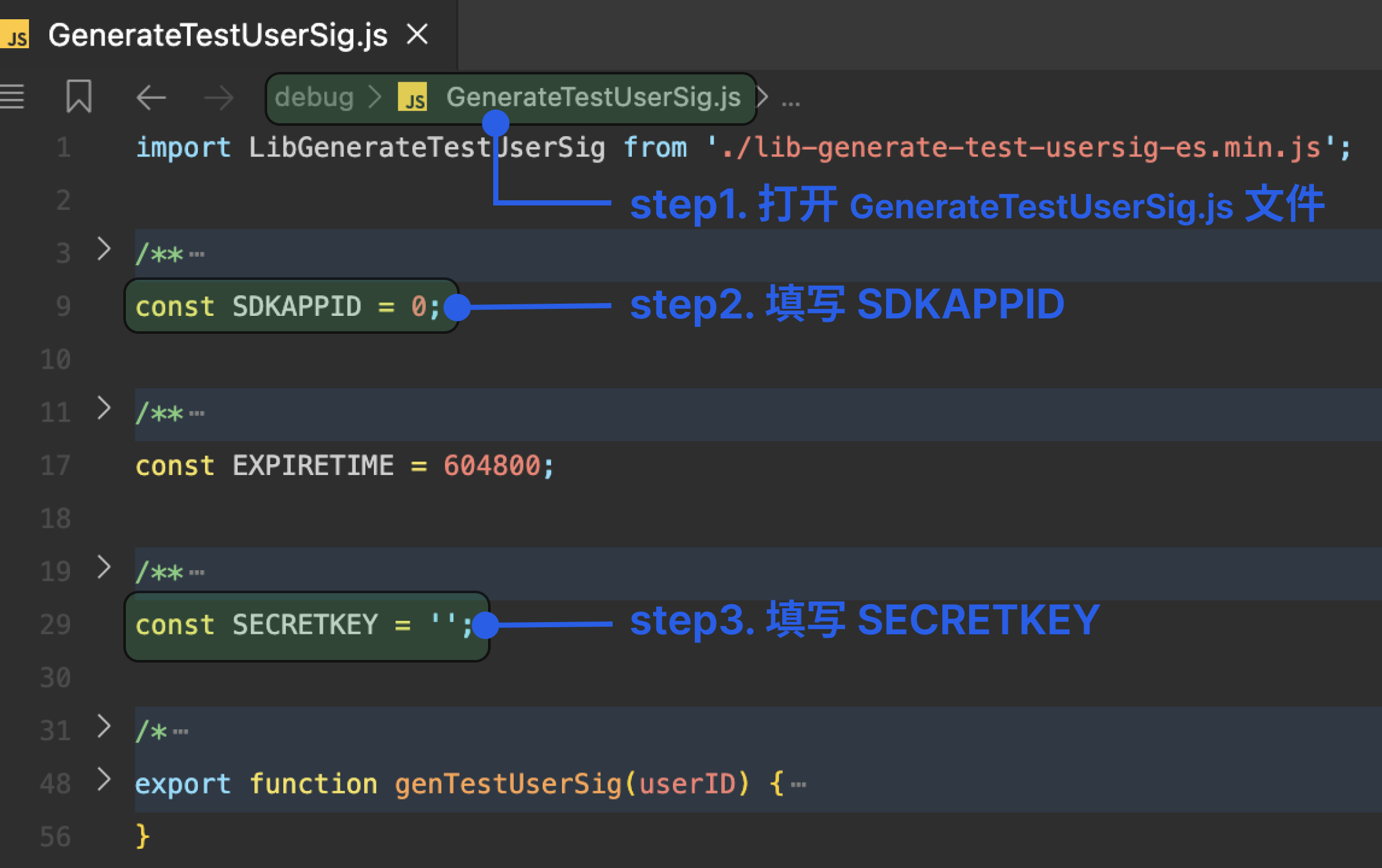
三. 填写 SDKAPPID 以及 SECRETKEY
修改
TUIKit/debug/GenerateTestUserSig-es.js 文件的 SDKAPPID 以及 SECRETKEY。说明:
鉴权文件在生产环境下需要移除,使用后台生成 UserSig,可以减少 150 KB 包体积。
Vue3 使用组合式 API (Composition API) 实现。
1. 修改打包配置
注意:
npm i @uni-ku/bundle-optimizer@1.3.16
修改
vite.config.js。import Uni from '@dcloudio/vite-plugin-uni'import Optimization from '@uni-ku/bundle-optimizer'import { defineConfig } from 'vite'export default defineConfig({plugins: [Uni(),Optimization({enable: {'optimization': true,'async-import': true,'async-component': true,},dts: {enable: true,base: './',},logger: true,}),],})
2. 创建登录页面
说明:
该页面位于主包,用于跳转到分包中的聊天组件。
请将以下内容复制到
pages/login/login.vue 文件。<template><view class="content"><view class="input-group"><input class="user-input" v-model="userID" placeholder="请输入用户ID" type="text"/></view><view class="service-btn" @click="goToService"><text class="service-text">客服咨询</text></view></view></template><script>export default {data() {return { userID: '' }},methods: {goToService() {if (!this.userID.trim()) {uni.showToast({ title: '请输入用户ID', icon: 'none' });return;}uni.navigateTo({ url: `/TUIKit/pages/conversation/conversation?userID=${encodeURIComponent(this.userID)}` });}}}</script><style>.content{display:flex;flex-direction:column;align-items:center;justify-content:center;height:100vh;padding:40rpx}.input-group{margin-bottom:60rpx;width:100%;max-width:600rpx}.user-input{width:100%;height:80rpx;border:2rpx solid #E5E5E5;border-radius:12rpx;padding:0 30rpx;font-size:28rpx;background-color:#FFFFFF;box-sizing:border-box}.user-input:focus{border-color:#007AFF}.service-btn{background-color:#007AFF;border-radius:50rpx;padding:20rpx 60rpx;box-shadow:0 4rpx 12rpx rgba(0,122,255,0.3)}.service-text{color:#FFFFFF;font-size:32rpx;font-weight:500}</style>
3. 创建发起会话页面
说明:
该页面位于 TUIKit 分包中,用于单聊/群聊的创建。
请将以下内容复制到
TUIKit/pages/createConversation/createConversation.vue 文件。<template><view class="create-conversation-page"><UserPicker :maxCount="maxCount" @confirm="handleConfirm" /><CreateGroup v-if="showGroupForm" @close="handleCloseGroupForm" @submit="handleGroupSubmit" /></view></template><script lang="ts" setup>import { ref } from 'vue';import { onLoad } from '@dcloudio/uni-app';import { useConversationListState } from '../../index';import UserPicker from '../../components/UserPicker/UserPicker.vue';import CreateGroup from '../../components/Group/CreateGroup.vue';const { setActiveConversation, createGroupConversation } = useConversationListState();const maxCount = ref(Number.POSITIVE_INFINITY);const isGroupMode = ref(false);const showGroupForm = ref(false);const selectedUserIDs = ref<string[]>([]);const isLoading = ref(false);onLoad((options) => {const { mode } = options;isGroupMode.value = mode === 'createGroupConversation';if (!isGroupMode.value) maxCount.value = 1;const title = isGroupMode.value ? '选择群成员' : '选择用户';uni.setNavigationBarTitle({ title });});const handleConfirm = async (userIDs: string[]) => {if (userIDs.length === 0) return;selectedUserIDs.value = userIDs;if (isGroupMode.value) {showGroupForm.value = true;} else {await handleCreateC2CConversation(userIDs[0]);}};const handleGroupSubmit = async (groupInfo: any) => {isLoading.value = true;try {uni.showLoading({ title: '创建群聊中...', mask: true });const conversation = await createGroupConversation({...groupInfo,type: 'Public',inviteOption: 'FreeAccess',memberList: selectedUserIDs.value.map(userID => ({ userID }))});uni.hideLoading();uni.showToast({ title: '群聊创建成功', icon: 'success', duration: 1500 });await setActiveConversation(conversation.conversationID);uni.redirectTo({ url: '/TUIKit/pages/chat/chat' });} catch (error) {uni.hideLoading();console.error('创建群聊失败:', error);uni.showToast({ title: '创建群聊失败', icon: 'none', duration: 2000 });} finally {isLoading.value = false;}};const handleCreateC2CConversation = async (userID: string) => {try {await setActiveConversation(`C2C${userID}`);uni.redirectTo({ url: '/TUIKit/pages/chat/chat' });} catch (error) {console.error('打开会话失败:', error);uni.showToast({ title: '打开会话失败', icon: 'none' });}};const handleCloseGroupForm = () => { showGroupForm.value = false; }</script><style lang="scss" scoped>.create-conversation-page{height:100vh;background-color:#f8f9fa;}</style>
4. 创建会话列表页面
说明:
该页面位于 TUIKit 分包中,用于渲染会话列表。
请将以下内容复制到
TUIKit/pages/conversation/conversation.vue 文件。<template><view><view class="action-buttons"><view class="action-button" @click="handleCreateConversation"><text class="button-icon">+</text><text class="button-text">发起会话</text></view><view class="action-button" @click="handleCreateGroupConversation"><text class="button-icon">+</text><text class="button-text">发起群聊</text></view></view><Conversation :onConversationSelect="handleConversationSelect"></Conversation><view v-if="!conversationList?.length" class="empty-guide"><text class="guide-text">暂无会话,点击上方按钮开始聊天</text></view></view></template><script lang="ts" setup>import { onLoad } from '@dcloudio/uni-app'import { ref } from 'vue';import Conversation from '../../components/ConversationList/ConversationList.vue'import { useConversationListState, useLoginState } from '../../index';import { genTestUserSig, SDKAPPID as SDKAppID } from '../../debug/GenerateTestUserSig-es.js';const userID = ref('')const { conversationList, setActiveConversation } = useConversationListState();const { login } = useLoginState();const handleConversationSelect = (conversation) => {const { conversationID } = conversationsetActiveConversation(conversationID);uni.navigateTo({url: '/TUIKit/pages/chat/chat',});}const handleCreateConversation = () => {uni.navigateTo({url: '/TUIKit/pages/createConversation/createConversation?mode=createC2CConversation'})};onLoad((options) => {if (options.userID) {userID.value = decodeURIComponent(options.userID);autoLogin();}})const handleCreateGroupConversation = () => {uni.navigateTo({url: '/TUIKit/pages/createConversation/createConversation?mode=createGroupConversation'})};const autoLogin = async () => {const { userSig } = genTestUserSig({ userID: userID.value });await login({userId: userID.value,userSig,sdkAppId: SDKAppID,});wx.$globalCallPagePath = 'TUIKit/components/CallView/CallView';}</script><style scoped>.action-buttons{display:flex;justify-content:space-between;padding:6px;background-color:#fff;border-bottom:1px solid #f0f0f0}.action-button{display:flex;align-items:center;justify-content:center;width:48%;height:42px;background:linear-gradient(135deg,#4086FF 0%,#2E5CFF 100%);border-radius:8px;box-shadow:0 6px 20px rgba(64,134,255,0.25),0 2px 6px rgba(64,134,255,0.15);transition:all 0.3s ease;cursor:pointer;gap:6px;position:relative;overflow:hidden}.action-button:active{transform:translateY(1px);box-shadow:0 4px 15px rgba(64,134,255,0.2),0 1px 4px rgba(64,134,255,0.1)}.action-button::before{content:'';position:absolute;top:0;left:0;right:0;height:50%;background:linear-gradient(180deg,rgba(255,255,255,0.15) 0%,transparent 100%);border-radius:8px 8px 0 0}.button-icon{font-size:20px;font-weight:bold;color:#fff}.button-text{font-size:14px;font-weight:500;color:#fff;text-align:center}.empty-guide{display:flex;flex-direction:column;align-items:center;justify-content:center;padding:40px 20px}.guide-text{font-size:16px;color:#999;text-align:center}</style>
5. 创建聊天页面
说明:
该页面位于 TUIKit 分包中,用于消息输入以及展示消息列表。
请将以下内容复制到
TUIKit/pages/chat/chat.vue 文件。<template><div class="TUIChat"><div v-if="isInGroup" class="more-float" @click="goToGroupSetting"><div class="more-text">更多</div></div><MessageList /><MessageInput /></div></template><script lang="ts" setup>import MessageInput from '../../components/MessageInput/MessageInput.vue';import MessageList from '../../components/MessageList/MessageList.vue';import { useGroupSettingState } from '../../index';const { isInGroup } = useGroupSettingState()const goToGroupSetting = () => {uni.navigateTo({url: '/TUIKit/components/Group/GroupSettings'});};</script><style lang="scss" scoped>.TUIChat{display:flex;flex-direction:column;width:100vw;height:100vh;overflow:hidden;position:relative;}.more-float{position:absolute;top:20px;right:8px;z-index:20;background:linear-gradient(135deg,#4086FF 0%,#2E5CFF 100%);backdrop-filter:blur(10px);border-radius:12rpx;padding:6rpx 12rpx;display:flex;align-items:center;justify-content:center;gap:4rpx;box-shadow:0 2rpx 8rpx rgba(64,134,255,0.3),0 4rpx 16rpx rgba(64,134,255,0.2),0 8rpx 24rpx rgba(64,134,255,0.15);cursor:pointer;transition:all 0.2s ease;border:1rpx solid rgba(255,255,255,0.2);min-width:80rpx;height:36rpx;}.more-float:active{transform:scale(0.95);box-shadow:0 1rpx 4rpx rgba(64,134,255,0.4),0 2rpx 8rpx rgba(64,134,255,0.3),0 4rpx 12rpx rgba(64,134,255,0.2);}.more-icon{color:white;font-size:20px;font-weight:bold;line-height:1;}.more-text{color:white;font-size:12px;font-weight:500;letter-spacing:0.5rpx;text-shadow:0 1rpx 2rpx rgba(0,0,0,0.1);}</style>
Vue2 使用选项式 API (Options API) 实现。
1. 创建登录页面
说明:
这个页面位于主包,用于跳转到分包中的聊天组件。
请将以下内容复制到
pages/login/login.vue 文件。<template><view class="content"><view class="input-group"><input class="user-input" v-model="userID" placeholder="请输入用户ID" type="text"/></view><view class="service-btn" @click="goToService"><text class="service-text">客服咨询</text></view></view></template><script>export default {data() {return { userID: '' }},methods: {goToService() {if (!this.userID.trim()) {uni.showToast({ title: '请输入用户ID', icon: 'none' });return;}uni.navigateTo({ url: `/TUIKit/pages/conversation/conversation?userID=${encodeURIComponent(this.userID)}` });}}}</script><style>.content{display:flex;flex-direction:column;align-items:center;justify-content:center;height:100vh;padding:40rpx}.input-group{margin-bottom:60rpx;width:100%;max-width:600rpx}.user-input{width:100%;height:80rpx;border:2rpx solid #E5E5E5;border-radius:12rpx;padding:0 30rpx;font-size:28rpx;background-color:#FFFFFF;box-sizing:border-box}.user-input:focus{border-color:#007AFF}.service-btn{background-color:#007AFF;border-radius:50rpx;padding:20rpx 60rpx;box-shadow:0 4rpx 12rpx rgba(0,122,255,0.3)}.service-text{color:#FFFFFF;font-size:32rpx;font-weight:500}</style>
2. 创建发起会话页面
说明:
该页面位于 TUIKit 分包中,用于单聊/群聊的创建。
请将以下内容复制到
TUIKit/pages/createConversation/createConversation.vue 文件。<template><view class="create-conversation-page"><UserPicker :maxCount="maxCount" @confirm="handleConfirm"/><CreateGroup v-if="showGroupForm" @close="handleCloseGroupForm" @submit="handleGroupSubmit"/></view></template><script>import { useConversationListState } from '../../index';import UserPicker from '../../components/UserPicker/UserPicker.vue';import CreateGroup from '../../components/Group/CreateGroup.vue';const { createGroupConversation, setActiveConversation } = useConversationListState();export default {components: { UserPicker, CreateGroup },data() {return { maxCount: 100, isGroupMode: false, showGroupForm: false, selectedUserIDs: [], isLoading: false }},onLoad(options) {const { mode } = options;this.isGroupMode = mode === 'createGroupConversation';if (!this.isGroupMode) this.maxCount = 1;uni.setNavigationBarTitle({ title: this.isGroupMode ? '选择群成员' : '选择用户' });},methods: {async handleConfirm(userIDs) {if (userIDs.length === 0) return;this.selectedUserIDs = userIDs;if (this.isGroupMode) {this.showGroupForm = true;} else {await this.handleCreateC2CConversation(userIDs[0]);}},async handleGroupSubmit(groupInfo) {this.isLoading = true;try {uni.showLoading({ title: '创建群聊中...', mask: true });const conversation = await createGroupConversation({ ...groupInfo, type: 'Public', inviteOption: 'FreeAccess', memberList: this.selectedUserIDs.map(userID => ({ userID })) });uni.hideLoading();uni.showToast({ title: '群聊创建成功', icon: 'success', duration: 1500 });await setActiveConversation(conversation.conversationID);uni.redirectTo({ url: '/TUIKit/pages/chat/chat' });} catch (error) {uni.hideLoading();console.error('创建群聊失败:', error);uni.showToast({ title: '创建群聊失败', icon: 'none', duration: 2000 });} finally {this.isLoading = false;}},async handleCreateC2CConversation(userID) {try {await setActiveConversation(`C2C${userID}`);uni.redirectTo({ url: '/TUIKit/pages/chat/chat' });} catch (error) {console.error('打开会话失败:', error);uni.showToast({ title: '打开会话失败', icon: 'none' });}},handleCloseGroupForm() {this.showGroupForm = false;}}}</script><style lang="scss" scoped>.create-conversation-page{height:100vh;background-color:#f8f9fa}</style>
3. 创建会话列表页面
说明:
该页面位于 TUIKit 分包中,用于渲染会话列表。
请将以下内容复制到
TUIKit/pages/conversation/conversation.vue 文件。<template><view><view class="action-buttons"><view class="action-button" @click="handleCreateConversation"><text class="button-icon">+</text><text class="button-text">发起会话</text></view><view class="action-button" @click="handleCreateGroupConversation"><text class="button-icon">+</text><text class="button-text">发起群聊</text></view></view><Conversation :onConversationSelect="handleConversationSelect"/><view v-if="!conversationList.length" class="empty-guide"><text class="guide-text">暂无会话,点击上方按钮创建聊天</text></view></view></template><script>import Conversation from '../../components/ConversationList/ConversationList.vue'import { useConversationListState, useLoginState } from '../../index';import { genTestUserSig, SDKAPPID as SDKAppID } from '../../debug/GenerateTestUserSig-es.js';const conversationState = useConversationListState();const { login } = useLoginState();export default {components: { Conversation },data() {return {conversationList: conversationState.conversationList || [],userID: ''}},onLoad(options) {if (options.userID) {this.userID = decodeURIComponent(options.userID);this.autoLogin();}},mounted() {this.$watch(() => conversationState.conversationList, newVal => this.conversationList = newVal || [], { immediate: true, deep: true });},methods: {handleConversationSelect({ conversationID }) {conversationState.setActiveConversation(conversationID);uni.navigateTo({ url: '/TUIKit/pages/chat/chat' });},handleCreateConversation() {uni.navigateTo({ url: '/TUIKit/pages/createConversation/createConversation?mode=createC2CConversation' });},handleCreateGroupConversation() {uni.navigateTo({ url: '/TUIKit/pages/createConversation/createConversation?mode=createGroupConversation' });},async autoLogin() {if (!this.userID) return uni.showToast({ title: '用户ID不能为空', icon: 'none' });try {const { userSig } = genTestUserSig({ userID: this.userID });await login({ userId: this.userID, userSig, sdkAppId: SDKAppID });wx.$globalCallPagePath = 'TUIKit/components/CallView/CallView';uni.showToast({ title: '登录成功', icon: 'success' });} catch (error) {console.error('登录失败:', error);uni.showToast({ title: '登录失败', icon: 'none' });}}}}</script><style scoped>.action-buttons{display:flex;justify-content:space-between;padding:6px;background:#fff;border-bottom:1px solid #f0f0f0}.action-button{display:flex;align-items:center;justify-content:center;width:48%;height:42px;background:linear-gradient(135deg,#4086FF 0%,#2E5CFF 100%);border-radius:8px;box-shadow:0 6px 20px rgba(64,134,255,0.25),0 2px 6px rgba(64,134,255,0.15);transition:all 0.3s ease;cursor:pointer;gap:6px;position:relative;overflow:hidden}.action-button:active{transform:translateY(1px);box-shadow:0 4px 15px rgba(64,134,255,0.2),0 1px 4px rgba(64,134,255,0.1)}.action-button::before{content:'';position:absolute;top:0;left:0;right:0;height:50%;background:linear-gradient(180deg,rgba(255,255,255,0.15) 0%,transparent 100%);border-radius:8px 8px 0 0}.button-icon{font-size:20px;font-weight:bold;color:#fff}.button-text{font-size:14px;font-weight:500;color:#fff;text-align:center}.empty-guide{display:flex;flex-direction:column;align-items:center;justify-content:center;padding:40px 20px}.guide-text{font-size:16px;color:red;margin-bottom:20px}</style>
4. 创建聊天页面
说明:
该页面位于 TUIKit 分包中,用于消息输入以及展示消息列表。
请将以下内容复制到
TUIKit/pages/chat/chat.vue 文件。<template><div class="TUIChat"><div v-if="isInGroup" class="more-float" @click="goToGroupSetting"><div class="more-text">更多</div></div><MessageList /><MessageInput /></div></template><script>import MessageInput from '../../components/MessageInput/MessageInput.vue';import MessageList from '../../components/MessageList/MessageList.vue';import { useGroupSettingState } from '../../index';export default {components: {MessageInput,MessageList},computed: {isInGroup() {const { isInGroup } = useGroupSettingState();return isInGroup;}},methods: {goToGroupSetting() {uni.navigateTo({url: '/TUIKit/components/Group/GroupSettings'});}}}</script><style lang="scss" scoped>.TUIChat{display:flex;flex-direction:column;width:100vw;height:100vh;overflow:hidden;position:relative;}.more-float{position:absolute;top:20px;right:8px;z-index:20;background:linear-gradient(135deg,#4086FF 0%,#2E5CFF 100%);backdrop-filter:blur(10px);border-radius:12rpx;padding:6rpx 12rpx;display:flex;align-items:center;justify-content:center;gap:4rpx;box-shadow:0 2rpx 8rpx rgba(64,134,255,0.3),0 4rpx 16rpx rgba(64,134,255,0.2),0 8rpx 24rpx rgba(64,134,255,0.15);cursor:pointer;transition:all 0.2s ease;border:1rpx solid rgba(255,255,255,0.2);min-width:80rpx;height:36rpx;}.more-float:active{transform:scale(0.95);box-shadow:0 1rpx 4rpx rgba(64,134,255,0.4),0 2rpx 8rpx rgba(64,134,255,0.3),0 4rpx 12rpx rgba(64,134,255,0.2);}.more-icon{color:white;font-size:20px;font-weight:bold;line-height:1;}.more-text{color:white;font-size:12px;font-weight:500;letter-spacing:0.5rpx;text-shadow:0 1rpx 2rpx rgba(0,0,0,0.1);}</style>
运行与测试
步骤1:运行
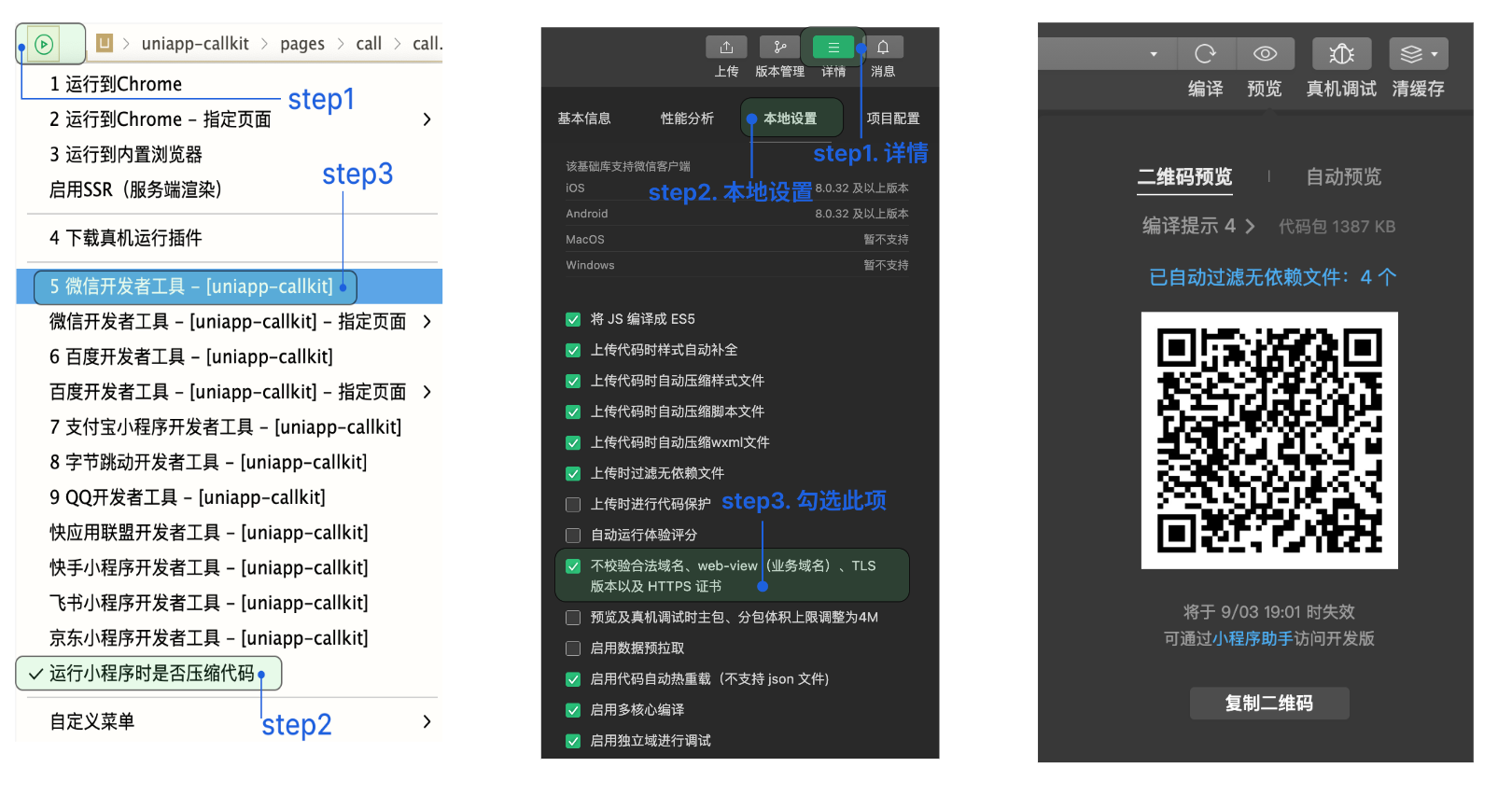
1. 以编译开发模式的微信小程序为例(编译至其他平台请参考 package.json 文件中 scripts 脚本配置):
npm run build:mp-weixin
2. 编译成功后,启动微信开发者工具导入
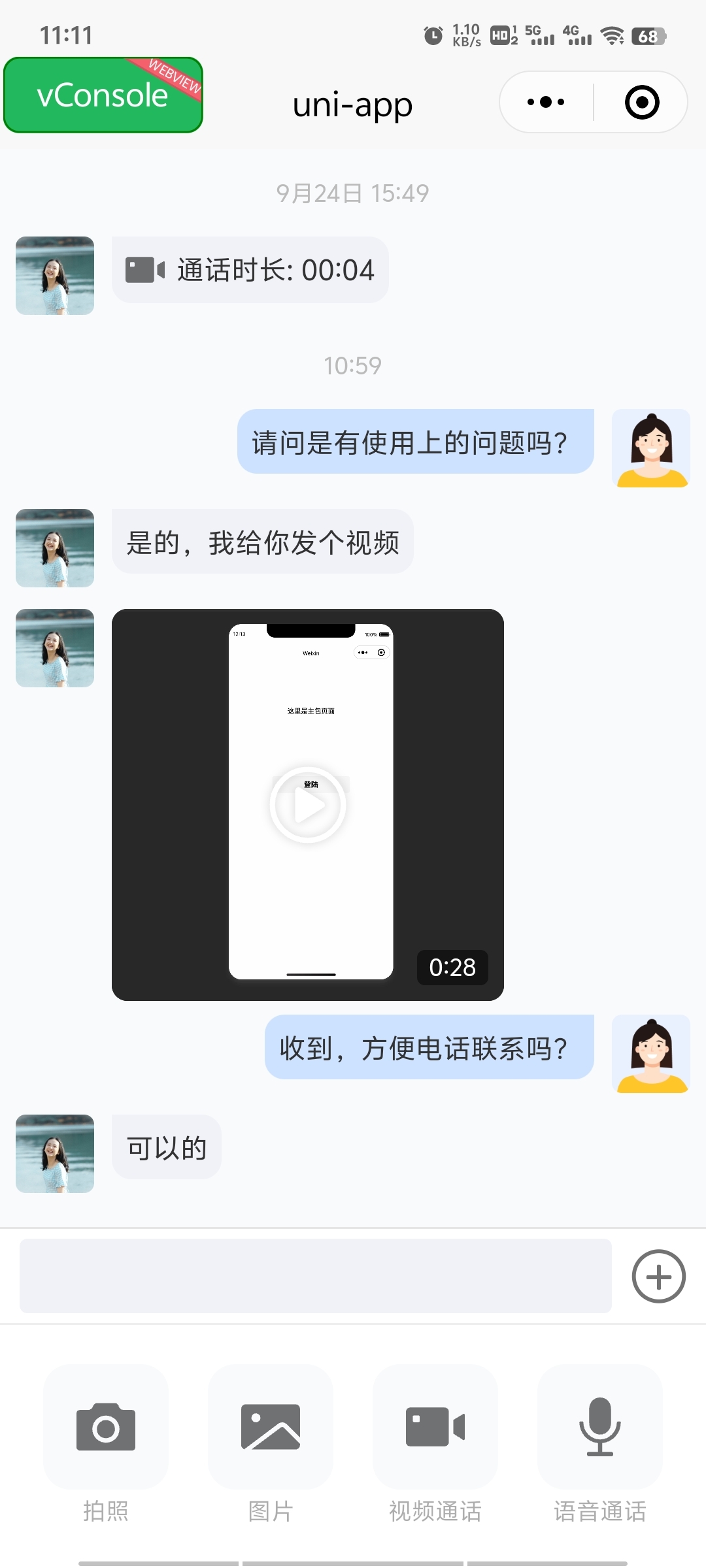
dist/build/mp-weixin 目录。步骤2:发送第一条消息
注意:
如果集成音视频通话功能,将增加 400KB 的体积增量。
步骤3:增加音视频通话(可选)
功能 | 音视频通话组件 |
1v1 视频、音频通话 | ✓ |
全局监听来电 | ✓ |
呼叫/接听/拒绝/挂断 | ✓ |
1. 拷贝源码
在您的项目中执行下面的脚本,会自动将音视频通话逻辑拷贝到您的项目中。跟您上面选择 chat 的接入方式保持一致。
node TUIKit/script/add-callview-page.js
node TUIKit/script/add-callview-page-subpackage.js
2:工程配置 (Vue3 项目请忽略)
2.1 修改 vue.config.js 文件
修改
vue.config.js 文件,进行 unplugin-vue2-script-setup 插件的使用,若没有 vue.config.js 文件请新建。const ScriptSetup = require('unplugin-vue2-script-setup/webpack').default;module.exports = {parallel: false,configureWebpack: {plugins: [ScriptSetup({}),],resolve: {// Prevent webpack from following pnpm symlinks to their real .pnpm store// paths. UniApp's compiler uses the resolved path to generate component// references in the output JSON. Without this, it produces unresolvable// paths like `node-modules/.pnpm/@tencentcloud+trtc-component-uniapp@.../...`.symlinks: false,},},chainWebpack(config) {config.plugins.delete('fork-ts-checker');},};
2.2 修改 main.js 文件
修改
main.js 文件,进行 @vue/composition-api 插件的使用。import vueComposition from "@vue/composition-api";Vue.use(vueComposition)
3. 开通服务
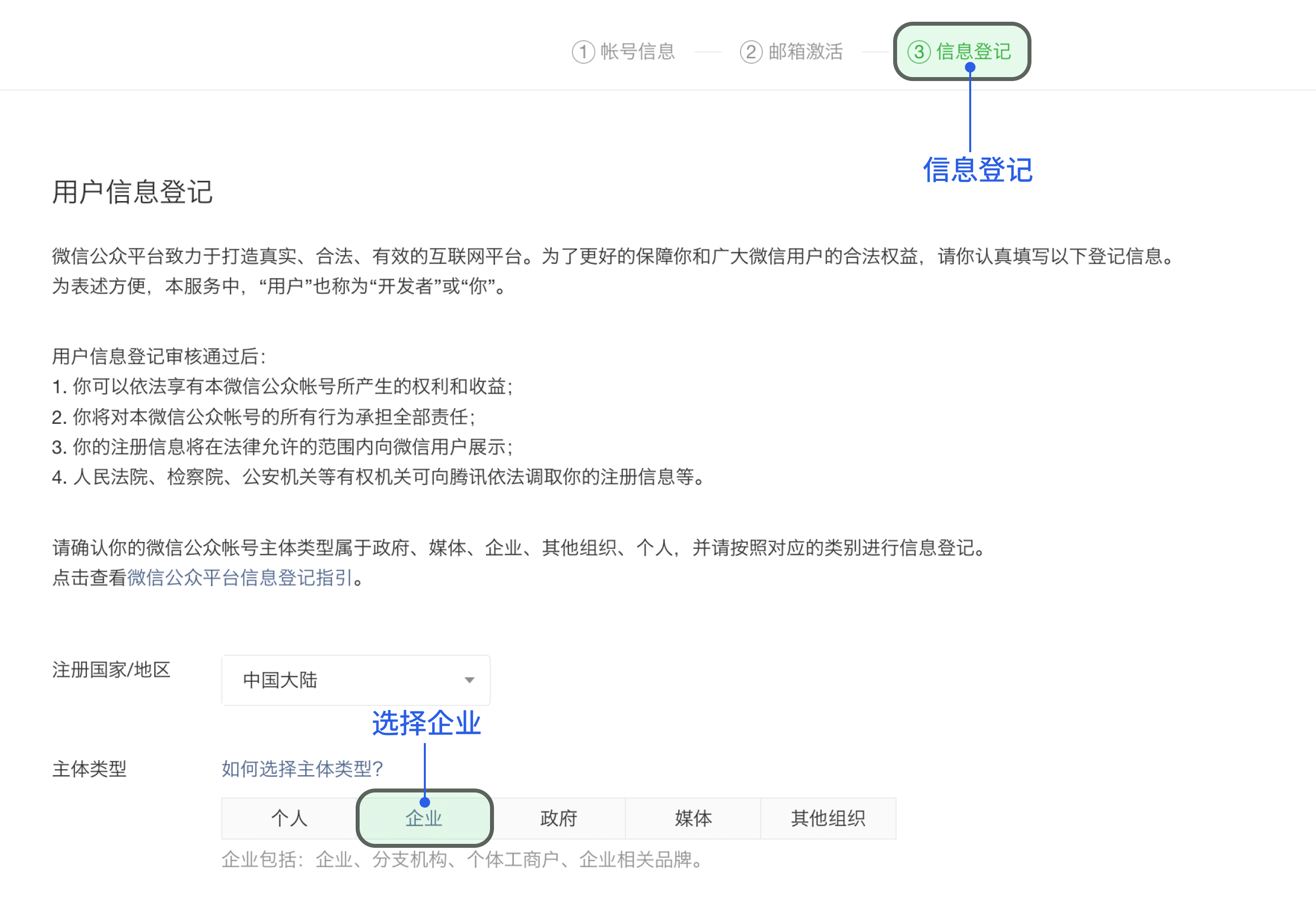
4. 配置微信开放平台
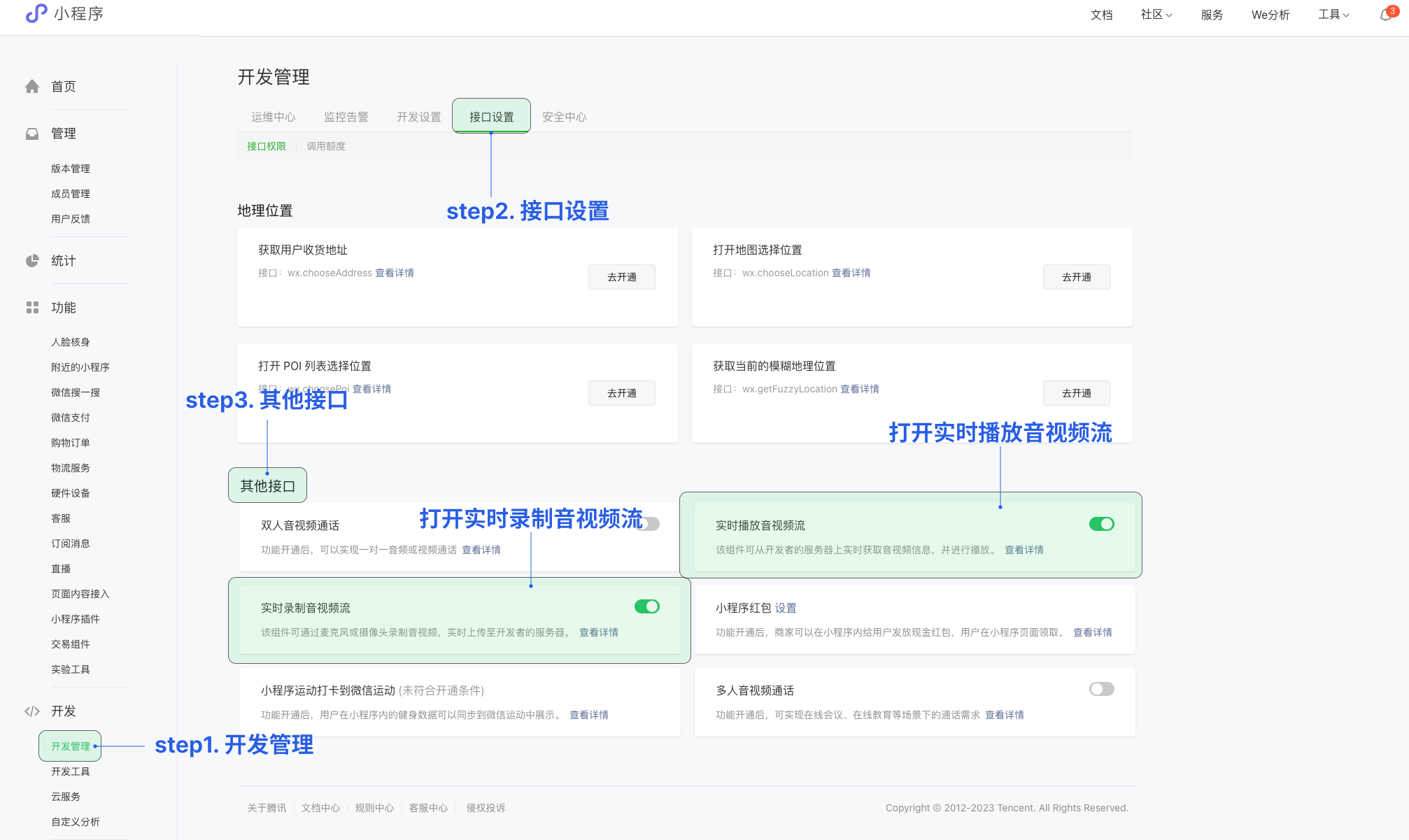
在小程序控制台开启实时音视频接口
小程序推拉流标签使用权限暂时只开放给有限类目,具体支持类目参见该地址。
符合类目要求的小程序,需要在 微信公众平台 > 开发 > 开发管理 > 接口设置中自助开通该组件权限。
5. 在小程序控制台配置域名
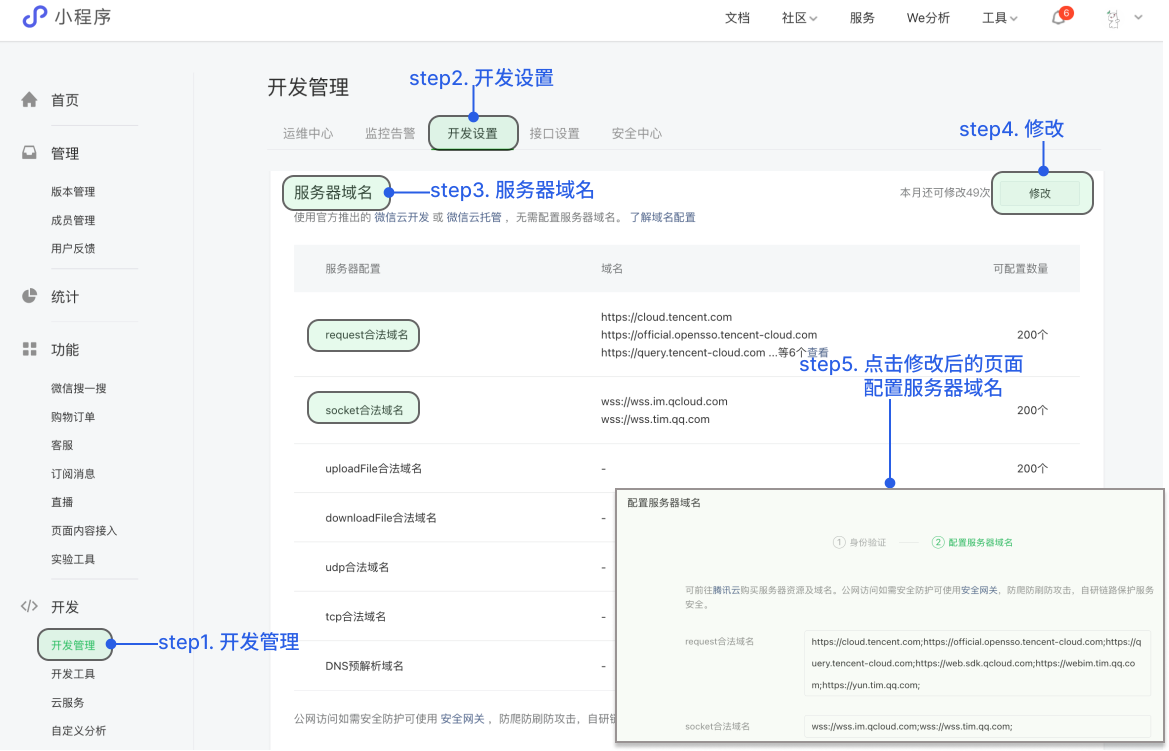
将以下域名添加到 socket 合法域名:
域名 | 说明 | 是否必须 |
wss://${SDKAppID}w4c.my-imcloud.com | 从 v3.4.6起,SDK 支持独立域名,可更好地保障服务稳定性。 例如您的 SDKAppID 是 1400xxxxxx,则独立域名为: wss://1400xxxxxxw4c.my-imcloud.com | 必须 |
wss://wss.im.qcloud.com | Web IM 业务域名 | 必须 |
wss://wss.tim.qq.com | Web IM 业务域名 | 必须 |
wss://wssv6.im.qcloud.com | Web IM 业务域名 | 必须 |
将以下域名添加到 request 合法域名:
域名 | 说明 | 是否必须 |
https://web.sdk.qcloud.com | Web IM 业务域名 | 必须 |
https://boce-cdn.my-imcloud.com | Web IM 业务域名 | 必须 |
https://api.im.qcloud.com | Web IM 业务域名 | 必须 |
https://events.im.qcloud.com | Web IM 业务域名 | 必须 |
https://webim.tim.qq.com | Web IM 业务域名 | 必须 |
https://wss.im.qcloud.com | Web IM 业务域名 | 必须 |
https://wss.tim.qq.com | Web IM 业务域名 | 必须 |
将以下域名添加到 uploadFile 合法域名:
域名 | 说明 | 是否必须 |
https://${SDKAppID}-cn.rich.my-imcloud.com | 从 2024年9月10日起,新增应用默认分配 COS 独立域名。 例如您的 SDKAppID 是 1400xxxxxx,则 COS 独立域名为: https://1400xxxxxx-cn.rich.my-imcloud.com | 必须 |
https://cn.rich.my-imcloud.com | 文件上传域名 | 必须 |
https://cn.imrich.qcloud.com | 文件上传域名 | 必须 |
https://cos.ap-shanghai.myqcloud.com | 文件上传域名 | 必须 |
https://cos.ap-shanghai.tencentcos.cn | 文件上传域名 | 必须 |
https://cos.ap-guangzhou.myqcloud.com | 文件上传域名 | 必须 |
将以下域名添加到 downloadFile 合法域名:
域名 | 说明 | 是否必须 |
https://${SDKAppID}-cn.rich.my-imcloud.com | 从 2024年9月10日起,新增应用默认分配 COS 独立域名。 例如您的 SDKAppID 是 1400xxxxxx,则 COS 独立域名为: https://1400xxxxxx-cn.rich.my-imcloud.com | 必须 |
https://cn.rich.my-imcloud.com | 文件下载域名 | 必须 |
https://cn.imrich.qcloud.com | 文件下载域名 | 必须 |
https://cos.ap-shanghai.myqcloud.com | 文件下载域名 | 必须 |
https://cos.ap-shanghai.tencentcos.cn | 文件下载域名 | 必须 |
https://cos.ap-guangzhou.myqcloud.com | 文件下载域名 | 必须 |
删除 Debug 脚本
出于体积和安全双重因素考虑,请在发布前删除项目目录下
/TUIKit/debug 文件夹。在开发阶段为了方便开发,项目提供生成本地 UserSig 的脚本文件存放于 TUIKit/debug 文件夹中,但这并不安全,该方法中的 SECRETKEY 很容易被反编译逆向破解,一旦您的密钥泄露,攻击者就可以盗用您的腾讯云流量,因此该方法仅适合本地跑通 Demo 和功能调试。因此,请在项目发布前删除 Debug 脚本,使用后台生成 UserSig,具体原因和操作步骤请参考文档:生成 UserSig。常见问题
Debug 脚本的作用
出于体积和安全双重因素考虑,请在发布前删除项目目录下
/TUIKit/debug 文件夹。在开发阶段为了方便开发,项目提供生成本地 UserSig 的脚本文件存放于 TUIKit/debug 文件夹中,但这并不安全,该方法中的 SECRETKEY 很容易被反编译逆向破解,一旦您的密钥泄露,攻击者就可以盗用您的腾讯云流量,因此该方法仅适合本地跑通 Demo 和功能调试。因此,请在项目发布前删除 Debug 脚本,使用后台生成 UserSig,具体原因和操作步骤请参考文档:生成 UserSig。报错 "authorize:fail:appid privacy api banned",如何处理?
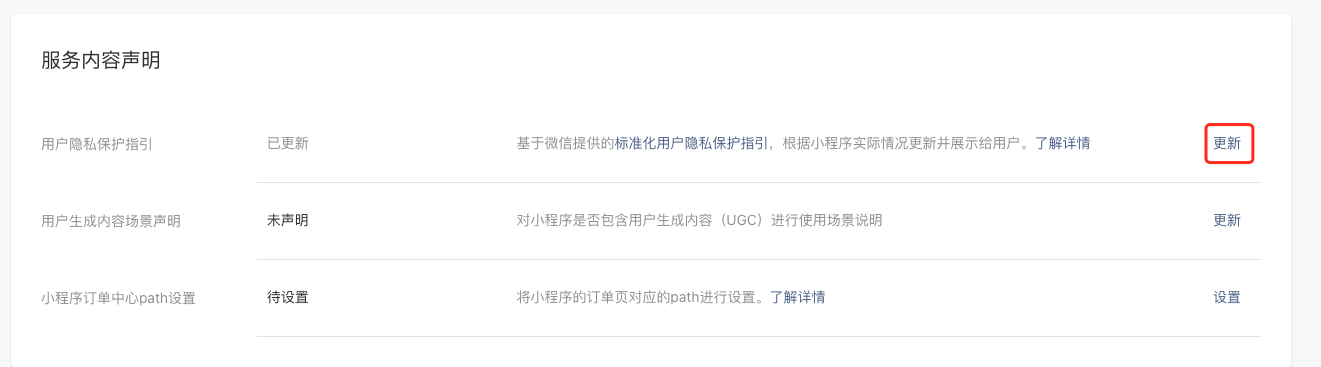
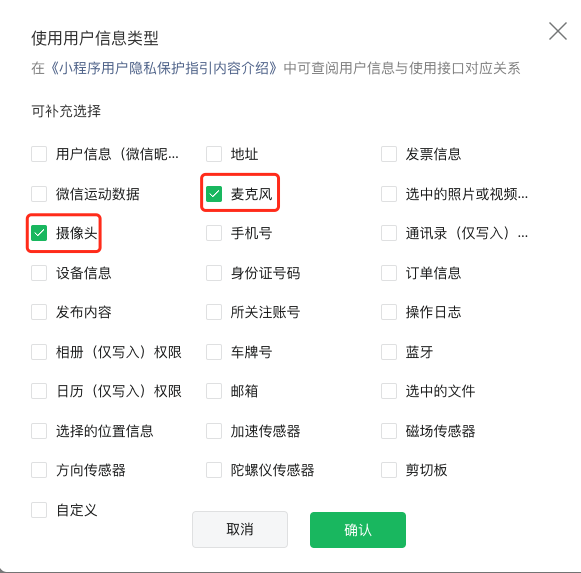
由于 TRTC 涉及到麦克风与摄像头的权限问题,需要用户在小程序控制台中更新隐私保护政策,具体步骤如下:
1. 登录微信公众平台 ,点击设置栏目。
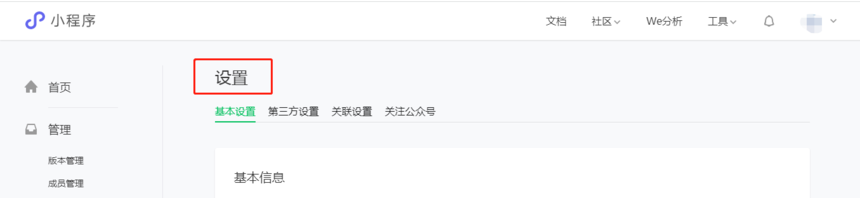
2. 选择用户隐私保护指引设置功能,点击更新。
3. 在弹出的表格中,勾选小程序会涉及到的类型。
联系我们


