OFD文档在线预览选型:想躺平选云预览,想受苦选纯前端
原创
OFD文档在线预览选型:想躺平选云预览,想受苦选纯前端
原创
用户12805970
发布于 2026-10-29 11:22:32
发布于 2026-10-29 11:22:32
兄弟们,文档预览这个大坑,我还在持续趟。项目上遇到针对电子发票、电子公文常用的 OFD(国产开放版式文档)格式,前端预览通常有两种主流的落地姿势。一种是直接利用 OfficeWeb365 云服务接口(最省心,带水印和防下载),另一种是使用纯前端开源库 ofd.js(纯前端渲染,数据不出内网),这两种方案的前端完整实现代码如下,你可以根据业务场景直接“抄作业”:
方案一:借助 OfficeWeb365 的云端预览方案
适用场景:需要全平台秒开(如微信、H5、PC)、需要防止用户右键下载/打印、需要加水印防截图的场景。
<!DOCTYPE html>
<html lang="zh-CN">
<head>
    <meta charset="UTF-8">
    <meta name="viewport" content="width=device-width, initial-scale=1.0">
    <title>OFD 安全预览 - OfficeWeb365 云端版</title>
    <style>
        body, html { margin: 0; padding: 0; width: 100%; height: 100%; overflow: hidden; }
        .preview-container { width: 100%; height: 100%; background: #f4f4f4; position: relative; }
        iframe { width: 100%; height: 100%; border: none; }
        .loading { position: absolute; top: 50%; left: 50%; transform: translate(-50%, -50%); font-family: sans-serif; color: #666; }
    </style>
</head>
<body>

<div class="preview-container">
    <div id="loading" class="loading">正在加载 OFD 云端渲染引擎...</div>
    <!-- 这里的 iframe src 会在 JS 中动态赋值 -->
    <iframe id="ofdViewer" style="display: none;" onload="document.getElementById('loading').style.display='none'; this.style.display='block';"></iframe>
</div>

<script>
    document.addEventListener("DOMContentLoaded", function() {
        // 1. 你的公开 OFD 文件下载地址
        const myOfdFileUrl = "https://yourdomain.com";

        // 2. OfficeWeb365 的标准云端解析接口入口(已修正为官方正确API路径)
        const apiBase = "https://officeweb365.com";

        // 3. 配置你的业务参数(统一在拼接时编码,防止多余字符产生)
        const config = {
            furl: myOfdFileUrl,
            isDownload: 0,
            isPrint: 0,
            watermark: "财务部-仅供查验-复制必究"
        };

        // 4. 干净、无重复转义的拼接逻辑
        const queryString = Object.keys(config)
            .map(key => `${key}=${encodeURIComponent(config[key])}`)
            .join('&');

        const finalPreviewUrl = `${apiBase}?${queryString}`;

        // 5. 渲染到页面上
        document.getElementById('ofdViewer').src = finalPreviewUrl;
    });
</script>
</body>
</html>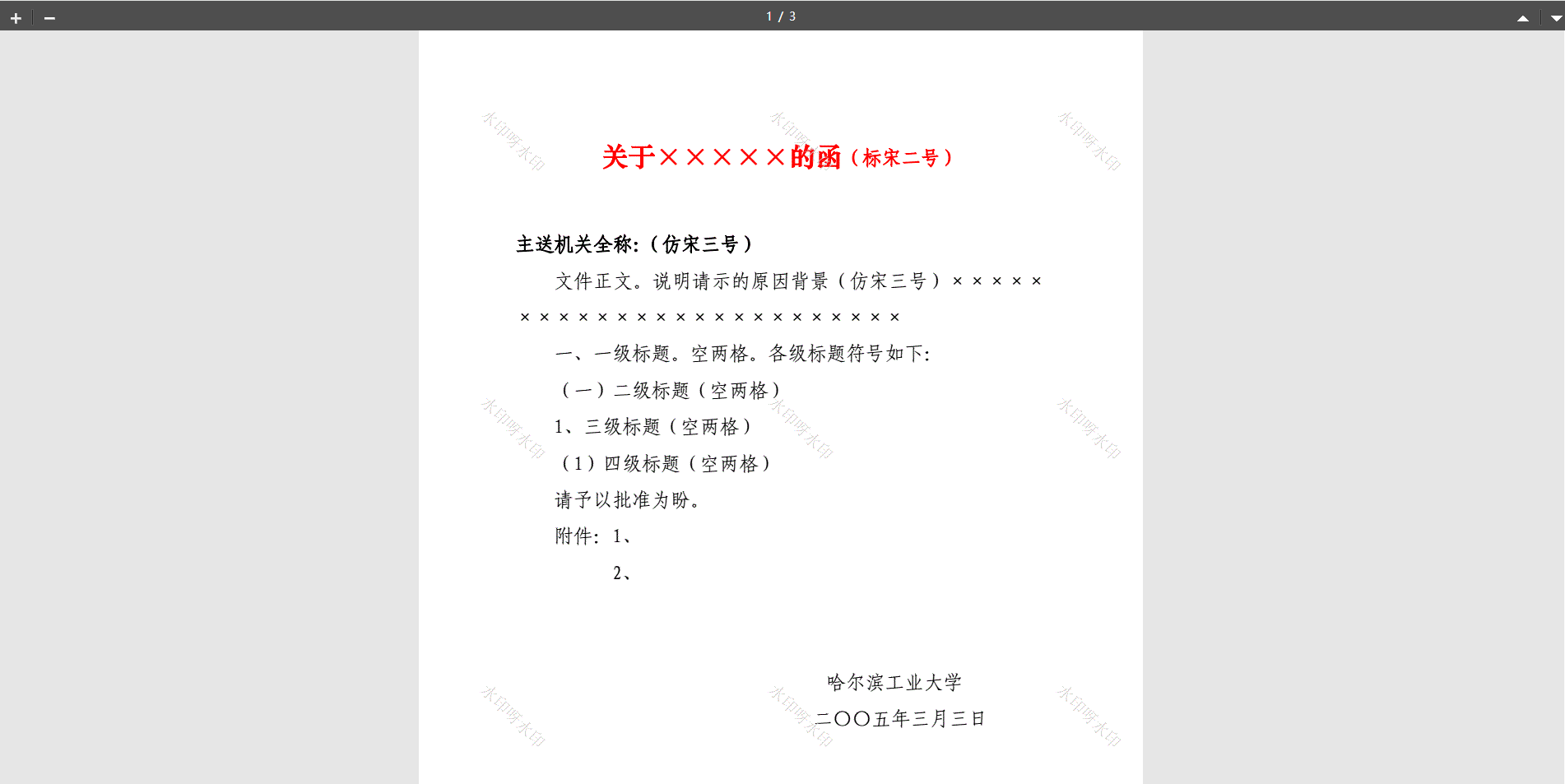
方案二:基于ofd.js 的纯前端本地解压渲染方案
适用场景:只要求纯前端将 OFD 的 XML 标签用 Canvas/SVG 绘制出来的场景。
在原生 HTML / JQuery 的传统开发模式下,最需要关注的就是 DOM 操作的便利性、异步加载的控制(避免页面卡死),以及全局变量的隔离。
下面打包一份开箱即用、完全符合原生 HTML/JQuery 范式的完整前端页面代码。里面将 OfficeWeb365 云渲染(方案一)和 纯前端 ofd.js(方案二) 整合进了一个经典的 Tab 切换面板中,方便你随时对比和集成:
<!DOCTYPE html>
<html lang="zh-CN">
<head>
    <meta charset="UTF-8">
    <meta name="viewport" content="width=device-width, initial-scale=1.0">
    <title>OFD 文档在线预览 - 原生 HTML & JQuery 版</title>

    <!-- 1. 修正:引入具体且可用的 JQuery 脚本路径 -->
    <script src="https://bootcdn.net"></script>

    <!-- 2. 修正:引入纯前端解压渲染库 ofd.js 的具体文件路径 -->
    <script src="https://unpkg.com"></script>

    <style>
        body { font-family: "Microsoft YaHei", sans-serif; background-color: #eaedec; margin: 0; padding: 0; }
        .app-header { background: #1a5c4e; color: white; padding: 15px 20px; box-shadow: 0 2px 5px rgba(0,0,0,0.2); }
        .app-header h2 { margin: 0; font-size: 20px; }

        .main-layout { display: flex; flex-direction: column; height: calc(100vh - 54px); }

        /* 经典JQuery风格控制台 */
        .control-bar { background: #fff; border-bottom: 1px solid #ddd; padding: 10px 20px; display: flex; align-items: center; gap: 15px; }
        .btn-tab { padding: 8px 15px; border: 1px solid #1a5c4e; background: #fff; color: #1a5c4e; cursor: pointer; border-radius: 4px; font-weight: bold; }
        .btn-tab.active { background: #1a5c4e; color: #fff; }
        .status-tips { color: #666; font-size: 14px; }

        /* 预览容器 */
        .viewer-box { flex: 1; position: relative; overflow: auto; padding: 20px; display: flex; justify-content: center; }

        /* 方案一:Iframe 容器样式 */
        .iframe-wrapper { width: 100%; height: 100%; display: none; }
        .iframe-wrapper iframe { width: 100%; height: 100%; border: none; }

        /* 方案二:Canvas 容器样式 */
        .local-canvas-wrapper { width: 100%; max-width: 900px; display: none; flex-direction: column; align-items: center; }
        .ofd-page { background: #fff; box-shadow: 0 4px 12px rgba(0,0,0,0.15); margin-bottom: 25px; border-radius: 2px; }

        /* 骨架屏 / Loading 动画 */
        .loading-mask { position: absolute; top: 0; left: 0; right: 0; bottom: 0; background: rgba(255,255,255,0.8); display: none; justify-content: center; align-items: center; font-size: 16px; color: #1a5c4e; font-weight: bold; }
    </style>
</head>
<body>

<div class="app-header">
    <h2> 发票/公文 OFD 在线预览集成控制台 (原生 JQuery 版)</h2>
</div>

<div class="main-layout">
    <!-- 顶部控制条 -->
    <div class="control-bar">
        <button id="btn-cloud" class="btn-tab active" data-type="cloud">方案一:OfficeWeb365 云渲染 (带防盗/水印)</button>
        <button id="btn-local" class="btn-tab" data-type="local">方案二:纯前端 ofd.js 本地解析</button>

        <div style="border-left: 1px solid #ccc; height: 24px; margin: 0 10px;"></div>

        <input type="file" id="file-uploader" accept=".ofd" style="display: none;" />
        <button id="btn-upload-trigger" class="btn-tab" style="border-color: #ff9800; color: #ff9800; display: none;">📂 模拟上传本地 OFD</button>

        <span id="global-status" class="status-tips">就绪。正在展示云端渲染示例...</span>
    </div>

    <!-- 核心展示区域 -->
    <div class="viewer-box">
        <!-- 方案一容器:Iframe 直接裸奔 -->
        <div id="container-cloud" class="iframe-wrapper" style="display: block;">
            <iframe id="web365-iframe" src=""></iframe>
        </div>

        <!-- 方案二容器:用 DOM 承载 ofd.js 吐出来的 Canvas 树 -->
        <div id="container-local" class="local-canvas-wrapper"></div>

        <!-- 统一的加载遮罩层 -->
        <div id="loading-layer" class="loading-mask"> 正在拼命加载渲染引擎,请稍候...</div>
    </div>
</div>

<script>
    // 固定的测试 OFD 文件路径
    const TEST_OFD_URL = "https://yourdomain.com";

    $(document).ready(function() {
        // 初始化运行:默认加载方案一
        loadCloudPreview(TEST_OFD_URL);

        /* =========================================================================
         *  补齐修复:OfficeWeb365 云端预览渲染函数
         * ========================================================================= */
        function loadCloudPreview(fileUrl) {
            $('#loading-layer').css('display', 'flex');
            $('#global-status').text("正在向 OfficeWeb365 云端集群提交解析请求...");

            // 正确的官方 API 入口路径
            const apiEntryPoint = "https://officeweb365.com";

            const queryParams = {
                furl: fileUrl,
                isDownload: 0,
                isPrint: 0,
                watermark: "内部查验-严禁截图"
            };

            // 安全利用 JQuery 自动完成高效、无错的 URL 参数组件编码
            const paramString = $.param(queryParams);
            const finalIframeSrc = apiEntryPoint + "?" + paramString;

            // 动态挂载 src 并安全解除骨架屏遮罩
            $('#web365-iframe').attr('src', finalIframeSrc).off('load').on('load', function() {
                $('#loading-layer').hide();
                $('#global-status').text("云端高保真渲染完成!支持全平台自适应。");
            });
        }

        /* =========================================================================
         *  纯前端 ofd.js 解析二进制流并挂载 DOM
         * ========================================================================= */
        function loadLocalPreview(fileSource) {
            $('#loading-layer').css('display', 'flex');
            $('#global-status').text("正在执行本地前端沙盒解压...");

            // 清空上一次残留的本地画布
            $('#container-local').empty();

            // 调用全局 umd 模块中的 ofd 引擎
            ofd.parseOfdDocument({
                ofd: fileSource,
                success: function(res) {
                    const canvasWidth = 850;
                    const pageDivs = ofd.renderOfd(canvasWidth, res);

                    $.each(pageDivs, function(index, singlePageElement) {
                        $(singlePageElement).addClass('ofd-page');
                        $('#container-local').append(singlePageElement);
                    });

                    $('#loading-layer').hide();
                    $('#global-status').text("本地沙盒渲染成功!红章与国密算法已本地加载。");
                },
                fail: function(err) {
                    console.error("ofd.js 错误堆栈: ", err);
                    $('#loading-layer').hide();
                    $('#global-status').text("解析失败,当前文件不是标准的国标OFD格式。");
                }
            });
        }

        /* =========================================================================
         * 交互事件绑定:Tab 切换面板控制
         * ========================================================================= */
        $('.btn-tab').on('click', function() {
            if ($(this).hasClass('active') && $(this).attr('id') === 'btn-cloud') return;

            const targetType = $(this).data('type');
            if(!targetType) return;

            $('.btn-tab').removeClass('active');
            $(this).addClass('active');

            if (targetType === 'cloud') {
                $('#btn-upload-trigger').hide();
                $('#container-local').hide();
                $('#container-cloud').show();
                loadCloudPreview(TEST_OFD_URL);
            } else if (targetType === 'local') {
                $('#btn-upload-trigger').show();
                $('#container-cloud').hide();
                $('#container-local').css('display', 'flex');
                loadLocalPreview(TEST_OFD_URL);
            }
        });

        // 绑定模拟上传
        $('#btn-upload-trigger').on('click', function() {
            $('#file-uploader').trigger('click');
        });

        // 监听文件选择框
        $('#file-uploader').on('change', function(e) {
            const nativeFileObj = e.target.files[0];
            if (nativeFileObj) {
                loadLocalPreview(nativeFileObj);
            }
        });
    });
</script>
</body>
</html>
原创声明:本文系作者授权腾讯云开发者社区发表,未经许可,不得转载。
如有侵权,请联系 cloudcommunity@tencent.com 删除。
目录
腾讯云开发者

Copyright © 2013 - 2026 Tencent Cloud. All Rights Reserved. 腾讯云 版权所有
深圳市腾讯计算机系统有限公司 ICP备案/许可证号:粤B2-20090059  粤公网安备44030502008569号
腾讯云计算(北京)有限责任公司 京ICP证150476号 | 京ICP备11018762号