代码分享 | 复现空间转录组“邻域组成”堆叠图

代码分享 | 复现空间转录组“邻域组成”堆叠图

生信大杂烩
发布于 2025-12-29 11:41:51
发布于 2025-12-29 11:41:51
前言
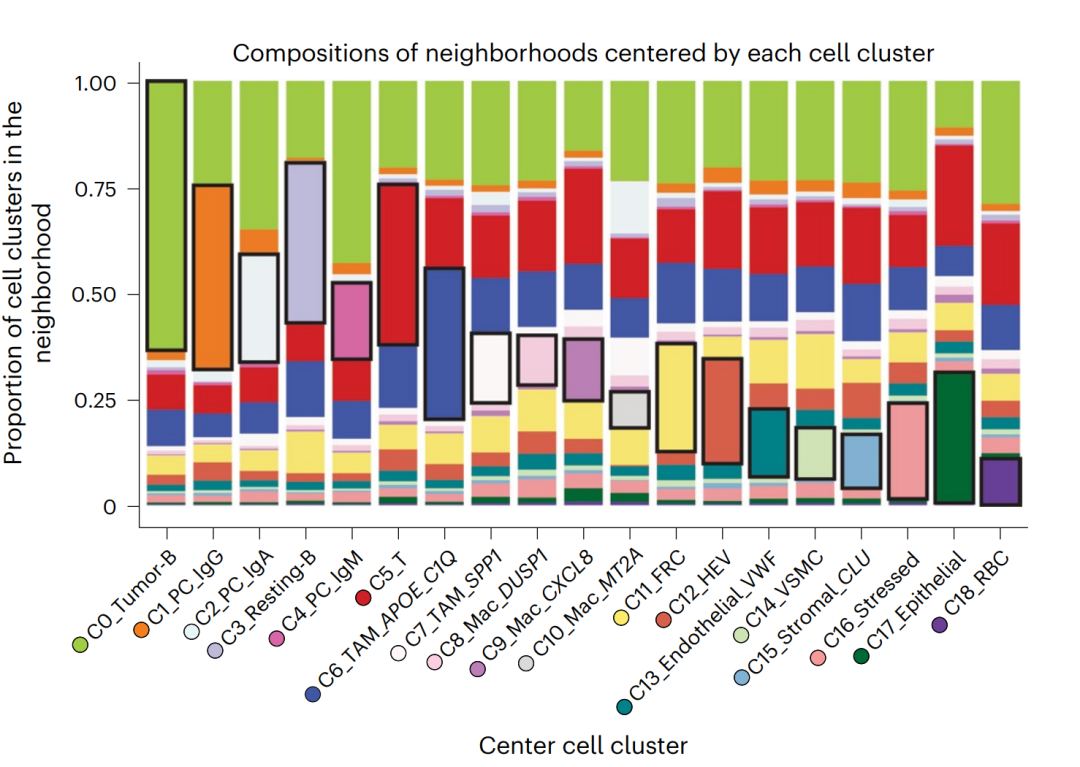
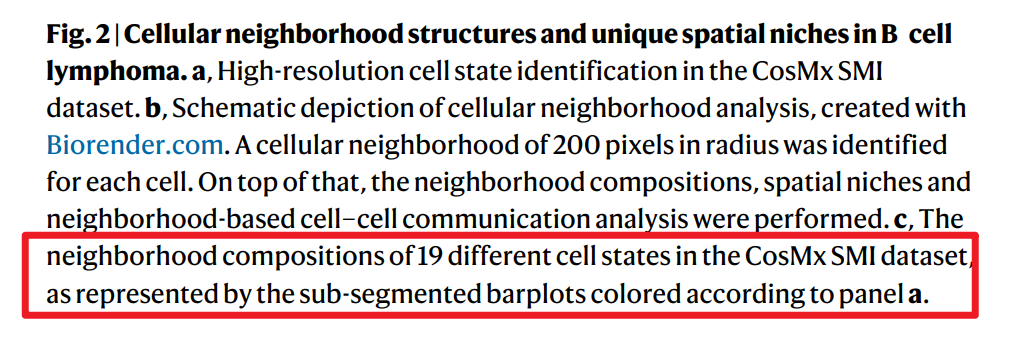
在空间转录组学(Spatial Transcriptomics)研究中,细胞不仅仅是表达谱的集合,更是组织生态系统中的节点。解析细胞的“邻域组成”(Neighborhood Composition)是理解细胞间相互作用(CCI)、组织结构域(Tissue Domains)及免疫浸润模式的关键步骤。最近看了篇文章,这项研究利用空间转录组学和多重免疫荧光技术,深入探讨了弥漫大 B 细胞淋巴瘤(DLBCL)中复杂的肿瘤微环境。研究人员通过分析细胞在二维空间中的排列,定义了不同的细胞生态位,并揭示了这些特定区域如何通过细胞间的通信影响免疫反应。研究发现,T 细胞的状态(如功能性、活化或竭竭)与它们所处的空间位置及邻近细胞类型密切相关。特别是针对 EBV 阳性的淋巴瘤病例,研究揭示了炎症微环境与治疗机会之间的潜在联系。其中的Figure2c 展示了以每个细胞簇为中心时邻域的组成比例,它揭示了弥漫大 B 细胞淋巴瘤(DLBCL)中细胞并非随机分布,而是具有显著的空间聚集性(Spatial Aggregation),文章中也给出了相应的实现代码,想着使用文章中给的代码(https://github.com/Coolgenome/Lymphoma-spatial/blob/main/R/Figure%202.r)复现一遍。

文章中Figure2c结果:
github上的实现代码:
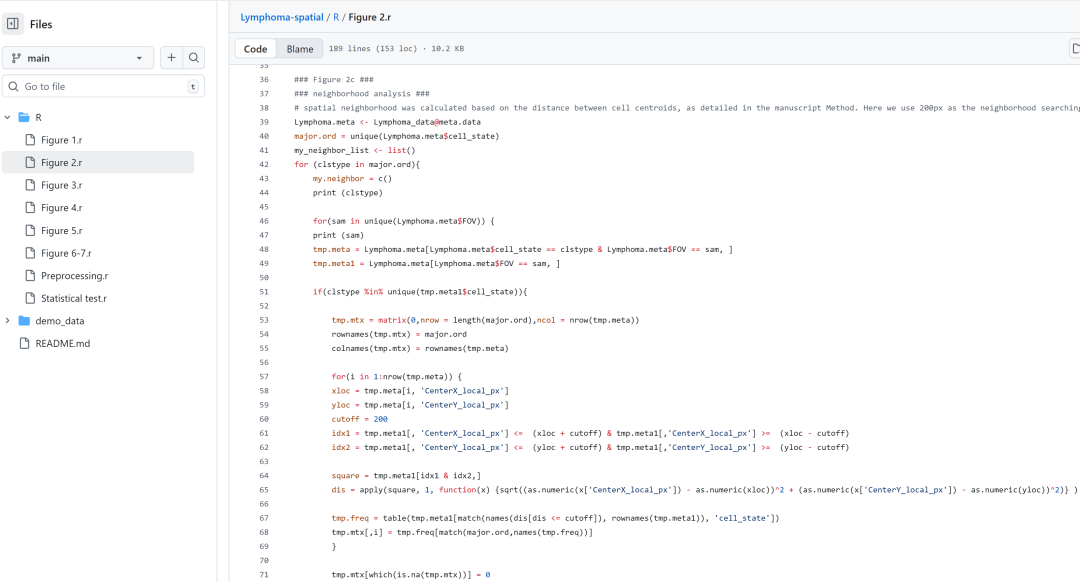
但是!这代码运行速度太慢了!找了之前一篇远端肺纤维化Xenium数据,160多万细胞的数据测试,整整跑了10多个小时,还没跑完,真得忍不了,于是觉得先研究明白整体计算逻辑,然后使用python重写这个函数。
本文将介绍一种基于稀疏矩阵运算的高性能计算方法,快速量化百万级细胞的空间邻居特征,并尝试复现文中的绘图样式。
1. 背景知识:为何关注“邻域组成”?
单细胞测序(scRNA-seq)告诉了我们组织中“有什么”细胞,而空间转录组技术进一步揭示了这些细胞“在哪儿”。然而,单纯的坐标可视化(Spatial Plot)往往是定性的。为了定量描述细胞的生存环境,我们需要引入邻域(Neighborhood)的概念。
邻域组成分析旨在回答以下核心科学问题:
- 同质性与结构维持(Homogeneity): 某种细胞(如上皮细胞)是否倾向于与同类聚集,形成致密的组织结构?
- 异质性与相互作用(Mixing & Interaction): 某种细胞(如T细胞)是否广泛散布在其他类型细胞(如肿瘤细胞)周围,提示潜在的免疫监视或杀伤作用?
- 边界效应(Boundary Effect): 在肿瘤-基质交界处(Tumor-Stroma Interface),细胞的邻居构成是否发生了特异性改变?
通过计算以每个细胞为中心、特定半径 内的邻居细胞类型比例,我们可以将物理空间的坐标信息转化为生物学意义上的“微环境特征向量”。
2. 算法原理:稀疏矩阵加速计算
1. 构建邻接矩阵 (Adjacency Matrix, )
利用 sklearn.neighbors.radius_neighbors_graph 构建一个 的二值稀疏矩阵。
注: 为细胞总数。此步骤需按样本(Sample)分别进行,防止跨样本计算距离。
2. 构建类型矩阵 (One-Hot Matrix, )
将细胞类型转换为 One-Hot 编码,构建 的稀疏矩阵。
注: 为细胞类型总数。
3. 矩阵乘法求解 (Matrix Multiplication)
通过稀疏矩阵乘法,一次性计算所有细胞的邻居统计:
结果矩阵 的维度为 ,其中 表示第 个细胞周围有多少个 类型的邻居。
性能优势: 这种方法利用了底层优化的 BLAS 库,比 Python 原生循环快数个数量级,且稀疏矩阵格式(CSR)极大地降低了内存消耗。
3. 核心代码实现
以下函数封装了上述逻辑,支持 AnnData 对象,自动处理多样本批次,并返回原始计数与归一化后的比例。
核心计算函数:
def neighborhood_composition_celltype(
        adata,
        sample_key='sample',
        celltype_key='celltype',
        spatial_key='spatial',
        radius=200,
    ):

    # 将细胞类型转换为整数索引
    cell_types = adata.obs[celltype_key].astype(str).values
    unique_types = np.sort(np.unique(cell_types))
    type_to_idx = {ct: i for i, ct in enumerate(unique_types)}
    n_types = len(unique_types)
    cell_type_indices = np.array([type_to_idx[t] for t in cell_types])

    all_counts_list = []
    valid_indices_list = [] # 记录顺序,防止 sample 乱序

    samples = adata.obs[sample_key].unique()
    for s in tqdm(samples, desc="Processing samples"):
        mask = (adata.obs[sample_key] == s).values
        if not np.any(mask): continue
        coords = adata.obsm[spatial_key][mask]
        # 这是一个 N x N 的稀疏矩阵,1代表是邻居,0代表不是
        adj = radius_neighbors_graph(coords, radius, mode='connectivity', metric='euclidean', include_self=True, n_jobs=-1)
        # 这是一个 N x CellTypes 的稀疏矩阵
        curr_type_indices = cell_type_indices[mask]
        n_curr_cells = len(curr_type_indices)
        # 构造稀疏 One-Hot: 行=细胞, 列=类型索引, 值=1
        rows = np.arange(n_curr_cells)
        cols = curr_type_indices
        data = np.ones(n_curr_cells)

        one_hot = sparse.csr_matrix((data, (rows, cols)), shape=(n_curr_cells, n_types))

        # 结果矩阵的 [i, j] 表示:第 i 个细胞周围有多少个 j 类型的邻居
        neighborhood_counts = adj.dot(one_hot)

        all_counts_list.append(neighborhood_counts)
        valid_indices_list.append(np.where(mask)[0])

    # vstack 用于垂直堆叠稀疏矩阵
    final_counts_sparse = sparse.vstack(all_counts_list)

    # 还原顺序
    flat_indices = np.concatenate(valid_indices_list)
    inverse_order = np.argsort(flat_indices)
    final_counts_sorted = final_counts_sparse[inverse_order]

    # 将稀疏矩阵转换为 Array 进行聚合计算 (Aggregating)
    neighborhood_df = pd.DataFrame(final_counts_sorted.toarray(), columns=unique_types, index=adata.obs_names)
    neighborhood_df['Center_Cell_Type'] = cell_types

    # 按中心细胞类型分组求和
    agg_counts = neighborhood_df.groupby('Center_Cell_Type').sum()

    # 计算比例 (Row-wise normalization)
    agg_props = agg_counts.div(agg_counts.sum(axis=1), axis=0)

    return {
        'cell_counts': neighborhood_df, # 每个细胞周围的邻居计数 (Raw Counts)
        'agg_counts': agg_counts,       # 聚合后的计数 (用于检查)
        'agg_props': agg_props          # 聚合后的比例 (用于画图)
    }
绘图函数
def plot_barplot(result, output_file=None):
    """
    绘制邻域组成图:
    1. 堆叠柱状图
    2. 同类邻居黑色边框高亮
    3. 移除图例框,改在X轴下方显示颜色圆点+细胞类型
    """
    df = result['agg_props'].copy()
    common_types = sorted(list(set(df.index) | set(df.columns)))

    # 重建索引和列,缺失值填0
    df = df.reindex(index=common_types, columns=common_types, fill_value=0)

    # 使用 tab20 (20色) + tab20b (20色) 拼接
    n_types = len(common_types)
    cmap1 = plt.get_cmap('tab20').colors
    cmap2 = plt.get_cmap('tab20b').colors
    cmap3 = plt.get_cmap('tab20c').colors
    color_pool = list(cmap1) + list(cmap2) + list(cmap3)
    colors = color_pool[:n_types]

    # 绘制堆叠柱状图, legend=False: 不显示默认图例, width=0.88: 柱子宽一点,缝隙小一点,更好看
    fig, ax = plt.subplots(figsize=(12, 7), dpi=300) # dpi高一点更清晰
    df.plot(kind='bar', stacked=True, color=colors, ax=ax, width=0.88, edgecolor='none', legend=False)

    # 添加黑色边框高亮 (Self-Neighbor)
    neighbor_types = df.columns.tolist()
    center_types = df.index.tolist()

    for i, container in enumerate(ax.containers):
        neighbor_name = neighbor_types[i]
        for j, rect in enumerate(container):
            center_name = center_types[j]
            if center_name == neighbor_name:
                x, y = rect.get_x(), rect.get_y()
                w, h = rect.get_width(), rect.get_height()
                # 只有当高度大于0时才画框,避免视觉干扰
                if h > 0.001:
                    ax.add_patch(plt.Rectangle((x, y), w, h, fill=False, edgecolor='black', linewidth=1.8, zorder=10))
    # 遍历每一个X轴刻度
    for i, label_text in enumerate(common_types):
        dot_y = -0.03  # 圆点的Y坐标 (负数表示在轴下方)
        ax.plot(i, dot_y,
                marker='o',
                markersize=8,       # 圆点大小
                markerfacecolor=colors[i],
                markeredgecolor='black', # 圆点加个细黑边更精致
                markeredgewidth=0.5,
                clip_on=False,      # 【关键】允许画在坐标轴范围外
                zorder=20)
    # 调整X轴标签文本
    ax.set_xticklabels(df.index, rotation=45, ha='right', fontsize=10)
    # 调整刻度线的长度,让文字离轴远一点,避免盖住圆点
    ax.tick_params(axis='x', which='major', pad=12) # pad=12 给圆点留空位
    # 图表美化
    ax.set_title("Compositions of neighborhoods centered by each cell cluster", fontsize=15, pad=20)
    ax.set_ylabel("Proportion of cell clusters in the\nneighborhood", fontsize=12)
    ax.set_xlabel("Center cell cluster", fontsize=12, labelpad=10)
    ax.set_ylim(0, 1)
    ax.set_xlim(-0.6, len(common_types)-0.4) # 调整X轴左右留白
    # 边框调整 (左下加粗,右上隐藏)
    ax.spines['top'].set_visible(False)
    ax.spines['right'].set_visible(False)
    ax.spines['left'].set_linewidth(1.2)
    ax.spines['bottom'].set_linewidth(1.2)
    plt.tight_layout()

    if output_file:
        plt.savefig(output_file, bbox_inches='tight')

    plt.show()
使用方法
adata = sc.read_h5ad('/mnt/e/空间转录组/Xenium/xenium_IPF.h5ad')

result = neighborhood_composition_celltype(
    adata,
    sample_key='sample',
    celltype_key='celltype',
    spatial_key='spatial',
    radius=200
)

plot_barplot(result, output_file=None)
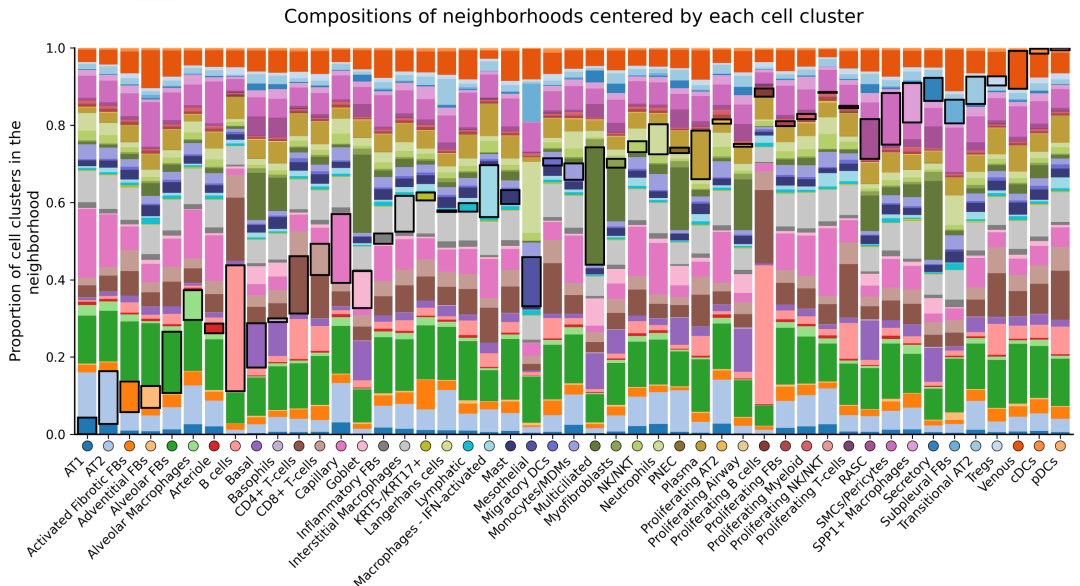
最终结果展示
本文参与 腾讯云自媒体同步曝光计划,分享自微信公众号。
原始发表:2025-12-26,如有侵权请联系 cloudcommunity@tencent.com 删除
目录
腾讯云开发者

Copyright © 2013 - 2026 Tencent Cloud. All Rights Reserved. 腾讯云 版权所有
深圳市腾讯计算机系统有限公司 ICP备案/许可证号:粤B2-20090059  粤公网安备44030502008569号
腾讯云计算(北京)有限责任公司 京ICP证150476号 | 京ICP备11018762号